

Introduction
Welcome to Day Two of my MongoDB tutorial. This is the second part in the MongoDB tutorial series. In the first part of this article, we covered and learned some basic queries and operations of MongoDB . In the last article, we compared some SQL queries with MongoDB queries. If somebody is new to MongoDB, then it will be good to go through my previous articles before this. In this article, we will see some MongoDB specific queries.
Background
You can learn more about MongoDB.
We covered the below topics of MongoDB in the first part of this article,
- Introduction of No-Sql (Different types of database comes under No-SQL)
- How to install and setup MongoDB on your machine.
- Introduction of Robomongo (MongoDB open source management tool)
- MongoDB Terminology
- How to insert a document in MongoDB
- How to select a document in MongoDB
- Where clause, Greater than and less Than
- Like, logical AND and logical OR
- In operator in MongoDB , Count and Sort records in MongoDB
- Update, Delete, Remove and Drop in MongoDB
- Top, Distinct and Backup in MongoDB
Some key points of MongoDB from my previous article,
- MongoDB is a Document Store database.
- MongoDB is Schema less
- MongoDB Stores Data in Json Format (we call it BSON(Binary JSON))
- JSON documents store data in Key Value Pair like {“X”:1,”Y”:2,”Z”:3}
Hence, it's time to cover some more MongoDB concepts, starting with the data types, which we can use in MongoDB .
Takeaway of this article will be:
- Schema less behavior of MongoDB
- $exists
- $type
- Different Data Types of MongoDB
- $in, $all and $nin
- Embedded documents and query on embedded documents
MongoDB is schema less
We always talk about the MongoDB schemaless behavior and this is the key behavior for which MongoDB is so popular, nowadays. Let's understand the meaning of schemaless.
Suppose we have a collection named Employee in our test database (Please go through my previous article to know how to create database and collection in MongoDB Database, as shown below):
Insert a document in Employee Collection:
- db.Employee.insert({Name:"Vijay",Age:30,Email:"[email protected]"})
Now let me insert one more document and this time I will add one more column named address.
- db.Employee.insert({Name:"Vijay",Age:30,Email:"[email protected]",Address:"Delhi"})

Now just think about RDMS. In case of RDMS, we had to Alter the table first to add a new column but in case of MongoDB , we don't need to add a new column because all the documents can have different schema in MongoDB.
Let me insert one more document in Employee Collection.
- db.Employee.insert
- ({
- Name:"Vijay",Age:30,Email:"[email protected]",Address:"Delhi",Interest:["Cricket","Music"]
- })
- Array: List of things are represented in list of Items [……..]
- Dictionaries: Associate maps {key:Value}
Hence, we are good with the concept of schemaless, and good to go ahead.
As in the above example in some document, we can have Address column and in another document in the same collection, it's not necessary to have the same column. In short, in a collection, different documents can have different columns/schema. Suppose you want to find out all the documents in a collection where Address column exists. In MongoDB , we have $exist for such queries.
$exists
We have Employee collection, as shown below:
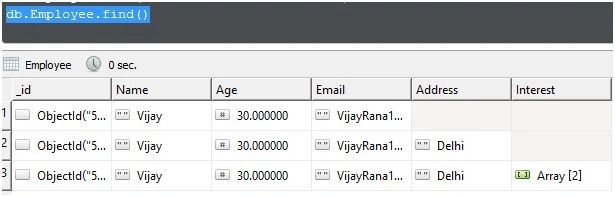
In the above collection, as shown below, suppose I have some documents, where we don't have Address and some documents where we have Address column along with other columns. Now, I want to retrieve all the records where Address exists.
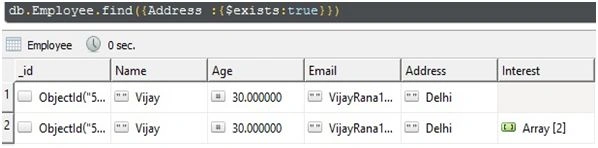
Let me insert one more document in Employee Collection, as shown below:
- db.Employee.insert
- ({
- Name:111,Age:30,Email:"[email protected]",Address:"Delhi"
- })
Suppose, I want to find out all the documents where the name is in string, how we will find out?
We have $type for this.
$type
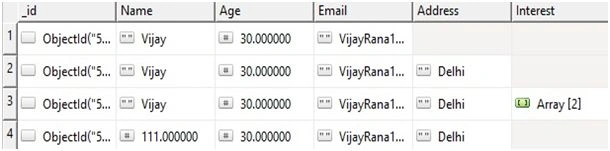
So far, we have the records, shown below, in my employee collection. I have three documents, where I have name as a string and 1 document, where name is in number.
Now, I want to find out all the documents, where the name is in string:
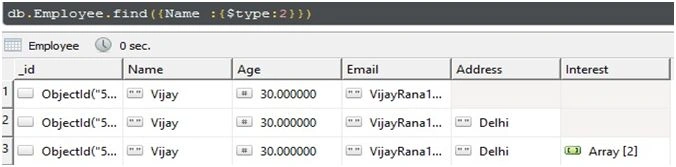
In MongoDB , we use 2 for string, 1 for number. Complete list of all the data types are shown in the below table.
We can use the below data types in $type.
Data Types in MongoDB
Some of the commonly used data types in MongoDB are as follows:
| Data Type | Number | Meaning |
| Double | 1 | For float values |
| String | 2 | String is most commonly used DataType. In MongoDB , string must be UTF-8 valid. |
| Object | 3 | For embedded documents |
| Array | 4 | For list or multiple values into one key |
| Binary Data | 5 | To store binary data |
| Undefined | 6 | |
| Object Id | 7 | To store the document’s ID |
| Boolean | 8 | To store a boolean (true/false) value |
| Date | 9 | To store date and Time |
| Null | 10 | To store a Null value |
| Regular Expression | 11 | To store regular expression |
| 32-bit integer | 16 | To store 32 bit Integer |
| Timestamp | 17 | To store date and Time |
| 64-bit integer | 18 | To store 64 bit Integer |
Now, what's next? Let me insert some more records:
- db.Employee.insert
- ({
- Name:"Preeti",Age:26,Email:"[email protected]",Address:"Delhi",Interest:["cooking","Music"]
- })
- db.Employee.insert
- ({
- Name:"Ajay",Age:26,Email:"[email protected]",Address:"Delhi",Interest:["Driving","Music"]
- })
We can search inside the array as well as shown below:
- db.Employee.find({Interest : "Music"})
$in, $all and $nin
If we want to find out all the documents where we have both cooking and music as an interest, then we can use$all:
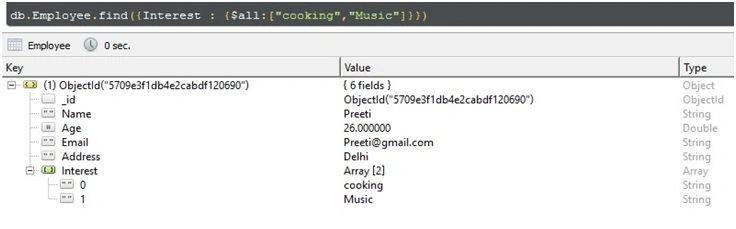
- db.Employee.find({Interest : {$all:["cooking","Music"]}})
- db.Employee.find({Interest : {$in:["Driving","Music"]}})
- db.Employee.find({Interest : {$nin:["cooking"]}})
Embedded Document and Dot Notation
We can have embedded documents as well in MongoDB, as shown below:
- db.Employee.insert
- ({
- Name:{firstName:"Preeti",LastName:"Rana"},Age:26,Email:"[email protected]",
- Address:"Delhi",Interest:["cooking","Music"]
- })
- db.Employee.insert
- ({
- Name:{firstName:"Vijay",LastName:"Rana"},Age:30,Email:"[email protected]",
- Address:"Delhi",Interest:["cooking","Music"]
- })
- db.Employee.find({"Name.firstName":"Vijay"})
In the next article of this series, I will cover aggregation(groupBy), indexes, $Text and $lookup. So, stay tuned.
NehaPosted Dec 29, 2016, 8:53 AM
Nice.........................
Prasanna MuraliPosted Sep 5, 2016, 11:12 AM
Nice post......
Vignesh ManiPosted Jun 9, 2016, 5:17 AM
Nice one
Santhakumar MunuswamyPosted Jun 9, 2016, 12:17 AM
Thank you for nice share
Thiruppathi RPosted Jun 8, 2016, 1:52 AM
Nice.
Debasis SahaPosted Jun 7, 2016, 3:53 PM
Nice share..