This article is all about the implementation
of MVVM Pattern using Silverlight.
Checked out the following link : http://weblogs.asp.net/dwahlin/archive/2009/12/08/getting-started-with-the-mvvm-pattern-in-silverlight-applications.aspx
I just loved the Implementation by dwahlin. The implementation is very simple
and easy to code. I have modified the implementation to talk to database.
Created a new Silverlight Project named as MVVMBasic.
Created a new DataModel as shown below: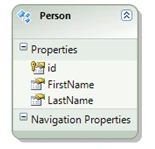
Created a new Silverlight Enabled WCF Service as shown below:
public
class
DataService
{
[OperationContract]
public List<Person>
GetPeople()
{
ProjectsDataEntities context =
new
ProjectsDataEntities();
var persons =
from person in
context.People
select person;
return persons.ToList();
}
[OperationContract]
public
OperationStatus UpdatePerson(Person p)
{
try
{
ProjectsDataEntities context
= new
ProjectsDataEntities();
Person currperson = (from
person in context.People
where
person.id == p.id
select
person).First();
currperson.LastName = p.LastName;
currperson.FirstName = p.FirstName;
context.SaveChanges();
return
new OperationStatus { Status =
true };
}
catch(Exception
ex)
{
return
new OperationStatus { Status =
false };
}
}
}
All the remainging things I have retained from the article by dwahlin.
Dwahlin returns the update status from the database in a nice way.
He uses a
class PeopleEventBus as shown below: Basically this is a event handler to track
the Completed Database Update Operation.
public static
class
PeopleEventBus
{
public static
event EventHandler<OperationCompletedEventArgs>
OperationCompleted;
public static
void OnOperationCompleted(object
sender, OperationCompletedEventArgs e)
{
if (OperationCompleted !=
null)
{
OperationCompleted(sender, e);
}
}
}
The Custom Event Args class which has the OperationStatus as a property.
public
class
OperationCompletedEventArgs :
EventArgs
{
public
OperationStatus OperationStatus { get;
set; }
}
Finally the Operation status class :
public class
OperationStatus
{
public bool
Status { get; set;
}
public string
Message { get; set;
}
}
Tne below
lines of code take care of catch the event and displaying the status:
void MainPage_Loaded(object
sender, RoutedEventArgs e)
{
this.ViewModel =
this.Resources["ViewModel"]
as PeopleViewModel;
PeopleEventBus.OperationCompleted
+= new EventHandler<OperationCompletedEventArgs>(PeopleEventBus_OperationCompleted);
}
void PeopleEventBus_OperationCompleted(object
sender, OperationCompletedEventArgs e)
{
MessageBox.Show("Operation
Status: " + e.OperationStatus.Status.ToString());
}
In the View
Model we add the below line where WCF method returns the status :
void
UpdatePerson_Completed(object sender,
UpdatePersonCompletedEventArgs e)
{
PeopleEventBus.OnOperationCompleted(this,
new
OperationCompletedEventArgs { OperationStatus = e.Result });
}
Lets give this a run.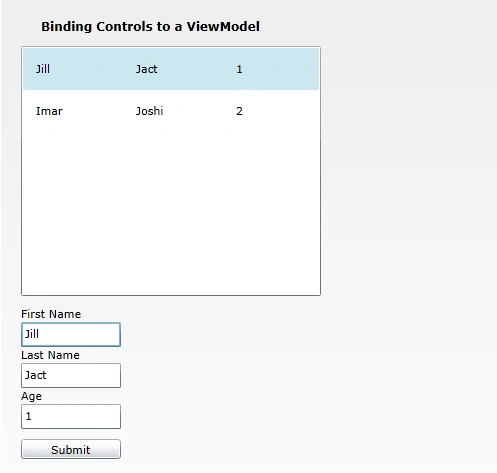
Let me modify the row and see if the update works: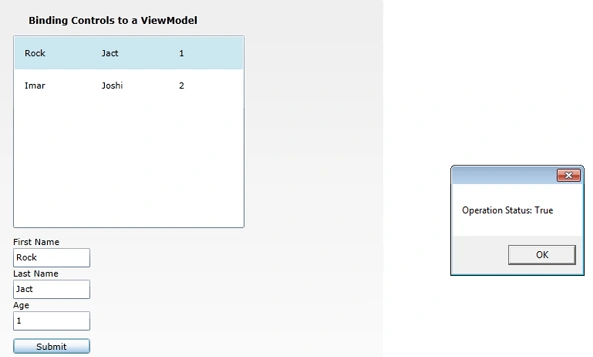
Great it works.
In my next post I will add commanding to this example . Till then Happy Coding.

Join the conversation! Your thoughts help the community grow.