

Introduction
In this article I explain the MySQL cheat sheet in PHP. I will use common MySQL commands during this article to assist you to apply with MySQL and effectively. Here, first is a discussion of working with a database. Using the following queries, you can approriately work on MySQL. The following queries describe that.
Working with Database
When a database does not exist the database server creates a new database. Such as:
<?php
$con = mysql_connect ("localhost","root","");
$db="Vinod";
if (!$con)
{
die ('Could not connect: ' . mysql_error());
}
if (mysql_query ("CREATE DATABASE If Not exists $db",$con))
{
echo "Your Database Created Which Name is : $db";
}
else
{
echo "Error creating database: " . mysql_error();
}
mysql_close ($con);
?>
To drop the database use this query:
<?php
$con = mysql_connect ("localhost","root","");
$db="Vinod";
if (!$con)
{
die ('Could not connect: ' . mysql_error());
}
if (mysql_query ("DROP DATABASE IF EXISTS $db",$con))
{
echo "Your Database removed Which Name is : $db";
}
else
{
echo "Your database $db not extst: " . mysql_error();
}
mysql_close ($con);
?>
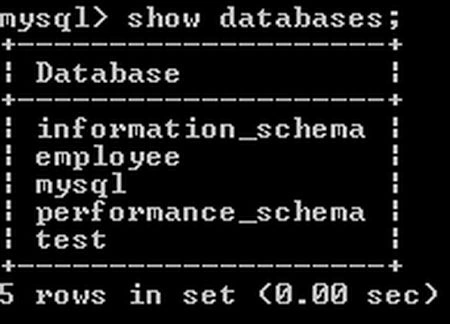
To show all the databases in your database server use:
Working with table
To list all tables in your database, you can use this query:
Create table in your database.

CREATE table IF NOT EXISTS table_name(create_clause) [table_options]
[[IGNORE|REPLACE] select];
Delete table permanently.
DROP table IF EXISTS table_name [ name,]
[RESTRICT | CASCADE];
Get information about table or column.
DESCRIBE table [column_name]
desc table [column_name];
Working with Index
Create an index on your table.
CREATE [UNIQUE|FULLTEXT] INDEX index_name
ON table (colu_name,);
Remove index from table.
DROP INDEX index_name;
Retrieving data from table
Retrieving all data from your table.
SELECT * FROM table_name;
Retrieve specific column data from your database table.
SELECT column_name, column_name2….
FROM table_name;
Retrieve unique record from your database.
SELECT DISTINCT (column_name)
FROM table_name;
Retrieve data from multiple table then using join.
SELECT * FROM tab_name1
INNER JOIN tab_name2 ON conditions;
SELECT * FROM tab_name1
LEFT JOIN tab_name2 ON conditions;
SELECT * FROM tab_name1;
Counting number of rows from your database tables.
SELECT COUNT (*) FROM table_name;
Sorting data ascending or descending.
SELECT column_name1, column_name2
FROM table_name
ORDER BY column_name1 ASC [DESC], column_name2 ASC [DESC];
Retrieve data from your table in group.
SELECT * FROM table_name
GROUP BY column_name;
Join the conversation! Your thoughts help the community grow.