
Hi. I have installed Visual Studio 2015 (Community 2015 RC version) and continuing my work using it. While working I found some very interesting new features so I thought to share. Today is the first finding.
When I add a new class and if there are unnecessary using statements then Visual Studio shows them in gray color and with a light bulb icon as in the following: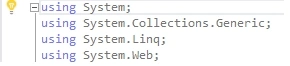
Figure 1: Unnecessary using statements
Not only that but if we hover over the light bulb icon it shows a down arrow near it and alt text as in the following: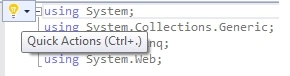
Figure 2: Light box with down arrow
Also if we hover on a Gray area then it shows a detailed window like: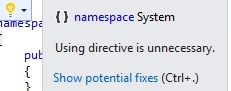
Figure 3: Pop-up after hovering on Grey area
When we click either on the down arrow or the "Show potential fixes (Ctrl+)” link from the preceding image, it shows detailed actions as in the following: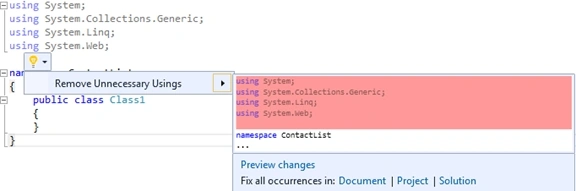
Figure 4: Actions
The preceding option is also available when we right-click on the namespaces and then "Quick Actions…" as in the following:
Figure 5: Quick Actions…
When we click on "Remove Unnecessary Usings" in Figure 4 then a require action happens. All unnecessary usings are removed. Interestingly, we also have options like "Preview changes" or "Fix all occurrences in: Document | Project | Solution" and I guess this option is very useful so that before release we can do this action one time throughout the solution.
The old way still exists. When we right-click on the namespaces and then click on "Organize Usings" as in the following:
Figure 5: "Remove Unnecessary Using"
Thanks!
Enjoy reading.
As usual any comments, feedback or suggestions are welcome.
New Features of Visual Studio 2015 : Part 1
This article explains a new feature, “Quick Actions”, of Visual Studio 2015


Sr KarthigaPosted Apr 2, 2016, 8:09 PM EDT
good one
Sr KarthigaPosted Apr 2, 2016, 8:08 PM EDT
nice explanation
Asfend YarPosted Feb 25, 2016, 8:01 AM EST
good
NitinPosted May 28, 2015, 9:00 AM EDT
good one
Abhishek JaiswalPosted May 27, 2015, 11:42 PM EDT
Now VS is getting healthier, good article!! :)
Sibeesh VenuTOP 100Posted May 27, 2015, 10:19 PM EDT
Good One.
Prasham SabadraPosted May 27, 2015, 10:14 PM EDT
Thanks a lot sir. Your appreciation is a lot for me. Thank you very much.
Mahesh ChandTOP 10Posted May 27, 2015, 9:35 PM EDT
Thank you, Prasham. Appreciate you sharing your experience. Editor has improved a lot. Look forward to see your next article on other features.