

Paging and sorting are the most commonly used features of a ListView Control. But this features becomes a time killer when we have large data in a select query (the rows count is greater than thousands/Lacs). The data binding time can be reduced if we fetch a portion of data that is required to display on the current page instead of fetching the complete data set.
Overview
First, we will optimize the select query used for the binding. Instead of writing a conventional select query we will write a Stored Procedure that will return a single page of records. The Stored Procedure will have StartIndex, SortBy Expression, Filter Expression and TotalRows will be the Output Parameter.
Finally, In the presentation layer we will have a ListView as the Presentation Control and Custom Paging. Also a few hidden fields to maintain the current Sort Expression, StartIndex and TotalPages.
Database details
I have dummy data as an employee table.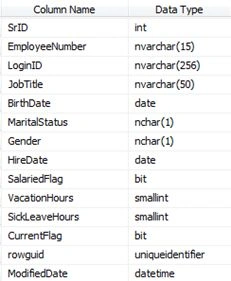
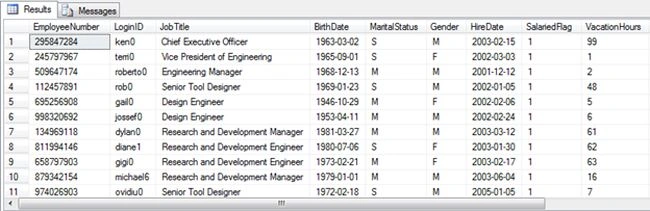
Stored Procedure
- -- =============================================
- -- USP_GetGVData 0, 0 ,'gender' ,'-1'
- -- USP_GetGVData 0, 0 ,'MaritalStatus','-1'
- -- =============================================
- CREATE PROCEDURE [dbo].[USP_GetGVData]
- @startIndex INT ,
- @totalRows INT OUTPUT ,
- @sortBy VARCHAR(50) ,
- @jobTitle VARCHAR(50)
- AS
- BEGIN
- DECLARE @sqlStatement NVARCHAR(MAX),
- @upperBound INT,
- @pageSize AS INT = 9;
- -- page size is declared as 10 records/ page
- -- calculate row number to be fetched = startindex + pagesize
- IF @startIndex < 1
- SET @startIndex = 1
- IF @pageSize < 1 SET @pageSize = 1
- SET @upperBound = @startIndex + @pageSize
- -- calculate total rows
- SELECT @totalRows = Count(*)
- FROM Employee
- WHERE JobTitle = CASE @jobTitle WHEN '-1' THEN JobTitle ELSE @jobTitle END
- ---- select data
- ;WITH T AS (
- SELECT ROW_NUMBER () OVER ( ORDER BY
- CASE @sortBy WHEN 'EmployeeNumber' THEN [EmployeeNumber]
- WHEN 'JobTitle' THEN [JobTitle]
- WHEN 'MaritalStatus' THEN [MaritalStatus]
- WHEN 'Gender' THEN [Gender]
- ELSE [EmployeeNumber] END
- ) AS ROWNUM
- , *
- FROM Employee
- WHERE JobTitle = CASE @jobTitle WHEN '-1' THEN JobTitle ELSE @jobTitle END )
- SELECT * FROM T
- WHERE ROWNUM BETWEEN @startIndex AND @upperBound
- END
The preceding Stored Procedure will always return <= 10 records with RowNumber manipulated depending on sortBy and Filter expression. Also the OutPut parameter @totalRows returns TotalRows for calculating the pages requred to display the data for the selected sortBy and Filter criteria.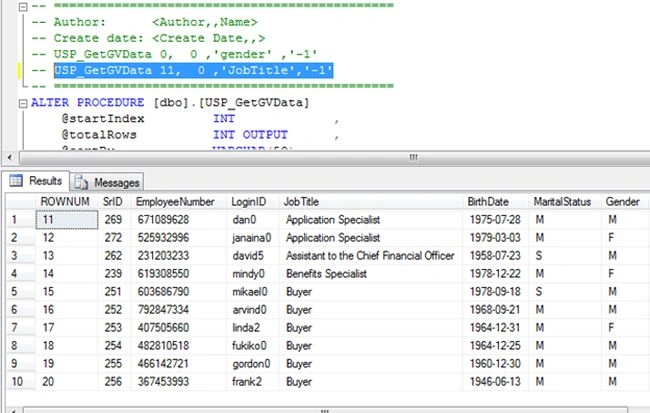
Presentaion Layer
For data presentation a GridView, ListView or a Repeater Control can be used. But among them Repeater is the fastest and most optimized since it is made up of HTML tags as well as it has lesser viewstate, due to which page has less payload for a postback. But it cannot have the functionality to handle events such as edit, delete and so on and also requires separate coding for paging.
A GridView is the slowest but it has built-in support for sorting, paging, deleting, editing and so on that can be added using less code. Many times a GridView has a huge ViewState that increases the payload for a postback. Hence the page becomes a slow performer.
A ListView is fast and has a few features that a Repeater and GridView has making it an average performer. It has less ViewState, less than a GridView and is faster than a GridView but slower than a Repeater. It doesn't however have built-in support for paging, inserting, deleting and updating the data.
aspx Page Implementation
.aspx script
- <%@ Page Language="C#" AutoEventWireup="true" CodeBehind="Default.aspx.cs" Inherits="TestApplication.Default" %>
- <!DOCTYPE html PUBLIC "-//W3C//DTD XHTML 1.0 Transitional//EN" "http://www.w3.org/TR/xhtml1/DTD/xhtml1-transitional.dtd">
- <html xmlns="http://www.w3.org/1999/xhtml">
- <head runat="server">
- <title></title>
- </head>
- <body>
- <form id="form1" runat="server">
- <div>
- <table width="100%">
- <tr>
- <td colspan="5" align="center">
- <asp:Label ID="lblError" runat="server"></asp:Label>
- <asp:HiddenField ID="TotalRows" runat="server" Value="0" />
- <asp:HiddenField ID="startIndex" runat="server" Value="0" />
- </td>
- </tr>
- <tr>
- <td align="right">
- Job Title :
- </td>
- <td align="left">
- <asp:DropDownList ID="ddlJobTitle" runat="server">
- <asp:ListItem Text="Select" Value="-1" Selected="True"></asp:ListItem>
- <asp:ListItem Text="Chief Executive Officer" Value="Chief Executive Officer"></asp:ListItem>
- <asp:ListItem Text="Design Engineer" Value="Design Engineer"></asp:ListItem>
- <asp:ListItem Text="Senior Tool Designer" Value="Senior Tool Designer"></asp:ListItem>
- <asp:ListItem Text="Marketing Manager" Value="Marketing Manager"></asp:ListItem>
- <asp:ListItem Text="Marketing Specialist" Value="Marketing Specialist"></asp:ListItem>
- </asp:DropDownList>
- </td>
- <td>
- <asp:Button ID="btnSearch" runat="server" Text="Search" OnClick="btnSearch_Click" />
- </td>
- </tr>
- <tr>
- <td colspan="5" align="center">
- <br />
- <br />
- <asp:ListView ID="lvData" runat="server" OnSorting="lvData_Sorting">
- <LayoutTemplate>
- <table border="0" cellpadding="1" width="100%">
- <tr style="background-color: #E5E5FE">
- <th>
- SrNo
- </th>
- <th>
- LoginID
- </th>
- <th>
- <asp:LinkButton ID="EmpNumber" runat="server" CommandName="Sort" CommandArgument="EmpNumber">EmpNumber</asp:LinkButton>
- </th>
- <th>
- <asp:LinkButton ID="JobTitle" runat="server" CommandName="Sort" CommandArgument="JobTitle">Job Title</asp:LinkButton>
- </th>
- <th>
- Birth Date
- </th>
- <th>
- <asp:LinkButton ID="MaritalStatus" runat="server" CommandName="Sort" CommandArgument="MaritalStatus">Marital Status</asp:LinkButton>
- </th>
- <th>
- <asp:LinkButton ID="Gender" runat="server" CommandName="Sort" CommandArgument="Gender">Gender</asp:LinkButton>
- </th>
- <th>
- Edit
- </th>
- </tr>
- <tr id="itemPlaceholder" runat="server">
- </tr>
- </table>
- </LayoutTemplate>
- <ItemTemplate>
- <tr>
- <td>
- <%# Eval("ROWNUM")%>
- </td>
- <td>
- <%# Eval("LoginID")%>
- </td>
- <td>
- <%# Eval("EmployeeNumber")%>
- </td>
- <td>
- <%# Eval("JobTitle")%>
- </td>
- <td>
- <%# Eval("BirthDate","{0:d}")%>
- </td>
- <td>
- <%# Eval("MaritalStatus")%>
- </td>
- <td>
- <%# Eval("Gender")%>
- </td>
- <th>
- Edit
- </th>
- </tr>
- </ItemTemplate>
- <AlternatingItemTemplate>
- <tr style="background-color: #cecece">
- <td>
- <%# Eval("ROWNUM")%>
- </td>
- <td>
- <%# Eval("LoginID")%>
- </td>
- <td>
- <%# Eval("EmployeeNumber")%>
- </td>
- <td>
- <%# Eval("JobTitle")%>
- </td>
- <td>
- <%# Eval("BirthDate","{0:d}")%>
- </td>
- <td>
- <%# Eval("MaritalStatus")%>
- </td>
- <td>
- <%# Eval("Gender")%>
- </td>
- <th>
- Edit
- </th>
- </tr>
- </AlternatingItemTemplate>
- </asp:ListView>
- </td>
- </tr>
- <tr>
- <td colspan="5">
- <table>
- <tr>
- <td>
- <asp:PlaceHolder ID="plcPaging" runat="server" />
- <br />
- <asp:Label runat="server" ID="lblPageName" />
- </td>
- </tr>
- <tr>
- <td>
- <asp:Label runat="server" ID="lblPage" ForeColor="Green" />
- </td>
- </tr>
- </table>
- </td>
- </tr>
- </table>
- </div>
- </form>
- </body>
- </html>
The code behind for the .aspx.cs is as below:
- using System;
- using System.Web.UI.WebControls;
- using System.Data;
- using System.Data.SqlClient;
- using System.Configuration;
- namespace TestApplication
- {
- public partial class Default : System.Web.UI.Page
- {
- int totalCnt = 0;
- protected void Page_Load(object sender, EventArgs e)
- {
- if (!IsPostBack)
- { }
- else
- {
- plcPaging.Controls.Clear();
- CreatePagingControl();
- }
- }
- protected void btnSearch_Click(object sender, EventArgs e)
- {
- ViewState["SortExpression"] = string.Empty;
- TotalRows.Value = "0";
- startIndex.Value = "0";
- getLvData(Convert.ToInt32(startIndex.Value), ref totalCnt, Convert.ToString(ViewState["SortExpression"]), ddlJobTitle.SelectedValue.ToString());
- TotalRows.Value = totalCnt.ToString();
- startIndex.Value = "11";
- plcPaging.Controls.Clear();
- CreatePagingControl();
- }
- #region " [ListView Events ] "
- protected void lvData_Sorting(object sender, ListViewSortEventArgs e)
- {
- ViewState["SortExpression"] = e.SortExpression;
- TotalRows.Value = "0";
- startIndex.Value = "0";
- getLvData(Convert.ToInt32(startIndex.Value), ref totalCnt, Convert.ToString(ViewState["SortExpression"]), ddlJobTitle.SelectedValue.ToString());
- TotalRows.Value = totalCnt.ToString();
- startIndex.Value = "11";
- plcPaging.Controls.Clear();
- CreatePagingControl();
- }
- #endregion
- #region " [ Paging ] "
- private void CreatePagingControl()
- {
- for (int i = 0; i < (Convert.ToInt32(TotalRows.Value) / 10) + 1; i++)
- {
- LinkButton lnk = new LinkButton();
- lnk.Click += new EventHandler(lbl_Click);
- lnk.ID = "lnkPage" + (i + 1).ToString();
- lnk.Text = (i + 1).ToString();
- plcPaging.Controls.Add(lnk);
- Label spacer = new Label();
- spacer.Text = " ";
- plcPaging.Controls.Add(spacer);
- lblPage.Text = "Total Pages : " + ((Convert.ToInt32(TotalRows.Value) / 10) + 1).ToString() + ", Selected Page : 1";
- }
- }
- void lbl_Click(object sender, EventArgs e)
- {
- LinkButton lnk = sender as LinkButton;
- int currentPage = int.Parse(lnk.Text);
- int take = currentPage * 10;
- int skip = currentPage == 1 ? 0 : take - 10;
- startIndex.Value = (((currentPage * 10) - 10) + 1).ToString();
- getLvData(Convert.ToInt32(startIndex.Value), ref totalCnt, Convert.ToString(ViewState["SortExpression"]), ddlJobTitle.SelectedValue.ToString());
- TotalRows.Value = totalCnt.ToString();
- lblPage.Text = "Total Pages : " + ((Convert.ToInt32(TotalRows.Value) / 10) + 1).ToString() + ", Selected Page : " + lnk.Text;
- }
- #endregion
- #region " [ Private Function ] "
- private void getLvData(int startIndex, ref int totalRows, string sortBy, string jobTitle)
- {
- DataSet dsData = new DataSet();
- SqlConnection sqlCon = null;
- SqlCommand sqlCmd = null;
- SqlDataAdapter sqlSelectCmd = null;
- try
- {
- using (sqlCon = new SqlConnection(ConfigurationManager.ConnectionStrings["connectionString"].ConnectionString))
- {
- sqlCmd = new SqlCommand("USP_GetGVData", sqlCon);
- sqlCmd.CommandType = CommandType.StoredProcedure;
- sqlCmd.Parameters.AddWithValue("@startIndex", startIndex);
- sqlCmd.Parameters.AddWithValue("@sortBy", sortBy);
- sqlCmd.Parameters.AddWithValue("@jobTitle", jobTitle);
- sqlCmd.Parameters.AddWithValue("@totalRows", totalRows);
- ((SqlParameter)sqlCmd.Parameters["@totalRows"]).Direction = ParameterDirection.Output;
- sqlCon.Open();
- sqlSelectCmd = new SqlDataAdapter();
- sqlSelectCmd.SelectCommand = sqlCmd;
- sqlSelectCmd.Fill(dsData);
- totalRows = Convert.ToInt32(((SqlParameter)sqlCmd.Parameters["@totalRows"]).Value);
- sqlCon.Close();
- }
- }
- catch
- {
- throw;
- }
- lvData.DataSource = dsData;
- lvData.DataBind();
- if (!IsPostBack)
- {
- CreatePagingControl();
- }
- }
- #endregion
- }
- }
Compile and run the page and it will look as in the following: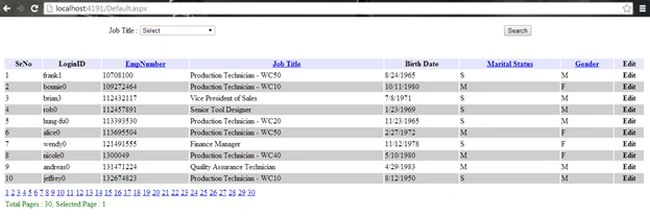
Paging Event 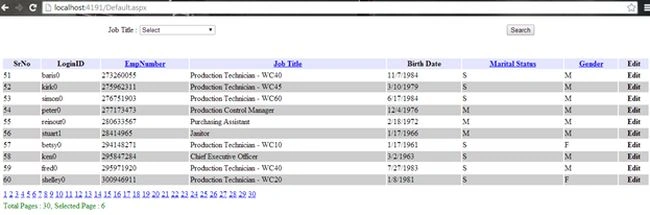
Search with Filter Expression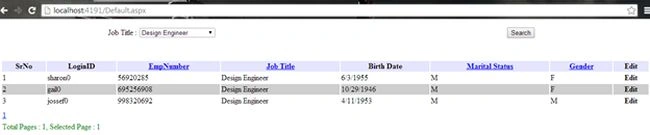
Search with Sorting Expression (job title selected)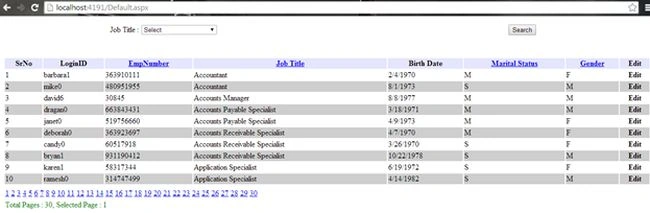
Download the source code for the database script and other explanations.
Gurunatha DogiPosted Jul 31, 2014, 4:29 AM
Great one and useful one...Thanks @Santosh bro