
Introduction
Here is my first article about Android on c-sharpcorner.com.
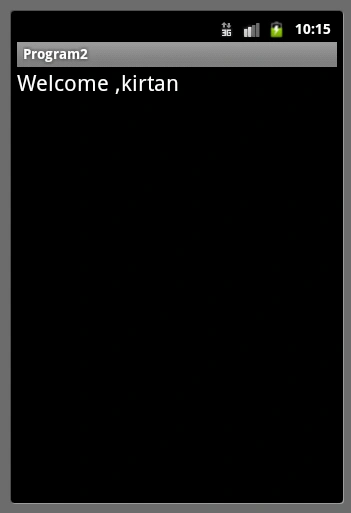
We will pass a username and a password in the EditView Control and if they match correctly then we need to move to another Intent else show a message box saying it is invalid. Also if the user successfully logins then we will show a Welcome , {username} message in TextView.
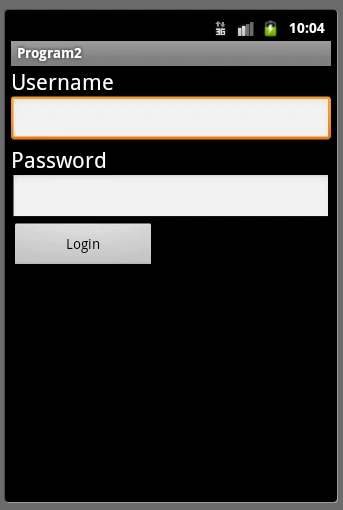
The main logic used here is very simple, wherein you just need to use the putExtra Method to pass the data across multiple program screens.
The putExtra method accepts many kinds of data, such as String, int, float, byte etc..
- package com.Program2;
- import android.app.Activity;
- import android.content.Intent;
- import android.os.Bundle;
- import android.view.View;
- import android.view.View.OnClickListener;
- import android.widget.Button;
- import android.widget.EditText;
- import android.widget.Toast;
- public class Main extends Activity {
- /** Called when the activity is first created. */
- @Override
- public void onCreate(Bundle savedInstanceState)
- {
- super.onCreate(savedInstanceState);
- setContentView(R.layout.main);
- /* Get button Text1 Text2 */
- final EditText edUsername = (EditText) findViewById(R.id.editText1);
- final EditText edPassword = (EditText)findViewById(R.id.editText2);
- Button btnValidate = (Button)findViewById(R.id.button1);
- btnValidate.setOnClickListener(new OnClickListener()
- {
- public void onClick(View arg0)
- {
- String uname = edUsername.getText().toString();
- String pass = edPassword.getText().toString();
- if(uname.equals("kirtan") && pass.equals("12345"))
- {
- Intent intent = new Intent(Main.this,Success.class);
- intent.putExtra("username",edUsername.getText().toString());
- startActivity(intent);
- }
- else
- {
- Toast.makeText(Main.this, "Invalid Usename password pair.", Toast.LENGTH_LONG).show();
- }
- }
- });
- }
- }
Success.Java
- package com.Program2;
- import android.app.Activity;
- import android.os.Bundle;
- import android.widget.TextView;
- public class Success extends Activity
- {
- protected void onCreate(Bundle savedInstanceState)
- {
- // TODO Auto-generated method stub
- super.onCreate(savedInstanceState);
- setContentView(R.layout.success);
- TextView tv = (TextView) findViewById(R.id.textView1);
- tv.setText("Welcome ,"+getIntent().getExtras().getString("username"));
- }
- }


Manav PandyaPosted Oct 4, 2016, 9:04 AM EDT
How can we get same functionality using different intent ???
Manav PandyaPosted Oct 4, 2016, 9:03 AM EDT
Nice share ...
kalu singh raoPosted Jul 12, 2016, 2:24 AM EDT
Nice...
mehri mPosted Jul 9, 2014, 1:19 AM EDT
thank u , i want an example like your program in MonoDroid, can u help me ?
sarath kumarPosted Nov 29, 2012, 12:13 AM EST
nice example thank you...
VenuGopal SriramadasuPosted Oct 17, 2012, 7:23 AM EDT
thank you for the example... its very helped lot thank you Kirtan Patel...
vs vankhedePosted Oct 1, 2012, 8:52 PM EDT
thanks a lot for this tutorial. i get this one very helpfull.
vs vankhedePosted Oct 1, 2012, 8:52 PM EDT
thanks a lot for this tutorial. i get this one very helpfull
LaraPosted Aug 18, 2012, 5:46 PM EDT
Nice and simple!! Thanks alot :)
Vena KhayaPosted Aug 1, 2012, 7:15 AM EDT
That help me a lot I was still thinking how should I implement that.
Manoj PalPosted Apr 19, 2012, 10:24 PM EDT
Hi, Its working properly for me. Thanks
Nic RochePosted Jul 25, 2011, 1:01 PM EDT
Hi Kirtan, Thanks for the article. I think it is worth mentioning there are many ways of doing this. For instance: Complex structures implementing Parcelable/Serializable, SharedPreferences... Nice work. Regards, Nic Roche
Mahesh ChandTOP 10Posted Jul 25, 2011, 9:03 AM EDT
Good stuff. Is your school done?
Abhimanyu K VatsaTOP 100Posted Jul 23, 2011, 1:24 AM EDT
congrats on your very first article, you are a best coder that I know. Keep it up!!
Dinesh BeniwalTOP 10editedPosted Jul 22, 2011, 10:20 PM EDTEdited Jul 22, 2011, 10:21 PM EDT
Very useful article, thanks for sharing