

Introduction
PDF generation is a common requirement in many applications, whether for generating reports, invoices, or other documents. In this article, we'll delve into how to generate PDFs in a .NET Core 8.0 API using the DinkToPdf library, a popular wrapper for the wkhtmltopdf tool. Specifically, we'll focus on creating an offer letter PDF on the server side by converting HTML content into a PDF document.
Prerequisites
Before we start, ensure you have the following installed.
- .NET Core 8.0 SDK
- Visual Studio or Visual Studio Code
- Basic knowledge of C# and .NET Core
namespaces of DinkToPdf
using DinkToPdf;
using DinkToPdf.Contracts;
Project Setup
- Create a New .NET Core Web API Project
- Open Visual Studio 2022 and create a new .NET Core Web API project.
- Alternatively, Use the Terminal
- Open your terminal and run the following command
dotnet new webapi -n HtmlToPdfDotNetCoreApi
cd HtmlToPdfDotNetCoreApi
Add the DinkToPdf Library
Add the DinkToPdf library to your project via NuGet by running the following command in your terminal:
dotnet add package DinkToPdf
dotnet add package DinkToPdf.Contracts
Most importantly, download the wkhtmltopdf DLL
- Download the wkhtmltopdf binaries from the official website.
- Place the downloaded binaries in a folder named wkhtmltopdf within your project directory.
Let's configure DinkToPdf. First, create a folder for the wkhtmltopdf binaries
- Place the downloaded binaries in a folder named wkhtmltopdf within your project directory.
- Open the Program.cs file and register the DinkToPdf service.
builder.Services.AddSingleton(typeof(IConverter), new SynchronizedConverter(new PdfTools()));Create an API controller in your project and name what you want to give.
using DinkToPdf;
using DinkToPdf.Contracts;
using Microsoft.AspNetCore.Mvc;
namespace HtmlToPdfDotNetCoreApi.Controllers
{
    [Route("api/[controller]")]
    [ApiController]
    public class HTMLTOPDFController : ControllerBase
    {
        private readonly IConverter _converter;
        public HTMLTOPDFController(IConverter converter)
        {
            _converter = converter;
        }
        [HttpPost("create-pdf")]
        public IActionResult CreatePdf()
        {
            var templateContent = @"<!DOCTYPE html>
<html lang=""en"">
<head>
    <meta charset=""UTF-8"">
    <meta name=""viewport"" content=""width=device-width, initial-scale=1.0"">
    <title>Offer Letter</title>
    <style>
        body {
            font-family: Arial, sans-serif;
            margin: 0;
            padding: 20px;
            background-color: #f4f4f4;
        }
        .container {
            background-color: #fff;
            padding: 20px;
            margin: 0 auto;
            border-radius: 5px;
            box-shadow: 0 0 10px rgba(0, 0, 0, 0.1);
            max-width: 800px;
        }
        .header, .footer {
            text-align: center;
        }
        .header h1, .footer p {
            margin: 0;
        }
        .content {
            margin: 20px 0;
        }
        .content p {
            line-height: 1.6;
        }
        .details {
            margin: 20px 0;
        }
        .details td {
            padding: 5px 0;
        }
    </style>
</head>
<body>
    <div class=""container"">
        <div class=""header"">
            <h1>Offer Letter</h1>
        </div>
        <div class=""content"">
            <p>Dear John Doe,</p>
            <p>We are pleased to offer you the position of Software Engineer at Tech Corp. We believe your skills and experience will be a valuable asset to our team.</p>
            <div class=""details"">
                <table>
                    <tr>
                        <td><strong>Start Date:</strong></td>
                        <td>August 1, 2024</td>
                    </tr>
                    <tr>
                        <td><strong>Salary:</strong></td>
                        <td>$80,000 per year</td>
                    </tr>
                    <tr>
                        <td><strong>Benefits:</strong></td>
                        <td>Health, Dental, 401(k)</td>
                    </tr>
                </table>
            </div>
            <p>We look forward to working with you and are confident that you will make significant contributions to our company.</p>
            <p>Please sign and return this letter by July 20, 2024, to confirm your acceptance of this offer.</p>
            <p>Sincerely,</p>
            <p>Jane Smith<br>
               HR Manager<br>
               Tech Corp</p>
        </div>
        <div class=""footer"">
            <p>© 2024 Tech Corp. All rights reserved.</p>
        </div>
    </div>
</body>
</html>
";

            var globalSettings = new GlobalSettings
            {
                ColorMode = ColorMode.Color,
                Orientation = Orientation.Portrait,
                PaperSize = PaperKind.A4,
                Margins = new MarginSettings { Top = 10, Bottom = 10, Left = 10, Right = 10 }
            };

            var objectSettings = new ObjectSettings
            {
                PagesCount = true,
                HtmlContent = templateContent,
                WebSettings = { DefaultEncoding = "utf-8" },
                HeaderSettings = { FontName = "Arial", FontSize = 9, Right = "Page [page] of [toPage]", Line = true, Spacing = 2.812 },
                FooterSettings = { FontName = "Arial", FontSize = 9, Line = true, Center = "Report Footer" }
            };

            var pdf = new HtmlToPdfDocument()
            {
                GlobalSettings = globalSettings,
                Objects = { objectSettings }
            };

            byte[] pdfBytes = _converter.Convert(pdf);
            return File(pdfBytes, "application/pdf", "ConvertedDocument.pdf");
        }
    }
}
The GlobalSettings class is used to define settings that apply to the entire PDF document.
- ColorMode: Sets the color mode of the PDF. In this case, it's set to ColorMode.Color, which means the PDF will be in color.
- Orientation: Sets the orientation of the PDF. Here, it's set to Orientation. Portrait, meaning the PDF will be in portrait mode.
- PaperSize: Specifies the size of the paper. PaperKind.A4 sets the paper size to A4.
- Margins: Defines the margins of the PDF. The MarginSettings class is used to set the top, bottom, left, and right margins to 10 units each.
Object Settings
The ObjectSettings class is used to define settings for individual objects within the PDF.
- PagesCount: When set to true, it includes the total number of pages in the PDF.
- HtmlContent: Contains the HTML content to be converted into a PDF. In this example, templateContent holds the HTML string.
- WebSettings: Defines web-related settings. Here, DefaultEncoding is set to "utf-8" to ensure proper character encoding.
- HeaderSettings: Configures the header of the PDF. It includes.
- FontName: Sets the font name to "Arial".
- FontSize: Sets the font size to 9.
- Right: Adds a right-aligned text "Page [page] of [toPage]" to the header.
- Line: When set to true, it adds a line below the header.
- Spacing: Sets the spacing between the header and the content to 2.812 units.
- FooterSettings: Configures the footer of the PDF. It includes.
- FontName: Sets the font name to "Arial".
- FontSize: Sets the font size to 9.
- Line: When set to true, it adds a line above the footer.
- Center: Adds a centered text "Report Footer" to the footer.
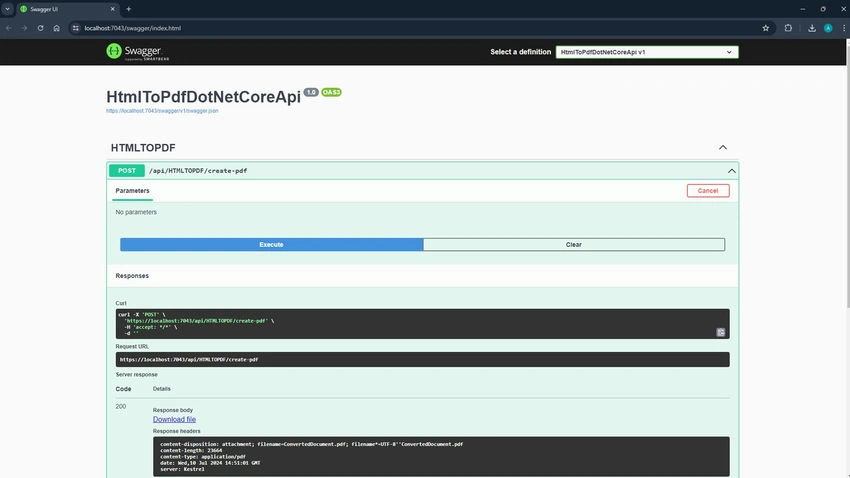
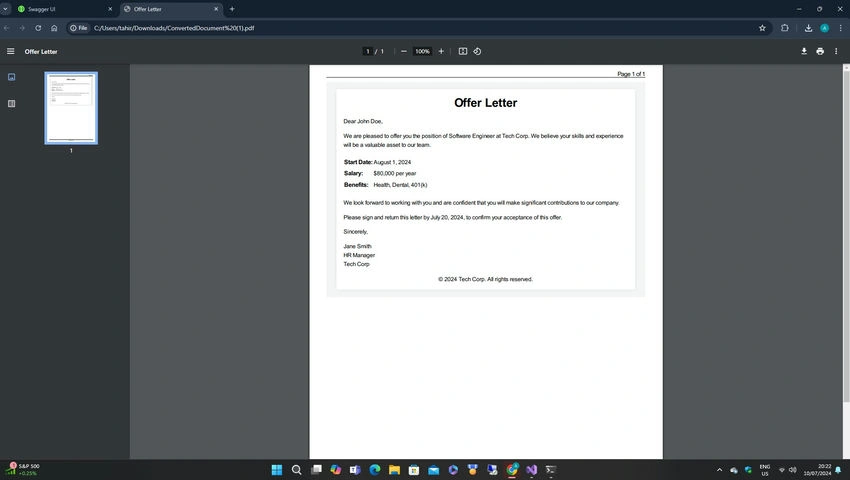
Let's test our API. Press F5 to launch the application and display the Swagger UI in your browser.
Conclusion
In this article, we've covered how to set up a .NET Core 8.0 Web API project and use the DinkToPdf library to generate PDFs. This powerful combination allows you to create dynamic and customizable PDF documents for various use cases.
Happy coding!
Jobin SPosted Jul 12, 2024, 1:12 AM
Internal separate class in css?
Jobin SPosted Jul 11, 2024, 3:34 PM
Its good but how to write css class separate ? multiple page add options here ?