

Introduction
This article describes Validation using Data Annotation. We use the "System.ComponentModel.DataAnnotations" namespace that specifies the validation for every individual field in the data model. These attributes define the validation of range checking and required fields.
The following is the procedure for creating the application.
Step 1
Create a Web API application using the following procedure:
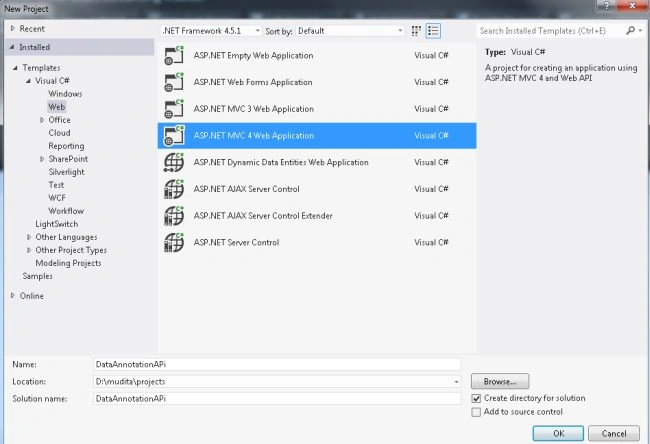
- Start Visual Studio 2012.
- From the Start window select "Installed" -> "Visual C#" -> "Web".
- Select "ASP.NET MVC4 Web Application" and click on the "OK" button.
- From the "MVC4 Project" window select "Web API".
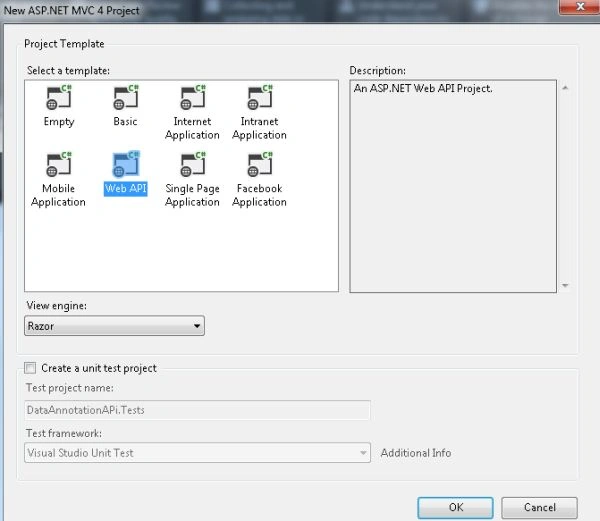
- Click on the "OK" button.
Step 2
Create a Model Class using the following procedure:
- In the "Solution Explorer".
- Right-click on the Model Folder.
- Select "Add" -> "Class".
- Select "Installed" -> "Visual C#" and select class.
- Click on the "Add" button.
Add the following code:
- using System;
- using System.Collections.Generic;
- using System.ComponentModel.DataAnnotations;
- using System.Linq;
- using System.Web;
- namespace DataAnnotationAPi.Models
- {
- public class EmployeeModel
- {
- public int Id { get; set; }
- [Required(ErrorMessage = "Enter Employee First Name")]
- public String EmpFirstName { get; set; }
- [Required(ErrorMessage = "Enter Employee Last Name")]
- public String EmpLastName { get; set; }
- [Required(ErrorMessage = "Enter Salary")]
- [Range(11000, 20000,ErrorMessage = "Salary should be more than 11000")]
- public int Salary { get; set; }
- }
- }
Step 3
Create a Controller using the following procedure:
- In the "Solution Explorer".
- Right-click on the Controller folder.
- Select "Add" -> "Controller" and change the name.
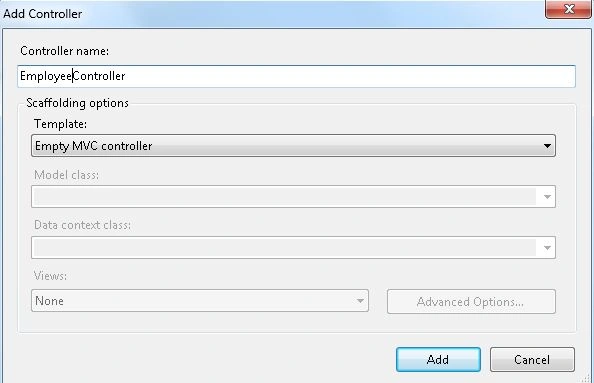
- Click on the "OK" button.
Add the following code:
- using System;
- using System.Collections.Generic;
- using System.Linq;
- using System.Web;
- using System.Web.Mvc;
- using DataAnnotationAPi.Models;
- namespace DataAnnotationAPi.Controllers
- {
- public class EmployeeController : Controller
- {
- //
- // GET: /Employee/
- public ActionResult GetEmployee()
- {
- return View();
- }
- [AcceptVerbs(HttpVerbs.Post)]
- public ActionResult GetEmployee([Bind(Exclude = "Id")]EmployeeModel P)
- {
- if (!ModelState.IsValid)
- {
- return View();
- }
- return RedirectToAction("Index");
- }
- }
- }
Step 4
Create a View as in the following:
- In the "EmployeeController".
- Right-click on the "GetEmployee" action method.
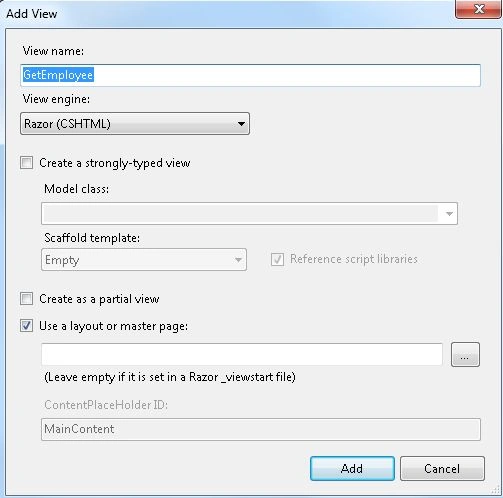
- Click on the "Add" button.
Add the following code:
- @{
- ViewBag.Title = "GetEmployee";
- }
- <h2>GetEmployee</h2>
- @model DataAnnotationAPi.Models.EmployeeModel
- @{
- Layout = null;
- }
- <div>
- @using (Html.BeginForm())
- {
- @Html.ValidationSummary(true)
- <p>
- @Html.LabelFor(m => m.EmpFirstName)
- @Html.TextBoxFor(m => m.EmpFirstName)
- @Html.ValidationMessageFor(m=>m.EmpFirstName)
- </p>
- <p>
- @Html.LabelFor(m=>m.EmpLastName)
- @Html.TextBoxFor(m => m.EmpLastName,"EmpLastName")
- @Html.ValidationMessageFor(m => m.EmpLastName)
- </p>
- <p>
- @Html.LabelFor(m=> m.Salary)
- @Html.TextBoxFor(m=>m.Salary,"Salary")
- @Html.ValidationMessageFor(m=> m.Salary)
- </p>
- <input type="submit"value="Submit"/>
- }
- </div>
Step 5
Change the code in the Route.config file:
- using System;
- using System.Collections.Generic;
- using System.Linq;
- using System.Web;
- using System.Web.Mvc;
- using System.Web.Routing;
- namespace DataAnnotationAPi
- {
- public class RouteConfig
- {
- public static void RegisterRoutes(RouteCollection routes)
- {
- routes.IgnoreRoute("{resource}.axd/{*pathInfo}");
- routes.MapRoute(
- name: "Default",
- url: "{controller}/{action}/{id}",
- defaults: new { controller = "Employee", action = "GetEmployee", id = UrlParameter.Optional }
- );
- }
- }
- }
Step 6
Execute the application.
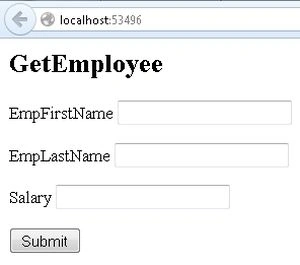
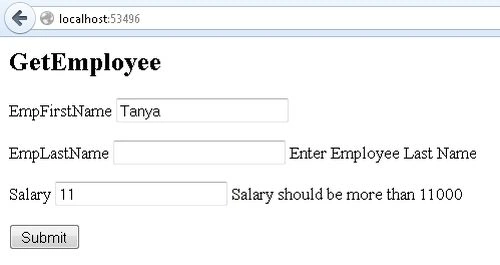
Fill in a salary less than 11000 and leave one TextBox empty and click on the Submit button. The output will be:
Join the conversation! Your thoughts help the community grow.