

Introduction
We are describing Form handling in PHP. The HTML form attribute is aoutomatically available in your PHP script.
-
The Form action is specified in the PHP script and handles the form tag.
-
The method attribute data is specified in the form attribute data.
-
The posible method attribute values are $_POST, $_GET and $_REQUEST.
-
Forms are submited using the post method with all the data collected by the post method. $_POST[['name'], $_POST[['email'], $_POST[['description'], where name, email and description are the name of the input elements of the form used.
-
The Get method is like associative arrays collected by a URL. When a user submits a form with method="get", all the data s(he) entered are collected by $_GET in the form of $_GET[['name'], $_GET[['email'], $_GET[['description'], where name, email and description are the name of the input elements of the form used.
-
The Browser uses the get method and the get method passes the value is 200 characters. While Apache uses 8000 characters by default. If you are using the GET method then use urlencode() to hide the actual value or characters in the URL.
-
$_REQUEST is an associative array thet contains the data used by get, post and cookies by default.
-
By setting the value of the type attribute to submit, the form data is submitted.
Example
Create a file named "Form.tpl".
<html>
<head>
<title>send mail in php</title>
<style type="text/css">
li {list-style-type: none;
font-size: 16pt;
margin-bottom: 7px;
}<br>
.survey
{
margin: auto;
padding-top: 10px;
padding-bottom: 10px;
width: 400px;
background : #D8F1F8;
border: 1px soild silver;
}
.survey h2
{
margin-left: 38px;
}
input
{
font-size: 20pt;
}
input:focus, textarea:focus
{
background-color: lightyellow;
}
input submit {
font-size: 12pt;
}
</style>
</head>
<body bgcolor="#FFFFCC">
<div class="survey">
<h2>Survey Form </h2>
<ul>
<form name="survey" action="action.php" method="POST" >
<li>Name:</li><li><input type="text" name="name" /></li>
<li>Date:</li><li><input type="text" name="date" /></li>
<li>email:</li><li><input type="text" name="email" /></li>
<li><input type="submit" /></li>
</form>
</ul>
</div>
</body>
</html>
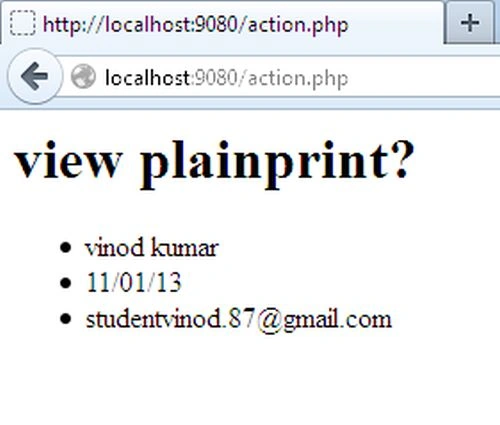
Next, the PHP script to save (action.php) handles the form data using $_POST.
<html>
<h1>view plainprint?</h1>
<?php
$name = $_POST['name'] ;
$date = $_POST['date'] ;
$email = $_POST['email'];
echo "<ul><li>".$name."</li><li>".$date."</li><li>".$email."</li></ul>";
?>
<html>
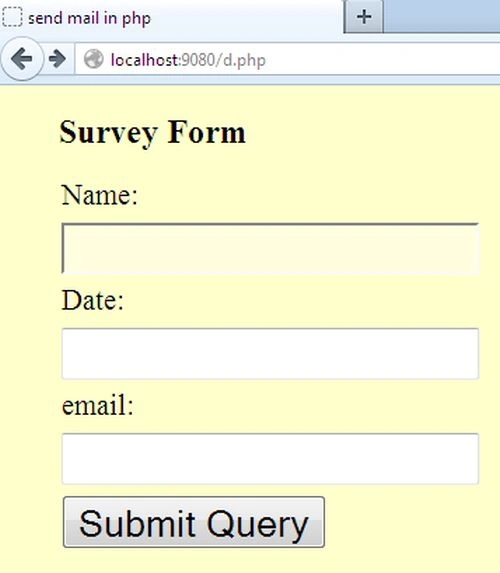
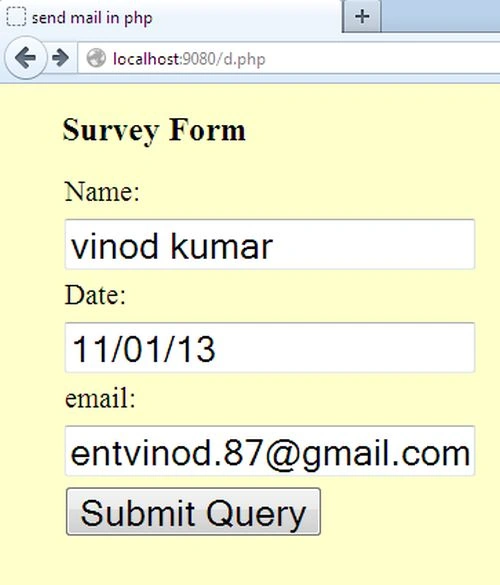
Output
Join the conversation! Your thoughts help the community grow.