

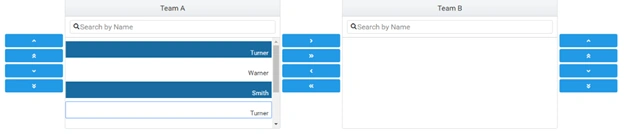
In this article, we will learn about PrimeNG Picklist and DataView. The Picklist component is used to shift the data from one list to another list. It provides default buttons to move the data between different lists.
In my previous article, we have learned about PrimeNG. You can check my previous article from the below mentioned link.
Step 1
Open SQL Server Management Studio and create two tables named "TeamA" and “TeamB”.
- CREATE TABLE [dbo].[TeamA](
- [ID] [int] IDENTITY(1,1) NOT NULL,
- [Name] [varchar](50) NULL,
- PRIMARY KEY CLUSTERED
- (
- [ID] ASC
- )WITH (PAD_INDEX = OFF, STATISTICS_NORECOMPUTE = OFF, IGNORE_DUP_KEY = OFF, ALLOW_ROW_LOCKS = ON, ALLOW_PAGE_LOCKS = ON) ON [PRIMARY]
- ) ON [PRIMARY]
- GO
- SET ANSI_PADDING OFF
- GO
- CREATE TABLE [dbo].[TeamB](
- [ID] [int] IDENTITY(1,1) NOT NULL,
- [Name] [varchar](50) NULL,
- PRIMARY KEY CLUSTERED
- (
- [ID] ASC
- )WITH (PAD_INDEX = OFF, STATISTICS_NORECOMPUTE = OFF, IGNORE_DUP_KEY = OFF, ALLOW_ROW_LOCKS = ON, ALLOW_PAGE_LOCKS = ON) ON [PRIMARY]
- ) ON [PRIMARY]
- GO
- SET ANSI_PADDING OFF
- GO
Step 2
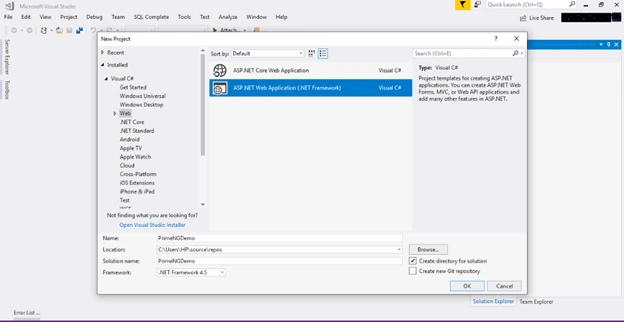
Open Visual Studio and create a new project. Change its name to PrimeNGDemo and select Web API as its template.
Step 3
Right-click the Models folder from Solution Explorer and go to Add >> New Item >> data.
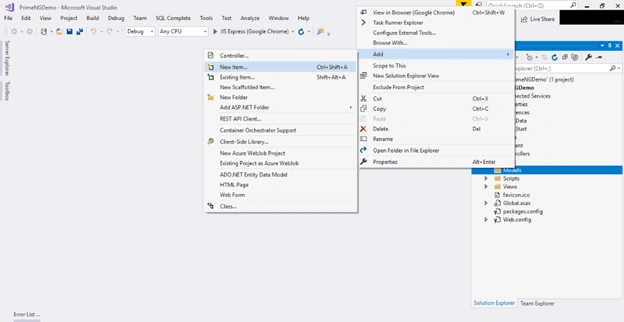
- Click on the "ADO.NET Entity Data Model" option and click "Add".
- Select EF Designer from the database and click the "Next" button.
- Add the connection properties and select database name on the next page and click OK.
- Check the Tables checkboxes.
- The internal options will be selected by default. Now, click the "Finish" button.
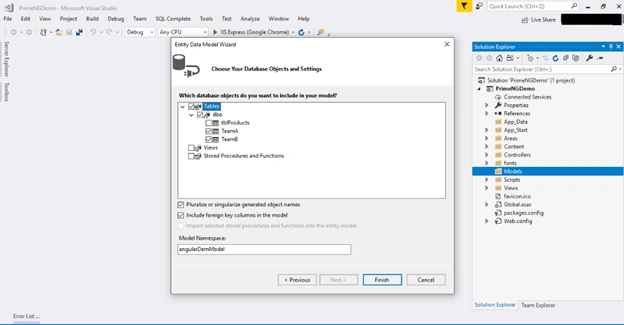
Our data model is created now.
Step 4
Right-click on the Models folder and a class - TeamOne. Now, paste the following code in the class.
- public class TeamOne
- {
- public int ID { get; set; }
- public string Name { get; set; }
- }
Step 5
Right-click on the Controllers folder and add a new controller. Name it as "PrimeNG controller".
Add the following namespace in the PrimeNG controller.
- using PrimeNGDemo.Models;
Now, add a method to fetch data from the database.
- [HttpGet]
- [Route("GetTeam")]
- public object GetTeam()
- {
- angularDemEntities DB = new angularDemEntities();
- return Json(DB.TeamAs.ToList());
- }
Add two new methods for inserting the data into database tables and add the following lines of code.
- [Route("Inserts")]
- [HttpPost]
- public void InsertTeam(List<TeamOne> obj)
- {
- angularDemEntities DB = new angularDemEntities();
- foreach (var item in obj)
- {
- TeamA obA = new TeamA { ID = item.ID, Name = item.Name };
- DB.TeamAs.Add(obA);
- DB.SaveChanges();
- }
- }
- [Route("InsertB")]
- [HttpPost]
- public void InsertTeamB(List<TeamOne> Obj)
- {
- try
- {
- angularDemEntities DB = new angularDemEntities();
- foreach (var item in Obj)
- {
- TeamB ObjB = new TeamB
- {
- ID = item.ID,
- Name = item.Name
- };
- DB.TeamBs.Add(ObjB);
- DB.SaveChanges();
- }
- }
- catch(Exception ex)
- {
- }
- }
- using System;
- using System.Collections.Generic;
- using System.Linq;
- using System.Net;
- using System.Net.Http;
- using System.Web.Http;
- using PrimeNGDemo.Models;
- namespace PrimeNGDemo.Controllers
- {
- [RoutePrefix("Api/prime")]
- public class PrimeNGController : ApiController
- {
- [HttpGet]
- [Route("GetTeam")]
- public object GetTeam()
- {
- angularDemEntities DB = new angularDemEntities();
- return Json(DB.TeamAs.ToList());
- }
- [Route("Inserts")]
- [HttpPost]
- public void InsertTeam(List<TeamOne> obj)
- {
- angularDemEntities DB = new angularDemEntities();
- foreach (var item in obj)
- {
- TeamA obA = new TeamA { ID = item.ID, Name = item.Name };
- DB.TeamAs.Add(obA);
- DB.SaveChanges();
- }
- }
- [Route("InsertB")]
- [HttpPost]
- public void InsertTeamB(List<TeamOne> Obj)
- {
- try
- {
- angularDemEntities DB = new angularDemEntities();
- foreach (var item in Obj)
- {
- TeamB ObjB = new TeamB
- {
- ID = item.ID,
- Name = item.Name
- };
- DB.TeamBs.Add(ObjB);
- DB.SaveChanges();
- }
- }
- catch(Exception ex)
- {
- }
- }
- }
- }
Step 7
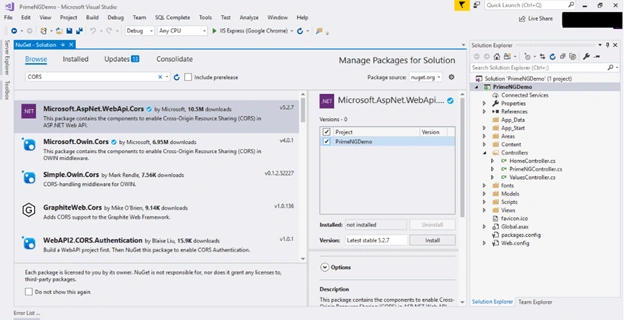
Now, let's enable CORS. Go to Tools, open NuGet Package Manager, search for Cors, and install the "Microsoft.Asp.Net.WebApi.Cors" package.
Step 8
Create a new Angular project by using the following command.
ng new PrimeUIDemo
Step 9
Open this project in Visual Studio Code and install the required packages for PrimeNG.
- npm install primeng --save
- npm install primeicons --save
Step 10
The tenth step is Style Configuration. Configure the required styles at the styles section in angular.json file or styles.css.
- @import '../node_modules/primeng/resources/themes/omega/theme.css';
- @import '../node_modules/primeicons/primeicons.css';
- @import '../node_modules/primeng/resources/primeng.min.css';
Step 11
Now, create a component. To create the component, open terminal and use the following command.
ng g c picklist
Step 12
Create a class named "Team".
ng g class team
- export class Team {
- Id:string;
- Name:string;
- }
Step 13
Create a service to call the Web API.
ng g s teamservice
Open the Team Service and import required packages and classes. Add the following lines of code in the team.service.ts file.
- import { Injectable } from '@angular/core';
- import { HttpHeaders, HttpClient } from '@angular/common/http';
- import { Team } from "./team";
- @Injectable({
- providedIn: 'root'
- })
- export class TeamService {
- Url = "http://localhost:63683/Api/prime/";
- constructor(private http: HttpClient) { }
- GetTeam() {
- debugger;
- return this.http.get<any>(this.Url + "GetTeam");
- }
- PostTeam(Team: Team) {
- debugger;
- const httpOptions = { headers: new HttpHeaders({ 'Content-Type': 'application/json' }) };
- return this.http.post<Team[]>(this.Url+"Inserts" , Team, httpOptions);
- }
- PostTeamB(team: Team) {
- debugger;
- const httpOptions = { headers: new HttpHeaders({ 'Content-Type': 'application/json' }) };
- return this.http.post<Team[]>(this.Url+"/InsertB", team, httpOptions)
- }
- }
Step 14
Open pick-lsit.component.ts file and add the following lines.
- import { Component, OnInit } from '@angular/core';
- import { TeamService } from "../team.service";
- import { Team } from "../team";
- import { TableModule } from 'primeng/table';
- @Component({
- selector: 'app-pick-list',
- templateUrl: './pick-list.component.html',
- styleUrls: ['./pick-list.component.css']
- })
- export class PickListComponent implements OnInit {
- constructor(private teamService: TeamService) { }
- TeamA: any;
- TeamB: any;
- ShotTeam: any;
- ShotTeamA: any;
- ngOnInit() {
- this.GetTeam();
- this.TeamB = [];
- }
- GetTeam() {
- debugger;
- this.teamService.GetTeam().subscribe(
- result => {
- this.TeamA = result;
- this.ShotTeamA = this.TeamA;
- }
- );
- }
- CreateTeam() {
- this.teamService.PostTeam(this.TeamA).subscribe(
- data => {
- }
- )
- }
- CreateTeamB() {
- debugger;
- this.teamService.PostTeamB(this.TeamB).subscribe(
- data => {
- }
- )
- }
- ShowTable() {
- debugger;
- this.ShotTeam = this.TeamB;
- debugger;
- }
- }
Open pick-lsit.componet.html and add this HTML.
- <p-pickList [source]="TeamA" [target]="TeamB" sourceHeader="Team A" targetHeader="Team B" [responsive]="true"
- filterBy="Name" dragdrop="true" sourceFilterPlaceholder="Search by Name" targetFilterPlaceholder="Search by Name"
- [sourceStyle]="{'height':'200px'}" [targetStyle]="{'height':'200px'}">
- <ng-template let-tm pTemplate="TeamA">
- <div class="ui-helper-clearfix">
- <div style="font-size:14px;float:right;margin:15px 5px 0 0">{{tm.Name}}</div>
- </div>
- </ng-template>
- </p-pickList>
- <br>
- <div style="text-align:center">
- <button pButton type="button" label="Display Data" (click)="ShowTable()"></button>
- </div>
- <br>
- <p-dataView #dv [value]="ShotTeam" [paginator]="true" [rows]="2">
- <ng-template let-team pTemplate="listItem">
- <div class="ui-g" style="padding: 2em;border-bottom: 1px solid #d9d9d9">
- <div class="ui-g-12 ui-md-8">
- <div class="ui-g">
- <div class="ui-g-2 ui-sm-6">ID: </div>
- <div class="ui-g-10 ui-sm-6"><b>{{team.ID}}</b></div>
- <div class="ui-g-2 ui-sm-6">Name: </div>
- <div class="ui-g-10 ui-sm-6"><b>{{team.Name}}</b></div>
- </div>
- </div>
- </div>
- </ng-template>
- </p-dataView>
- <br>
- <div style="text-align:center">
- <button pButton type="button" label="Send Into Team A" (click)="CreateTeam()"></button>
- </div>
- <br>
- <div style="text-align:center">
- <button pButton type="button" label="Send Into Team B" (click)="CreateTeamB()"></button>
- </div>
Step 16
Configure PrimeNG module in app.module.ts file. Let's import the required module in this file. We are going to use Picklist and Dataview components in this demo, so add required modules for these components respectively.
- import {DataViewModule} from 'primeng/dataview';
- import {ButtonModule} from 'primeng/button';
- import {PickListModule} from 'primeng/picklist';
- import { BrowserModule } from '@angular/platform-browser';
- import { NgModule } from '@angular/core';
- import { BrowserAnimationsModule } from "@angular/platform-browser/animations";
- import { AppRoutingModule } from './app-routing.module';
- import { AppComponent } from './app.component';
- import { AccordionModule } from 'primeng/components/accordion/accordion';
- import {OrderListModule} from 'primeng/orderlist';
- import { PickListComponent } from './pick-list/pick-list.component';
- import { HttpClientModule } from '@angular/common/http';
- import { TeamComponent } from './team/team.component';
- import {DataViewModule} from 'primeng/dataview';
- import { DataTableModule } from 'primeng/primeng';
- import {ButtonModule} from 'primeng/button';
- import {PickListModule} from 'primeng/picklist';
- @NgModule({
- declarations: [
- AppComponent,
- PickListComponent,
- TeamComponent
- ],
- imports: [
- BrowserModule,HttpClientModule,DataTableModule,ButtonModule,
- AppRoutingModule,BrowserAnimationsModule,AccordionModule,OrderListModule,PickListModule,DataViewModule
- ],
- providers: [],
- bootstrap: [AppComponent]
- })
- export class AppModule { }
Step 16
Now, run the project and check the result.
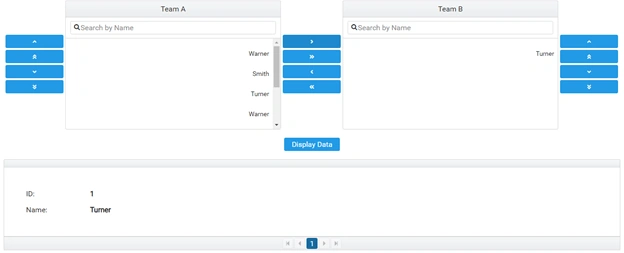
Click on the arrow button to move data from one list to another and reorder the data in the list by clicking on the button given in the left side.
Summary
In this article, we learned about PrimeNG Picklist and Dataview components. I hope you have found this article helpful.
Martin GoffPosted Oct 9, 2019, 9:08 AM
Where is the definition of “angularDemEntities”?
Cris GomezPosted Apr 12, 2019, 1:48 PM
Great tutorial, well done.