

Optimizing performance in ServiceNow helps keep the system fast and responsive. badly written scripts, slow queries, and heavy workflows can slow things down(when I say slow, it really can get slow). This article will help you improve ServiceNow performance with simple, practical tips.
Introduction
ServiceNow is a powerful tool, but sometimes, slow performance can frustrate users. This happens due to bad scripts, unwanted database queries, and unoptimized workflows. In this article, we’ll explore ways to speed things up.
Common Performance Issues
Most of the performance issues in ServiceNow often come from,
- Slow database queries due to poor filtering or missing indexes.
- Heavy server-side processing, like too many Business Rules or Scheduled Jobs.
- Too many client-side scripts, slowing the UI, which sometimes is a real nightmare.
- Inefficient API calls that fetch unnecessary data (I have seen scripts that get a whole chunk of data every time an API is called but not used later.
Optimizing Database Queries with GlideRecord Obj
GlideRecord helps retrieve data from tables. Yes, poorly written queries can slow down the system.
Best Practices
Filter results to fetch only what’s needed.
var gr = new GlideRecord('incident');
gr.addQuery('priority', '1');
gr.setLimit(10);
gr.query();

while (gr.next()) {
    gs.info(gr.number);
}
Use addActiveQuery() instead of manual filters.
gr.addActiveQuery();Use setLimit() to fetch fewer records and avoid overload.
Use GlideAggregate for summaries instead of looping through records.
var ga = new GlideAggregate('incident');
ga.addAggregate('COUNT');
ga.query();

if (ga.next()) {
    gs.info('Incident count: ' + ga.getAggregate('COUNT'));
}
Reducing Server-Side Load
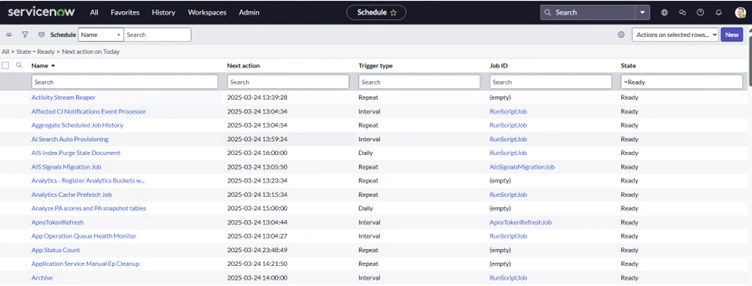
Too much processing on the server slows ServiceNow systems.
Tips
- Reduce unnecessary GlideRecord calls by storing results in variables. (This seems simple, but this can really bring down server-side loads.
- Move non-urgent tasks to Scheduled Jobs or Event Queues.
- gs.eventQueue('custom_event_name', current, 'param1', 'param2');
- Use asynchronous Business Rules for background tasks.
(function executeRule(current, previous) {
    var task = new GlideRecord('task');
    task.get(current.sys_id);
    task.state = 3;
    task.update();
})(current, previous);
Improving Client-Side Performance
Client-side scripts affect how fast users see results.
Best Practices
- Limit the number of Client Scripts.
- Use g_scratchpad to send data from server to client efficiently.
- Avoid unnecessary DOM changes; only use it if it's absolutely needed.
- Use asynchronous calls for better UI performance.
Script
g_form.setValue('priority', '1');
new GlideAjax('MyScriptInclude').addParam('sys_id', someValue).getXMLAnswer(function(response) {
    console.log(response);
});
Making Business Rules Efficient
Best Practices
- Run Business Rules only when needed.
- Reduce unnecessary database queries.
- Use async Business Rules for non-urgent tasks, as it won't wait for the script or process.
- Avoid using display Business Rules unless really necessary.
- Minimize current.update() to prevent extra database hits.
Enhancing Workflows and Flow Designer
Workflows should run efficiently to prevent delays.
Tips
- Use Subflows for reusable logic. (Many just created multiple flows, but it really tampers performance).
- Limit unnecessary approvals and notifications(check if this can be clubbed in a single flow or if that notifications is needed.
- Use decision conditions to skip unnecessary steps.
- Avoid long-running loops in Flow Designer.
Database Indexing and Cleanup
ServiceNow performance improves when the database is optimized.
Best Practices
- Use indexed fields in queries for faster searches.
- Archive old records to keep the database light.
- Use Performance Analytics to monitor slow queries(this works like a charm; keep an eye on slow-running scripts to find the culprit).
Using Caching and Script Includes
Use Script Includes to avoid redundant script execution, create one SI and reuse it, and avoid creating multiple Script Includes.
var MyScriptInclude = Class.create();
MyScriptInclude.prototype = {
    initialize: function() {},
    getData: function() {
        return’’Demo_Test;
    },
    type: 'MyScriptInclude'
};
Cache frequently used data instead of querying repeatedly.
var cache = new GlideCache();
cache.put('cache_key', value, 600); // the csache for 600 seconds
Optimizing APIs and Integrations
- Use batch processing instead of making many API calls.
- Implement rate limiting to prevent overload.
- Use Scripted REST APIs for optimized data retrieval.
(function process(request, response) {
    var result = {};
    var myGrInc = new GlideRecord('incident');
    gr.addQuery('priority', '1');
    gr.query();
    while (gr.next()) {
        result[gr.sys_id] = gr.short_description;
    }
    response.setBody(result);
})(request, response);
Monitoring and Debugging Performance Issues
Tools to Identify Issues
- Application Performance Monitoring (APM): Finds slow transactions.
- SQL Debugging: Helps analyze slow queries.
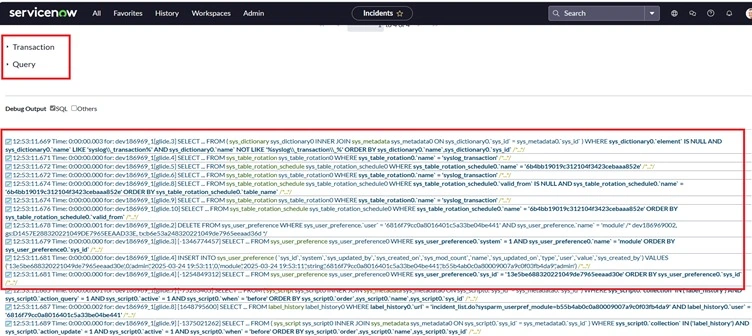
- Performance Analytics: Provides insights into execution time.
- Script Debugger: Helps debug server-side scripts.
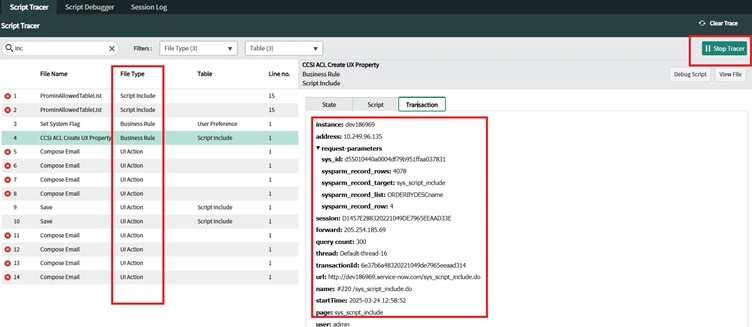
- Use gs.log() to check script execution times.
Conclusion
Optimizing ServiceNow means writing better scripts, improving database performance, and reducing unnecessary processing. By following these tips, developers can keep ServiceNow fast and efficient for users.
Join the conversation! Your thoughts help the community grow.