

In this article we will be seeing how to create folder in SharePoint list using
SharePoint Object Model.
Steps Involved:
- Open Visual Studio 2010.
- Go to File => New => Project.
- Select Console Application template from the installed templates.
- Enter the Name and click on Ok.
- Add the following reference.
- Microsoft.SharePoint.dll
- Add the following Namespace.
- Using Microsoft.SharePoint;
- Replace Program.cs with the following
code.
using System;
using System.Collections.Generic;
using System.Linq;
using System.Text;
using Microsoft.SharePoint;namespace ConsoleApplication2
{
class Program
{
static void Main(string[] args)
{
using (SPSite site = new SPSite("http://serverName:25374/sites/Team/"))
{
using (SPWeb web = site.OpenWeb())
{
SPList list = web.Lists.TryGetList("Custom");
SPListItem folderColl = list.Items.Add(list.RootFolder.ServerRelativeUrl, SPFileSystemObjectType.Folder);
folderColl["Title"] = "New Folder";
folderColl.Update();
list.Update();
}
}
}
}
}
8. Build the solution.
9. Hit F5.
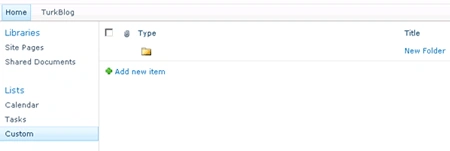
10. Go to the SharePoint list and you could be able to see the new folder that we have created.
Manoj SPosted Sep 1, 2015, 9:34 AM
I have added Microsoft.Sharepoint reference but while building the application it is showing the error reference missing. Can anyone please help me to this issue.