

Introduction:
Managed Paths - We can specify which paths in the URL namespace of a Web
application are used for site collections. We can also specify that one or more
site collections exists at a specified path.
Types of Managed Paths:
- Explicit inclusion.
- Wildcard inclusion.
Explicit inclusion:
An explicitly named path is used for a single site collection.
Example: http://server/sites/team.
Wildcard inclusion:
A wildcard path of "sites" indicates that child URLs of the path are site
collections. An wildcard named path is used for a multiple site collections.
Example: http://server/sites/
In this article we will be seeing the following
- Programmatically create managed paths
- Programmatically get all the managed paths for a web application
Programmatically create managed paths:
- Open Visual Studio 2010.
- Go to File => New => Project.
- Select the console application template.
- Add the following references.
- Microsoft.SharePoint
- Add the following namespaces.
- using Microsoft.SharePoint;
- using Microsoft.SharePoint.Administration;
- Replace Program.cs with the following code.
using System;
using
System.Collections.Generic;
using System.Linq;
using System.Text;
using
Microsoft.SharePoint;
using
Microsoft.SharePoint.Administration;
namespace ManagedPath
{
class
Program
{
static
void Main(string[]
args)
{
string path =
"Bangalore";
SPWebApplication
webApp = SPWebApplication.Lookup(new
Uri("http://serverName:1111/"));
SPPrefixCollection
prefixColl = webApp.Prefixes;
if (prefixColl.Contains(path)
== false)
{
SPPrefix
newPrefix = webApp.Prefixes.Add(path, SPPrefixType.ExplicitInclusion);
Console.WriteLine(path+"
is successfully added to the web application");
}
else
{
Console.WriteLine(path
+ " already existe in the web application");
}
Console.ReadLine();
}
}
}
- Build the solution.
- Hit F5.
Output:
- Go to Central Administration => Application Management => Manage Web Applications.
- Select the web application, click on Managed Paths available in the ribbon
interface.
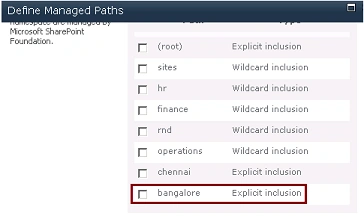
- "Bangalore" managed path is created successfully.
Code:
using System;
using System.Collections.Generic;
using System.Linq;
using System.Text;
using Microsoft.SharePoint;
using Microsoft.SharePoint.Administration;
namespace ManagedPath
{
class Program
{
static void Main(string[] args)
{
SPWebApplication webApp = SPWebApplication.Lookup(new Uri("http://serverName:1111/"));
SPPrefixCollection prefixColl = webApp.Prefixes;
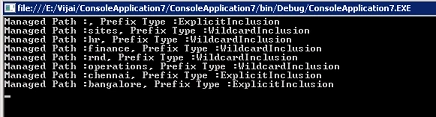
foreach (SPPrefix prefix in prefixColl)
{
Console.WriteLine("Managed Path :{0}, Prefix Type :{1}", prefix.Name, prefix.PrefixType);
}
Console.ReadLine();
}
}
}
Output:
To create, get and delete the managed paths for a web application using PowerShell refer
http://www.c-sharpcorner.com/uploadfile/anavijai/5355/.
Join the conversation! Your thoughts help the community grow.