
This article is continuation of Part-1 & Part-2.
- Provider Hosted MVC App With AngularJS in Sharepoint - Part 1
- Provider Hosted MVC App With AngularJS in SharePoint - Part 2
Let's start with Provider Hosted MVC App with AngularJS - Part 3. In this part we are going to create dynamic TileView using CSS and AngularJS.
SharePoint HostWeb List Structure
The following is a list structure which we are referencing for our application.
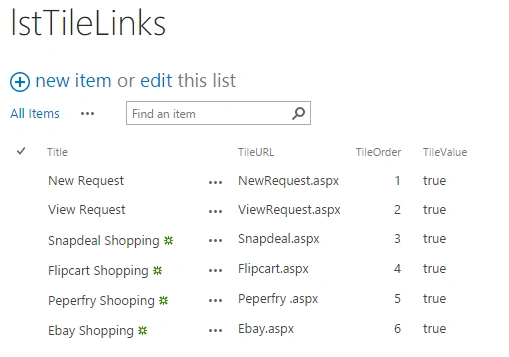
Figure 1: App
We are going to create the following UI Design and final output format.
UI Change
In top navigation bar new option added to show tileview i.e. TileView.
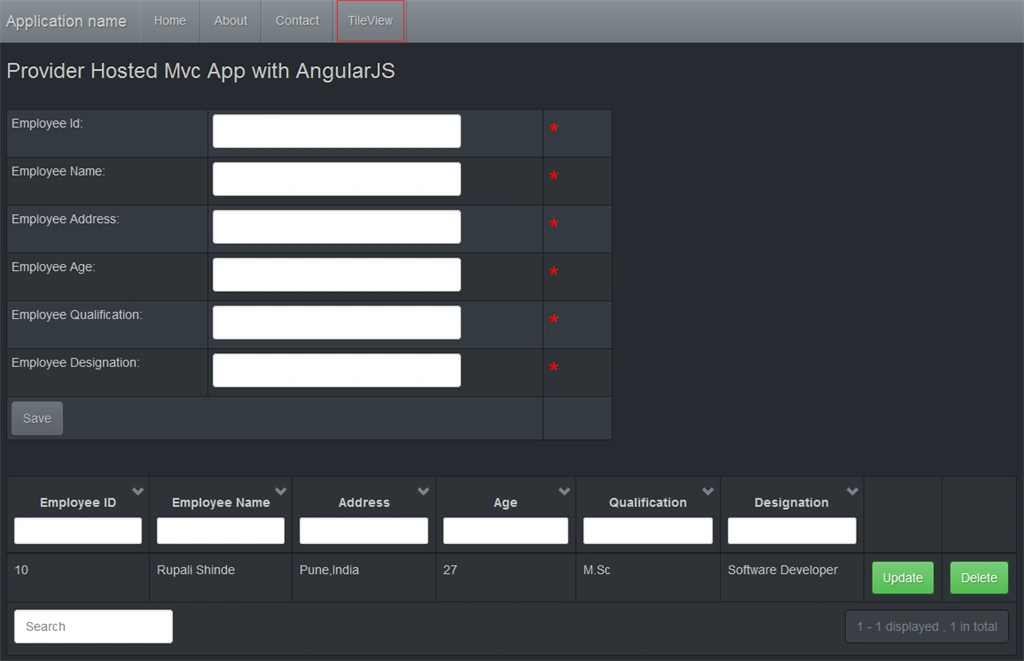
Figure 2: Tile
Output
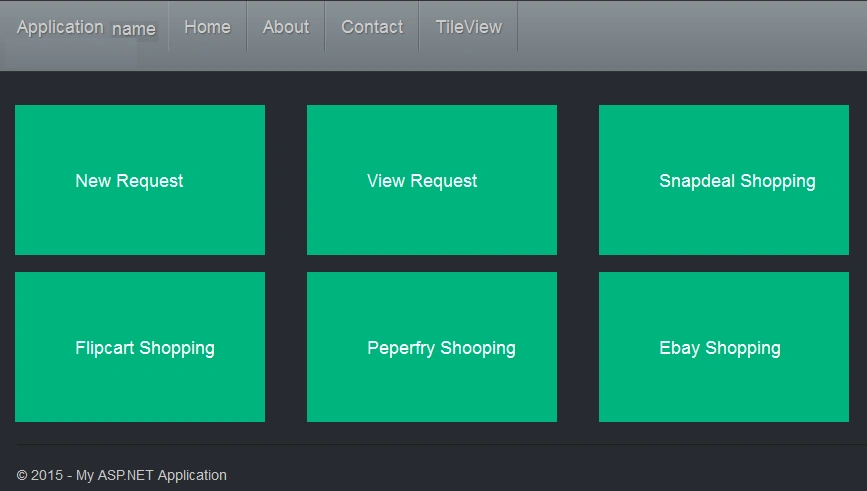
Figure 3: output
Solution Changes in term of new controller, view , javascript and CSS files.
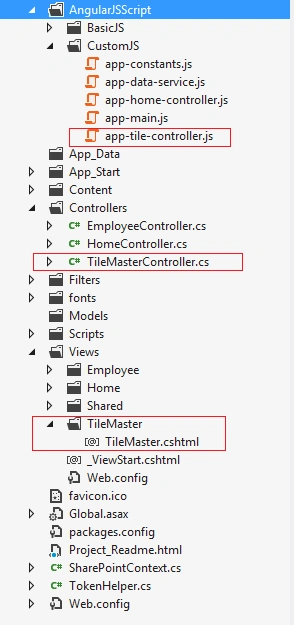
Figure 4: Solution
Let's start with service layer coding to fetch list data.
Step 1: Session Management in AngularJS
When we navigate from one page to another page, we need ' hostweburl ' & ' appweburl ' URL values to access SharePoint site data, so we need to save those values in session to access on another page.
There are two ways to save data in session - sessionStorage & localStorage.
Figure 2: Tile
Output
Figure 3: output
Solution Changes in term of new controller, view , javascript and CSS files.
Figure 4: Solution
Let's start with service layer coding to fetch list data.
Step 1: Session Management in AngularJS
When we navigate from one page to another page, we need ' hostweburl ' & ' appweburl ' URL values to access SharePoint site data, so we need to save those values in session to access on another page.
There are two ways to save data in session - sessionStorage & localStorage.
- var hostweburl;
- var appweburl;
- //The SharePoint App where the App is actualy installed
- hostweburl = decodeURIComponent(QueryStringParameter('SPHostUrl'));
- //The App web where the component to be accessed by the app are deployed
- appweburl = decodeURIComponent(QueryStringParameter('SPAppWebUrl'));
- var Sessionhostweburl = sessionStorage.getItem("hostweburl");
- var Sessionappweburl = sessionStorage.getItem("appweburl");
- if (Sessionhostweburl == null || Sessionappweburl == null)
- {
- sessionStorage.setItem("hostweburl", hostweburl);
- sessionStorage.setItem("appweburl", appweburl);
- }
- if (hostweburl == null || appweburl == null || hostweburl == 'undefined' || appweburl == 'undefined')
- {
- hostweburl = sessionStorage.getItem("hostweburl");
- appweburl = sessionStorage.getItem("appweburl");
- }
- console.log("hostweburl : " + hostweburl);
- console.log("appweburl : " + appweburl);
app-data-service.js
New service layer method to get SharePoint List data in order to create TileView.
- this.getTileData = function()
- {
- var TileArray = [];
- var deferred = $q.defer();
- // Load 15hives js files and continue to the successHandler
- $.getScript(scriptbase + "SP.Runtime.js",
- function()
- {
- $.getScript(scriptbase + "SP.js",
- function()
- {
- $.getScript(scriptbase + "SP.RequestExecutor.js",
- function()
- {
- //Represents the context for objects and operations.
- var context = new SP.ClientContext(appweburl);
- //Access host web from app using JavaScript CSOM
- var factory = new SP.ProxyWebRequestExecutorFactory(appweburl);
- context.set_webRequestExecutorFactory(factory);
- var appContextSite = new SP.AppContextSite(context, hostweburl);
- var web = appContextSite.get_web();
- context.load(web);
- //Access HostWeb List
- var list = web.get_lists().getByTitle('lstTileLinks');
- var camlQuery = SP.CamlQuery.createAllItemsQuery();
- this.listItems = list.getItems(camlQuery);
- context.load(this.listItems);
- context.executeQueryAsync(
- Function.createDelegate(this, function()
- {
- var ListEnumerator = this.listItems.getEnumerator();
- while (ListEnumerator.moveNext())
- {
- var currentItem = ListEnumerator.get_current();
- TileArray.push({
- ID: currentItem.get_item('ID'),
- Title: currentItem.get_item('Title'),
- TileURL: currentItem.get_item('TileURL')
- });
- }
- console.log(TileArray);
- deferred.resolve(TileArray);
- }),
- Function.createDelegate(this, function(sender, args) {
- deferred.reject('Request failed. ' + args.get_message());
- console.log("Error : " + args.get_stackTrace());
- }));
- });
- });
- });
- return deferred.promise;
- }; // Get
app-tile-controller.js
New controller added into solution for TileView creation.
- (function()
- {
- console.log('app-tile-controller.js loaded ..');
- 'use strict'
- angular.module(window.AngularApp_constants.architecture.modules.MainApp.moduleKey)
- .controller('TileController', HomeController)
- HomeController.$inject = ['$scope', '$location', 'app-data-service'];
- function HomeController($scope, $location, AngularDataService)
- {
- /********* Fill Tile *********/
- $scope.TileMaster = [];
- LoadTileData();
- function LoadTileData()
- {
- console.log("LoadTileData called");
- var promiseGet = AngularDataService.getTileData();
- promiseGet.then(function(resp)
- {
- $scope.TileMaster = resp;
- },
- function(err)
- {
- $scope.Message = "Error " + err.status;
- console.log($scope.Message);
- });
- }
- }
- })();
TileMasterController
New controller added into solution for tile creation.
- public class TileMasterController: Controller
- {
- // GET: TileMaster
- public ActionResult TileMaster()
- {
- return View();
- }
- }
TileMaster.cshtml
- @{
- ViewBag.Title = "Home Page";
- }
- <!-- Javascript from hives Layout folder -->
- <script type="text/javascript" src="/_layouts/15/sp.runtime.js"></script>
- <script type="text/javascript" src="/_layouts/15/sp.js"></script>
- <script type="text/ecmascript" src="/_layouts/SP.Core.js"></script>
- <script type="text/javascript" src="https://ajax.aspnetcdn.com/ajax/4.0/1/MicrosoftAjax.js"></script>
- <!-- Basic JS Files -->
- <script src="~/AngularJSScript/BasicJS/angular.min.js"></script>
- <script src="~/AngularJSScript/BasicJS/trNgGrid.js"></script>
- <script src="~/AngularJSScript/BasicJS/angular-messages.js"></script>
- <!-- Custom JS Files -->
- <script src="~/AngularJSScript/CustomJS/app-constants.js"></script>
- <script src="~/AngularJSScript/CustomJS/app-main.js"></script>
- <script src="~/AngularJSScript/CustomJS/app-data-service.js"></script>
- <script src="~/AngularJSScript/CustomJS/app-tile-controller.js"></script>
- <link href="~/Content/TileBranding.css" rel="stylesheet" />
- <div ng-app="AngularApp">
- <div ng-controller="TileController">
- <br />
- <br />
- <ul>
- <li ng-repeat="Tile in TileMaster">
- <div class="ActiveTile">
- <div class="TileHeading">
- <a href="{{ Tile.TileURL }}" target="_blank">{{ Tile.Title }} </a>
- </div>
- </div>
- </li>
- </ul>
- </div>
- </div>
TileBranding.css
- .ActiveTile {
- display: inline-block;
- position: relative;
- width: 250px;
- height: 150px;
- /*background: #ccffcc;*/
- background-color: rgb(0, 179, 125);
- z-index: 0;
- margin: 15px 40px 2px -2px;
- transition: all .15s ease-in-out;
- }
- .ActiveTile:hover {
- /*background: #9CC;*/
- background-color: #00CC66;
- z-index: 100;
- /*transform: scale(1.2,1.2);*/
- box-shadow: 0 5px 10px 0 rgba(0,0,0,.2);
- }
- .TileHeading {
- color: powderblue;
- font-size:20px;
- margin: 63px 10px 10px 60px;
- }
- /************************************/
- ul, li {
- list-style: none;
- margin: 0;
- padding: 0;
- display: inline;
- }
- a {
- display: block;
- width: 100%;
- height: 100%;
- text-decoration: none !important;
- color: white;
- font-size: 18px;
- }
I hope you all liked this article as you liked the Part 1 and Part 2 of the series..
Thank you!


Santhakumar MunuswamyPosted Oct 17, 2015, 10:20 PM EDT
Good one
Abhay ShankerPosted Oct 17, 2015, 1:22 AM EDT
Nice Article
Rupali ShindePosted Oct 16, 2015, 11:37 PM EDT
Thank you all for reading & supporting me to do more r&d in SharePoint
Mukesh KumarPosted Oct 16, 2015, 8:51 PM EDT
Great job
Nilesh JadavPosted Oct 16, 2015, 8:11 PM EDT
Excellent work mam !!
Harshad PansuriyaPosted Oct 16, 2015, 8:09 PM EDT
Nice one
Priyaranjan K STOP 100Posted Oct 16, 2015, 7:52 PM EDT
Good One Rupali . Was this implemented in your project ?
Kamlesh BhorPosted Oct 16, 2015, 11:58 AM EDT
Very Nice...
Shridhar SharmaPosted Oct 16, 2015, 11:57 AM EDT
nice post :)
Sujeet SumanPosted Oct 16, 2015, 11:32 AM EDT
Nice one..................