

This tutorial shows you how to create and use a RadioButton control available in Windows Presentation Foundation (WPF) and XAML. A RadioButton is usually used in a group with multiple options where one must be selected.
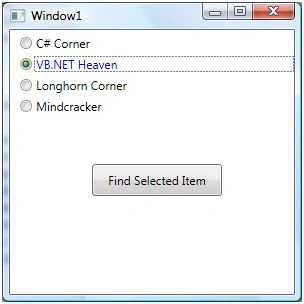
The RadioButton element represents a RadioButton control in XAML.
- <RadioButton></RadioButton>
The Width and Height properties represent the width and the height of a RadioButton. The Name property represents the name of the control, which is a unique identifier of a control. The Margin property tells the location of a RadioButton on the parent control. The HorizontalAlignment and VerticalAlignment properties specify the horizontal and vertical alignments.
The Background and Foreground properties represent the background and foreground colors ofa RadioButton.
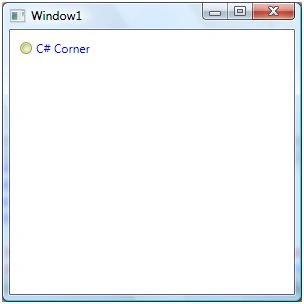
The following code snippet sets the name, height, and width of a RadioButton control. The code also sets the horizontal alignment to the left and the vertical alignment to the top.
- <RadioButton Margin="10,10,0,13" Name="RadioButton1" HorizontalAlignment="Left"VerticalAlignment="Top" Width="150" Height="15" Background="Yellow " Foreground="Blue">
- C# Corner
- </RadioButton>
The RadioButton looks like the following.
RadioButton Grouping
The GroupName property of a RadioButton assigns a RadioButton to a group. Only one RadioButton can be in the selected states at once and by selecting a new RadioButton unselects the previous selected RadioButton.
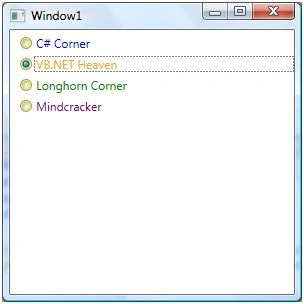
The following code assigns four RadioButton controls to a group called MCSites.
- <RadioButton Margin="10,5,0,0" GroupName="MCSites" Background="Yellow" Foreground="Blue"> C# Corner </RadioButton>
- <RadioButton Margin="10,5,0,0" GroupName="MCSites" Background="Yellow" Foreground="Orange"> VB.NET Heaven </RadioButton>
- <RadioButton Margin="10,5,0,0" GroupName="MCSites" Background="Yellow" Foreground="Green"> Longhorn Corner </RadioButton>
- <RadioButton Margin="10,5,0,0" GroupName="MCSites" Background="Yellow" Foreground="Purple"> Mindcracker </RadioButton>
The output looks as in Figure 2. If you select one RadioButton then the previous RadioButton will be unselected.
Adding a Checked Event Handler
The RadioButton control has the Checked event as the default event and raised when you check a radio button. The following code snippet adds the event handler.
- <RadioButton Name="Btn1" Margin="10,5,0,0" GroupName="MCSites" Background="Yellow" Foreground="Blue" Checked="Btn1_Checked">
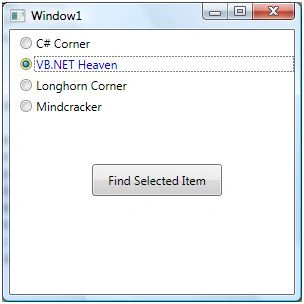
The following checked event handler sets the foreground and background colors of the checked RadioButton and sets black and white for the rest of them.
- privatevoid Btn1_Checked(object sender, RoutedEventArgs e) {
- Btn1.Foreground = Brushes.Blue;
- Btn1.Background = Brushes.Yellow;
- Btn2.Foreground = Brushes.Black;
- Btn2.Background = Brushes.White;
- Btn3.Foreground = Brushes.Black;
- Btn3.Background = Brushes.White;
- Btn4.Foreground = Brushes.Black;
- Btn4.Background = Brushes.White;
- }
The new RadioButton group looks as in Figure 3.
Finding a Selected Item in the Group
The IsChecked property of RadioButton indicates whether a RadioButton is checked. The following code snippet on a button click event handler finds the text of the selected RadioButton in a group.
- privatevoid button1_Click(object sender, RoutedEventArgs e) {
- if (Btn1.IsChecked == true) MessageBox.Show(Btn1.Content.ToString());
- elseif(Btn2.IsChecked == true)
- MessageBox.Show(Btn2.Content.ToString());
- elseif(Btn3.IsChecked == true)
- MessageBox.Show(Btn3.Content.ToString());
- else MessageBox.Show(Btn4.Content.ToString());
- }
Alternatively, you may want to replace the "if..else" statement with the "switch" statement to make your code read and work better.
Summary
In this article, I explained how to create and use a RadioButton control available in WPF and XAML.
Bohdan StupakPosted Apr 25, 2022, 1:44 PM
This is a nice article covering very basic things. I think diving into MVVM and bindings would be a useful addition to it.
Tim RowePosted Nov 24, 2021, 11:36 AM
What expression could be used for a switch? The IsChecked properties all belong to different items.
Muhammad SadiqPosted Aug 1, 2019, 2:31 AM
Very simple explanation of subject for beginners like me. I found this forum very useful.
Kuldip PowarPosted Mar 16, 2016, 2:07 AM
How to bind multiple radio buttons with single class property ?
John HareeditedPosted Oct 23, 2012, 2:24 PMEdited Oct 23, 2012, 2:25 PM
This was a god send. You saved me. So many of the examples I have found on the web are snippets from someone's college program. Very few will take the time to explain the simple ways to do WPF. Thank you so much. This worked the first time.
Deepak ShuklaeditedPosted Oct 4, 2012, 3:42 AMEdited Oct 4, 2012, 3:45 AM
Hi this is good but can use switch case in place of else if
Mahesh ChandPosted Jun 12, 2012, 2:55 PM
Send you what Fang? Everything else is. What you see what you get.
fang SterlingPosted Oct 19, 2011, 4:20 AM
Thanks a lot. please send to me : [email protected]
fang SterlingPosted Oct 19, 2011, 4:19 AM
Thanks a lot. please send to me : [email protected]