

In this article, I described how to use ReadText and WriteText statement in SQL Server. The ReadText statement is used to read or retrieve the text data instead of the select statement. The WriteText statement is used to write large of amounts of data to a "text" field or used to modifies the whole text data. So let's have a look at a practical example of how to use ReadText and WriteText statements in SQL Server 2012. The example is developed in SQL Server 2012 using the SQL Server Management Studio.
Creating a table in SQL Server
Now we create a table named employee.
Create table EmployeeTable
(
EmpID int,
EmpName varchar(30),
EmpSalary int,
EmployeeFile Text
)
Go
insert into employeeTable values('1','Smith','200000','Mrs. Smith has worked in Infosys since 22/7/2010')
Go
Select * from employeeTable
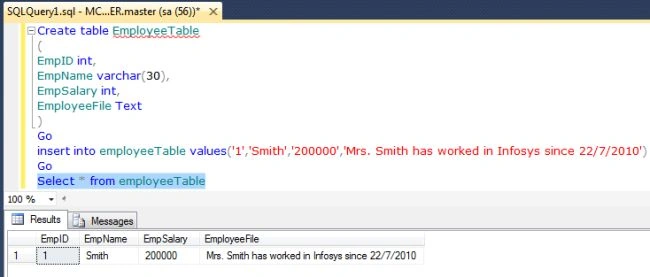
The following is the sample data for the employee Table.
ReadText statement
The ReadText statement is used to read or retrieve text data instead of the select statement. The general syntax of the ReadText statement is:
Syntax
READTEXT table_name.col_name
pointer_name offset size
[HOLDLOCK]
TEXTPTR - TEXTPTR returns a pointer to the text, ntext, or image column in the specified row or to the text, ntext, or image column in the last row returned by the query if more than one row is returned. Because TEXTPTR returns a 16-byte binary string, we recommend declaring a local variable to hold the text pointer, and then use the variable with READTEXT. From MSDN: http://msdn.microsoft.com/en-us/library/ms187365.aspx
Size - Size specifies the limit of the number of bytes of data to be returned.
Example
Declare @pointer varbinary(30)
Select @pointer =TEXTPTR (EmployeeFile)from employeeTable
Where EmpID=1
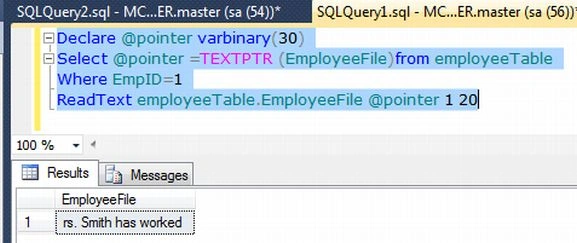
ReadText employeeTable.EmployeeFile @pointer 1 20
Output
WriteText statement
The WriteText statement is used to write large of amounts of data to a "text" field or used to modify all the text data. The general syntax of the WriteText statement is:
WRITETEXT table_name.col_name
pointer_name [with log] data
Example
Declare @pointer varbinary(30)
Select @pointer =TEXTPTR (EmployeeFile)from employeeTable
Where EmpID=1
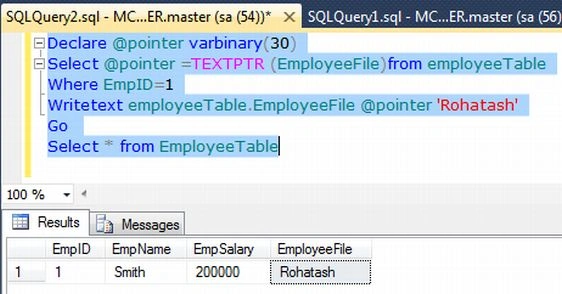
Writetext employeeTable.EmployeeFile @pointer 'Rohatash'
Go
Select * from EmployeeTable
Output
Join the conversation! Your thoughts help the community grow.