

I would like to share a piece of code that can save a significant amount of time.
Scenario
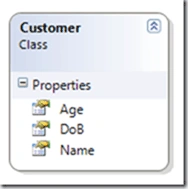
You have a Customer class with properties Age, DOB and Name which are int, datetime and string respectively.
The Customer objects are stored in a list and to custom sort them based on different properties, we need to write code implementing IComparer. This could be a tedious task if many UI screens exist and you need to write specific code for each screen. The problem is worse if you want to support sorting ascending/descending and based on multiple properties.
Solution
You can accomplish the above by using the following class which implements IComparer interface.
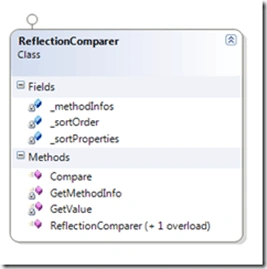
The above class 'ReflectionComparer' has a constructor which takes the property on which the object to be sorted.
The constructor takes multiple property names so that we can sort on multiple items. There is one overloaded constructor too, which takes the SortOrder (Ascending/Descending).
Invoking
You can just call the Sort method of the array/ArrayList and pass the instance of the above class to it.
Eg: list.Sort(new ReflectionComparer("Age"));
ReflectionComparer Class Explained
It contains 2 constructors which are explained above.
There is one core method named Compare() which takes arguments x and y.
public int Compare(object x, object y)
For each objects passed - the corresponding CompareTo() method is called using Reflection.
The method GetMethodInfo() returns the "CompareTo" method info object. Some optimizations were used there to reuse the same CompareTo() MethodInfo object to speed up the sorting process.
The method GetValue() returns the value of property to be compared. Here also Reflection is the underlying mechanism.
Test Application
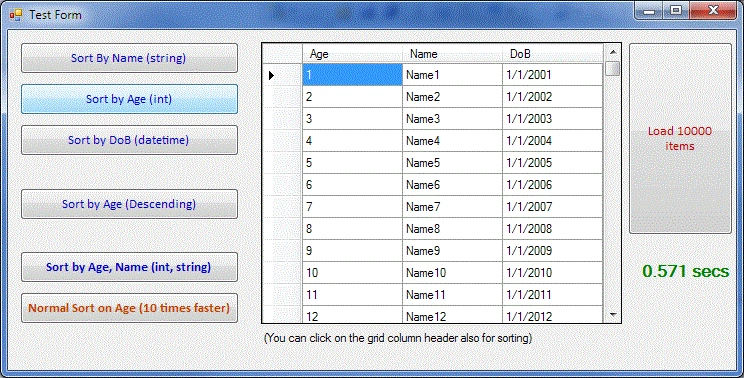
The attachment contains the test application which was created in Visual Studio 2008. The test application provides us the UI to test various scenarios and their corresponding time taken for execution in seconds. The application also provides testing the normal sort scenario (sorting without using reflection).
Summary
Eventhough Reflection comparison will be slower than normal comparisons, we can judiciously use the code above if the sorting speed is within our expectations. The idea for the above comparer class is to minimize the coding effort on doing the manual comparison code creation. In the above screen shot, 10 thousand records were sorted within 1 second in my computer having 3GHz speed. Reflection is slower but your computer is many times faster than your requirement - then it is a right choice to use the code above. Happy Coding.
Source Code of ReflectionComparer
using
System;

using
System.Collections.Generic;

using
System.Linq;

using
System.Text;

using
System.Collections;

using
System.Reflection;

using
System.Windows.Forms;


namespace
ReflectOn

{


///
<summary>


///
General Sort Comparer class


///
[Only this class is required while adding to projects]


///
</summary>


public class
ReflectionComparer :
IComparer

    {


private string[]
_sortProperties;


private SortOrder _sortOrder =
SortOrder.Ascending;


///
<summary>

        ///
ctor 1


///
</summary>


///
<param name="sortProperties"></param>


public ReflectionComparer(params
string[] sortProperties)

        {

            _sortProperties
= sortProperties;

            _methodInfos =
new
MethodInfo[sortProperties.Length];

        }


///
<summary>


///
ctor 2


///
</summary>


///
<param name="sortOrder"></param>


///
<param name="sortProperties"></param>


public ReflectionComparer(SortOrder sortOrder,
params string[]
sortProperties)

        {

            _sortOrder =
sortOrder;

            _sortProperties
= sortProperties;

            _methodInfos =
new
MethodInfo[sortProperties.Length];

        }


///
<summary>


///
Core Comparison method

        ///
</summary>


///
<param name="x">first
object</param>


///
<param name="y">second
object</param>


///
<returns></returns>


public int
Compare(object x,
object y)

        {


int result = 0;


for (int i
= 0; i < _sortProperties.Length; i++)

            {


string property = _sortProperties[i];


object value1 = GetValue(x, property);


object value2 = GetValue(y, property);


// todo: Check for nulls


if (_sortOrder == SortOrder.Ascending)

                    result =
(int)GetMethodInfo(value1, i).Invoke(value1,
new object[1]
{ value2 });


else

                    result = (int)GetMethodInfo(value1,
i).Invoke(value2, new
object[1] { value1 });


                if (result != 0)

                    break;

            }


            return result;

        }


private
MethodInfo[] _methodInfos;


///
<summary>


///
Returns the "CompareTo" MethodInfo


///
</summary>


///
<param name="value">The
object on which we have to reflect on</param>


///
<param name="index">The
index of property (methods differ based on property]</param>


///
<returns></returns>

        private
MethodInfo GetMethodInfo(object
value, int index)

        {


// Use reflection to get the
CompareTo method from object, reuse previuos method info if exists


if (_methodInfos[index] ==
null)

                _methodInfos[index]
= value.GetType().GetMethods().Where(m => m.Name ==
"CompareTo").FirstOrDefault();


            return _methodInfos[index];

        }


<summary>


/// Returns the value
of the property in given object


/// [Using Reflection]


///
</summary>


///
<param name="obj"></param>


///
<param name="property"></param>


///
<returns></returns>


private object GetValue(object
obj, string property)

        {


return obj.GetType().GetProperty(property).GetValue(obj,
null);

        }

    }

}
Sam HobbseditedPosted Dec 31, 2010, 7:12 AMEdited Dec 31, 2010, 7:35 AM
Thank you; this does look useful.