

In this article we will create a registration page with captcha implemented to it.
Before going forward we should know what is captcha?
CAPTCHA: Completely Automated Public Turing test to tell Computers and Humans Apart. A captcha is a program that protects websites against bots by generating and grading tests that humans can pass but current computer programs cannot. For example, humans can read distorted text but current computer programs can't.
Characteristics: A captcha is a means of automatically generating challenges which intends to:
- Provide a problem easy enough for all humans to solve.
- Prevent standard automated software from filling out a form, unless it is specially designed to circumvent specific CAPTCHA systems.
For more information please visit
http://en.wikipedia.org/wiki/CAPTCHA
Table structure
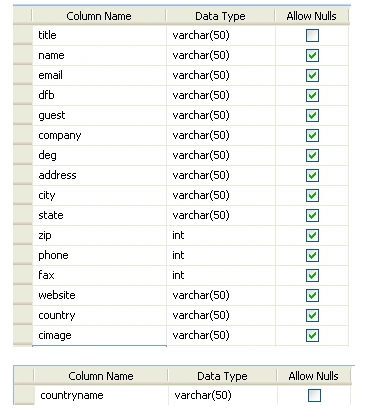
Create two tables employee and country as below:
Program
Default.aspx code
<%@ Page Language="VB" AutoEventWireup="false" CodeFile="Default.aspx.vb" Inherits="_Default"%>
<!DOCTYPE html PUBLIC "-//W3C//DTD
XHTML 1.0 Transitional//EN""http://www.w3.org/TR/xhtml1/DTD/xhtml1-transitional.dtd">
<html xmlns="http://www.w3.org/1999/xhtml">
<head runat="server">
<title>Registration
Page</title>
<style type="text/css">
#datePicker
{
display:none;
position:absolute;
border:solid 2px black;
background-color:white;
}
.content
{
width:400px;
background-color:white;
margin:auto;
padding:10px;
}
html
{
background-color:white;
}
.style10
{
background-color: #eeeeee;
height: 26px;
}
.style11
{
height: 26px;
}
.style12
{
background-color: #eeeeee;
}
</style>
<link href="style.css" rel="stylesheet" type="text/css" />
</head>
<body>
<form id="form1" runat="server">
<div>
<table>
<tr>
<td class="deepbluetextbold"><b>Employee
Information</b></td>
</tr>
<tr>
<td class="colouredCell">
<asp:Label runat="server" ID="LocationLabel1" AssociatedControlID="LocationLabel1"CssClass="style7" Text="Title" />
</td>
<td>
<asp:RadioButtonList id="rb1" runat="server" RepeatLayout="Flow" RepeatColumns="4"
RepeatDirection="Horizontal" Width="200px" >
<asp:ListItem Text="Mr." Selected="False"/>
<asp:ListItem Text="Mrs."/>
<asp:ListItem Text="M/S"/>
<asp:ListItem Text="Dr."/>
</asp:RadioButtonList>
</td>
<td><asp:RequiredFieldValidator ID="rfv1" Text="Select
any Choice" runat="server"
ControlToValidate="rb1"></asp:RequiredFieldValidator></td>
</tr>
<tr>
<td class="colouredCell">
<asp:Label runat="server" ID="LocationLabel2" AssociatedControlID="LocationLabel2"CssClass="style7" Text="Name*" />
</td>
<td>
<asp:TextBox runat="server" ID="txtname" Width="200px" />
</td>
<td>
<asp:RequiredFieldValidator ID="rfv2" Text="Please
Enter the Name" runat="server"ControlToValidate="txtname"></asp:RequiredFieldValidator>
</td>
</tr>
<tr>
<td class="colouredCell">
<asp:Label runat="server" ID="LocationLabel3" AssociatedControlID="LocationLabel3"CssClass="style7" Text="Email*" />
</td>
<td>
<asp:TextBox runat="server" ID="txtemail" Width="200px"/>
</td>
<td>
<asp:RequiredFieldValidator ID="rfv3" Text="Please
Enter the Email" runat="server"ControlToValidate="txtemail"></asp:RequiredFieldValidator>
</td>
<td> <asp:RegularExpressionValidator ID="RegularExpressionValidator1" runat="server"
ErrorMessage="Please
enter valid email"
ValidationExpression="\w+([-+.']\w+)*@\w+([-.]\w+)*\.\w+([-.]\w+)*"
ControlToValidate="txtemail"></asp:RegularExpressionValidator></td>
</tr>
<tr>
<td class="colouredCell">
<asp:Label runat="server" ID="LocationLabel4" AssociatedControlID="LocationLabel4"CssClass="style7" Text="Date
of Birth*" />
</td>
<td colspan="0" rowspan="1">
<asp:TextBox runat="server" ID="txtdateofbirth" Width="200px"/>
</td>
<td>
<asp:RequiredFieldValidator ID="rfv4" Text="Please
Enter the Dateofbirth" runat="server"ControlToValidate="txtdateofbirth"
</asp:RequiredFieldValidator>
</td>
</tr>
<tr>
<td class="colouredCell">
<asp:Label runat="server" ID="LocationLabel5" AssociatedControlID="LocationLabel5"CssClass="style7" Text="Guest?*" />
</td>
<td>
<asp:RadioButtonList id="rb2" runat="server" RepeatLayout="Flow" RepeatColumns="3"RepeatDirection="Horizontal" >
<asp:ListItem Text="Yes" Selected="False"/>
<asp:ListItem Text="No"/>
</asp:RadioButtonList>
</td>
<td>
<asp:RequiredFieldValidator ID="rfv5" Text="Select
yes or no" runat="server"ControlToValidate="rb2"></asp:RequiredFieldValidator>
</td>
</tr>
<tr>
<td class="colouredCell">
<asp:Label runat="server" ID="LocationLabel6" AssociatedControlID="LocationLabel6"
CssClass="style7" Text="Company/Organization*" />
</td>
<td>
<asp:TextBox runat="server" ID="txtcompany" Width="200px"/>
</td>
<td>
<asp:RequiredFieldValidator ID="rfv6" Text="Please
Enter the Company" runat="server"ControlToValidate="txtcompany"></asp:RequiredFieldValidator>
</td>
</tr>
<tr>
<td class="colouredCell">
<asp:Label runat="server" ID="LocationLabel7" AssociatedControlID="LocationLabel7"
CssClass="style7" Text="Designation*" />
</td>
<td>
<asp:TextBox runat="server" ID="txtdeg" Width="200px"/>
</td>
<td>
<asp:RequiredFieldValidator ID="rfv7" Text="Please
Enter the Designation" runat="server"ControlToValidate="txtdeg"></asp:RequiredFieldValidator>
</td>
</tr>
<tr>
<td class="colouredCell">
<asp:Label runat="server" ID="LocationLabel8" AssociatedControlID="LocationLabel8"
CssClass="style7" Text="Street
Address*" />
</td>
<td>
<asp:TextBox runat="server" ID="txtaddress" Width="200px"/>
</td>
<td>
<asp:RequiredFieldValidator ID="rfv8" Text="Please
Enter the Street Address"runat="server" ControlToValidate="txtaddress"
</asp:RequiredFieldValidator>
</td>
</tr>
<tr>
<td class="colouredCell">
<asp:Label runat="server" ID="LocationLabel9" AssociatedControlID="LocationLabel9"
CssClass="style7" Text="City*" />
</td>
<td>
<asp:TextBox runat="server" ID="txtcity" Width="200px"/>
</td>
<td>
<asp:RequiredFieldValidator ID="rfv9" Text="Please
Enter the Street City" runat="server"ControlToValidate="txtcity"</asp:RequiredFieldValidator>
</td>
</tr>
<tr>
<td class="colouredCell">
<asp:Label runat="server" ID="LocationLabel10" AssociatedControlID="LocationLabel10"
CssClass="style7" Text="State" />
</td>
<td>
<asp:TextBox runat="server" ID="txtstate" Width="200px"/>
</td>
<td>
<asp:RequiredFieldValidator ID="rfv10" Text="Please
Enter the Street state"runat="server" ControlToValidate="txtstate"
</asp:RequiredFieldValidator>
</td>
</tr>
<tr>
<td class="colouredCell">
<asp:Label runat="server" ID="LocationLabel11" AssociatedControlID="LocationLabel11"
CssClass="style7" Text="Zip
Code*" />
</td>
<td>
<asp:TextBox runat="server" ID="txtzip" Width="200px"/>
</td>
<td>
<asp:RequiredFieldValidator ID="rfv11" Text="Please
Enter the Zip" runat="server"ControlToValidate="txtzip"></asp:RequiredFieldValidator>
</td>
</tr>
<tr>
<td class="style10">
<asp:Label runat="server" ID="LocationLabel12" AssociatedControlID="LocationLabel12"
CssClass="style7" Text="Phone*" />
</td>
<td class="style11">
<asp:TextBox runat="server" ID="txtphone" Width="200px"/>
</td>
<td>
<asp:RequiredFieldValidator ID="rfv12" Text="Please
Enter the Phone" runat="server"ControlToValidate="txtphone
</asp:RequiredFieldValidator>
</td>
</tr>
<tr>
<td class="colouredCell">
<asp:Label runat="server" ID="LocationLabel13" AssociatedControlID="LocationLabel13"
CssClass="style7" Text="Fax*" />
</td>
<td>
<asp:TextBox runat="server" ID="txtfax" Width="200px"/>
</td>
<td>
<asp:RequiredFieldValidator ID="rfv13" Text="Please
Enter the Fax" runat="server"ControlToValidate="txtfax"></asp:RequiredFieldValidator>
</td>
</tr>
<tr>
<td class="colouredCell">
<asp:Label runat="server" ID="LocationLabel14" AssociatedControlID="LocationLabel14"
CssClass="style7" Text="Website*" />
</td>
<td>
<asp:TextBox runat="server" ID="txtwebsite" Width="200px"/>
</td>
<td>
<asp:RequiredFieldValidator ID="rfv14" Text="Please
Enter the Website" runat="server"ControlToValidate="txtwebsite"</asp:RequiredFieldValidator>
</td>
<td> <asp:RegularExpressionValidator ID="RegularExpressionValidator2" runat="server"
ErrorMessage="Please
enter valid Url"
ValidationExpression="http(s)?://([\w-]+\.)+[\w-]+(/[\w-
./?%&=]*)?"
ControlToValidate="txtwebsite"></asp:RegularExpressionValidator>
</td>
</tr>
<tr>
<td class="style12">
<asp:Label runat="server" ID="LocationLabel15" AssociatedControlID="LocationLabel15"
CssClass="style7" Text="Country*" />
</td>
<td>
<asp:DropDownList ID="d1" Width="200px" runat="server">
<asp:ListItem>Select</asp:ListItem>
</asp:DropDownList>
</td>
<td>
<asp:RequiredFieldValidator ID="rfv15" Text="Please
select any value" runat="server"ControlToValidate="d1"></asp:RequiredFieldValidator>
</td>
</tr>
<tr>
<td class="colouredCell">
<asp:Label runat="server" ID="LocationLabel16" AssociatedControlID="LocationLabel16"
CssClass="style7" Text="Captcha
Image*" />
</td>
<td><asp:TextBox runat="server" ID="txtcaptcha" Width="200px"/></td>
<td>
<img style="WIDTH: 119px; HEIGHT: 34px" alt="" src="Captcha.aspx" />
</td>
<td><a href="Default.aspx" id="uu">Can't
Read?</a></td>
</tr>
</table>
</div>
<asp:Button ID="b1" runat="server" Text="Register" />
</form>
</body>
</html>
Default.aspx.vb code
Imports System.Data
Imports System.Data.SqlClient
Partial Class _Default
Inherits System.Web.UI.Page
Dim strConnString As String =
System.Configuration.ConfigurationManager.ConnectionStrings.Item("ConnectionString").ToString()
Dim sqlda As SqlDataAdapter
Dim com As SqlCommand
Dim ds As DataSet
Dim dt As DataTable
Dim str As String
Dim con As New SqlConnection(strConnString)
Protected Sub Page_Load(ByVal sender As Object, ByVal e As System.EventArgs) HandlesMe.Load
If Not Page.IsPostBack Then
con.Open()
str = "select
* from country"
com = New SqlCommand(str,
con)
Dim reader As SqlDataReader
= com.ExecuteReader
While reader.Read
d1.Items.Add(reader("countryname"))
End While
reader.Close()
con.Close()
End If
End Sub
Protected Sub b1_Click(ByVal sender As Object, ByVal e As System.EventArgs) Handles b1.Click
Try
con.Open()
If Session("randomStr").ToString()
= txtcaptcha.Text Then
str = "insert into employee values ('" & rb1.SelectedValue & "','" & txtname.Text & "','" & txtemail.Text & "','" & txtdateofbirth.Text & "','" & rb2.SelectedValue & "','" & txtcompany.Text & "','"& txtdeg.Text & "','" & txtaddress.Text & "','" & txtcity.Text & "','" & txtstate.Text & "','" & txtzip.Text & "'," & txtphone.Text & "," & txtfax.Text & ",'" & txtwebsite.Text & "','" & d1.SelectedValue & "','" & txtcaptcha.Text & "')"
com = New SqlCommand(str,
con)
com.ExecuteNonQuery()
Response.Redirect("Success.aspx")
con.Close()
Else
Response.Write("Wrong
text inserted ,Please enter new characters shown in image textbox")
End If
Catch err As Exception
Response.Write(err.Message)
End Try
End Sub
End Class
Captcha.aspx code
<%@ Page Language="VB" AutoEventWireup="false" CodeFile="Captcha.aspx.vb" Inherits="Captcha"%>
<!DOCTYPE html PUBLIC "-//W3C//DTD
XHTML 1.0 Transitional//EN""http://www.w3.org/TR/xhtml1/DTD/xhtml1-transitional.dtd">
<html xmlns="http://www.w3.org/1999/xhtml">
<head runat="server">
<title>Untitled
Page</title>
</head>
<body>
<form id="form1" runat="server">
<div>
</div>
</form>
</body>
</html>
Captcha.aspx.vb code
Imports System.Drawing
Imports System.Drawing.Imaging
Imports System.Drawing.Text
Partial Class Captcha
Inherits System.Web.UI.Page
Protected Sub Page_Load(ByVal sender As Object, ByVal e As System.EventArgs) HandlesMe.Load
'create
object of Bitmap Class and set its width and height.
Dim objBMP As Bitmap
= New Bitmap(180,
51)
'Create
Graphics object and assign bitmap object to graphics' object.
Dim objGraphics As Graphics
= Graphics.FromImage(objBMP)
objGraphics.Clear(Color.OrangeRed)
objGraphics.TextRenderingHint = TextRenderingHint.AntiAlias
Dim objFont As Font
= New Font("arial",
30, FontStyle.Regular)
'genetating
random 6 digit random number
Dim randomStr As String =
GeneratePassword()
'set
this random number in session
Session.Add("randomStr",
randomStr)
objGraphics.DrawString(randomStr, objFont, Brushes.White, 2, 2)
Response.ContentType = "image/GIF"
objBMP.Save(Response.OutputStream, ImageFormat.Gif)
objFont.Dispose()
objGraphics.Dispose()
objBMP.Dispose()
End Sub
Public Function GeneratePassword() As String
'
Below code describes how to create random numbers.some of the digits and letters
'
are ommited because they look same like "i","o","1","0","I","O".
Dim allowedChars As String = "a,b,c,d,e,f,g,h,j,k,m,n,p,q,r,s,t,u,v,w,x,y,z,"
allowedChars += "A,B,C,D,E,F,G,H,J,K,L,M,N,P,Q,R,S,T,U,V,W,X,Y,Z,"
allowedChars += "2,3,4,5,6,7,8,9"
Dim sep() As Char =
{","c}
Dim arr() As String =
allowedChars.Split(sep)
Dim passwordString As String = ""
Dim temp As String
Dim rand As Random
= New Random()
Dim i As Integer
For i
= 0 To 6
- 1 Step i
+ 1
temp = arr(rand.Next(0, arr.Length))
passwordString += temp
Next
Return passwordString
End Function
End Class
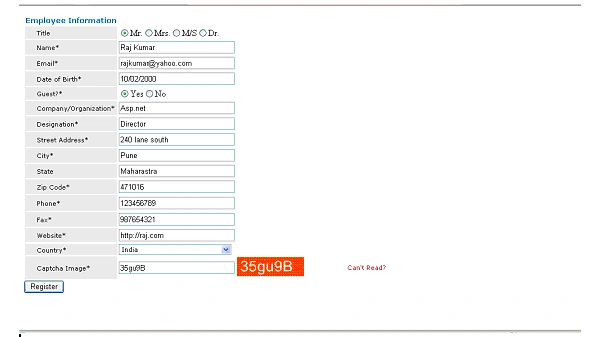
Output
Join the conversation! Your thoughts help the community grow.