
In SharePoint 2013 we have a good option in SharePoint List, i.e. bulk edit. In SharePoint 2010 it is not available, and also we can remove this option from the list.
Here I’ve explained a simple way to remove this option,

Steps
Here are the steps to remove the Quick Edit Option,
Step 1: Open the List in SharePoint Site,
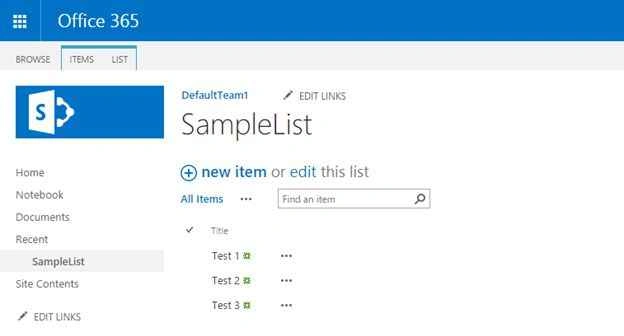
Step 2: Select List option from the ribbon bar to go to the list settings as in the following screenshot:

Step 3: Then click on the List Settings on the ribbon bar,
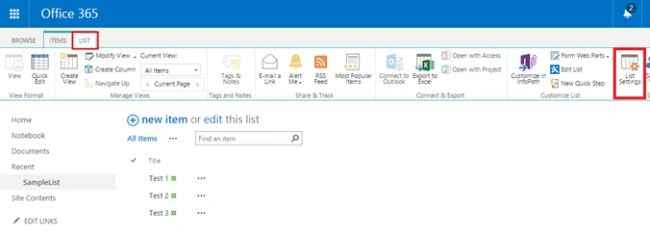
Step 4: On the List settings page select the Advanced settings option

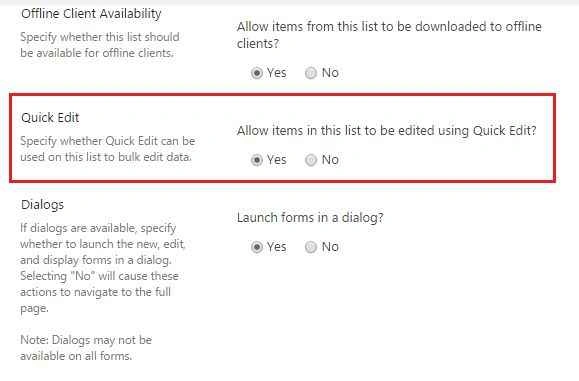
Step 5: Then scroll down the advanced settings page, you will get the following option,
Step 6: Check the “No” on advanced settings page to open the form on dialog,
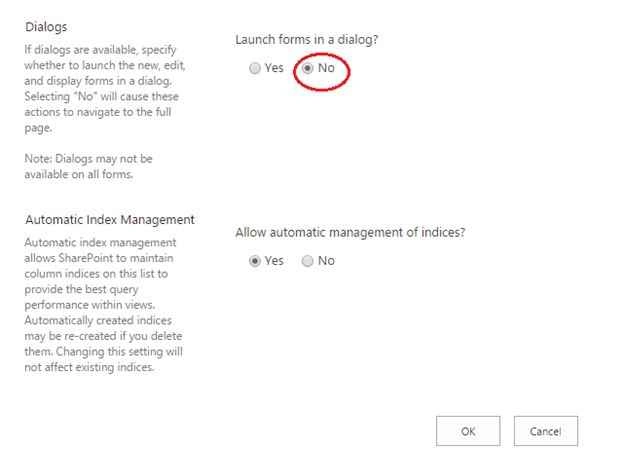
Step 7: Click “Ok” to save the settings.
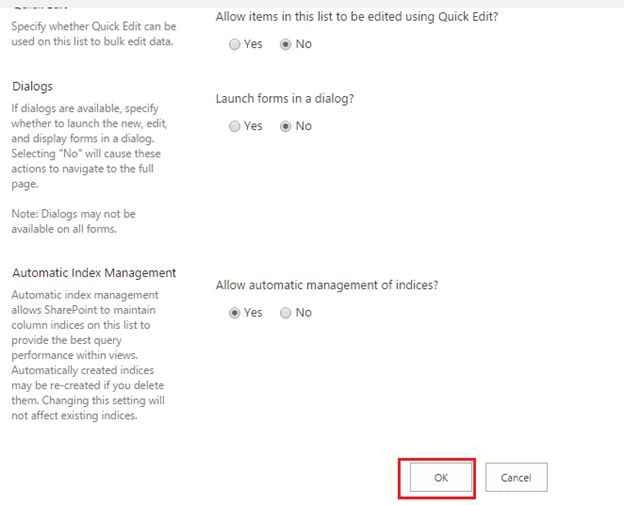
Finally Quick “Edit” option will be removed from your site.

Summary
In this article we explored how to remove the Quick Edit option in SharePoint 2013 List.
Remove Quick Edit Option From SharePoint 2013 List
In this article I will share the steps for removing the Quick edit or Bulk Edit option from SharePoint List.


Kaviya BalasubramanianPosted Sep 28, 2015, 12:59 AM EDT
Thank u vinodh
Vinodh NarayananPosted Sep 27, 2015, 4:42 AM EDT
nice share
Kaviya BalasubramanianPosted Sep 26, 2015, 10:47 PM EDT
Thank u
Saineshwar BageriPosted Sep 25, 2015, 4:36 AM EDT
Nice one
Saineshwar BageriPosted Sep 25, 2015, 4:35 AM EDT
Nice one
Kaviya BalasubramanianPosted Sep 23, 2015, 5:25 AM EDT
Thank you all :)
Harshad PansuriyaPosted Sep 22, 2015, 11:18 PM EDT
Nice Share
Sibeesh VenuTOP 100Posted Sep 22, 2015, 11:05 PM EDT
Nice Share
Ankit BansalPosted Sep 22, 2015, 9:51 PM EDT
thanks for sharing..
Kaviya BalasubramanianPosted Sep 22, 2015, 8:22 PM EDT
Thank you all :)
Karthikeyan KPosted Sep 22, 2015, 7:17 PM EDT
Thanks for sharing...
Santhakumar MunuswamyPosted Sep 22, 2015, 10:59 AM EDT
Thanks for nice share
Pankaj Kumar ChoudharyTOP 100Posted Sep 22, 2015, 9:38 AM EDT
Nice Explain Sir.........
Sujeet SumanPosted Sep 22, 2015, 7:49 AM EDT
Nice Article....................
Rajeesh MenothPosted Sep 22, 2015, 7:18 AM EDT
Thanks for sharing...
Vinodh NarayananPosted Sep 22, 2015, 3:57 AM EDT
nice share