
Resources and Styles in WPF
Windows resources allow us to reuse defined values and objects. We can set the properties of multiple control at a time.
Here’s a list of place where your resources can be declared:
Here’s a list of place where your resources can be declared:
- As global application scope within the application App.xaml file.
- As Window level scope within the Resources property of the current window.
- Within the Resources property of any FrameworkElement or FrameworkContentElement. (eg Grid, StackPanel).
- Separate XAML resource file.
Lets see a very simple example of reusable string resource placing as Window Level Scope:
- Use the following namespace.
- xmlns:sys="clr-namespace:System;assembly=mscorlib"
- Declare the resource in Windows.Resources.
- <sys:String x:Key="strTitle">Pi-Techniques</sys:String>
- Now we can use above resource for binding data to controls.
- <TextBlock Text="{StaticResource strTitle}"/>
Code:
- <Window x:Class="WpfApplication.MainWindow"
- xmlns="http://schemas.microsoft.com/winfx/2006/xaml/presentation"
- xmlns:x="http://schemas.microsoft.com/winfx/2006/xaml"
- xmlns:d="http://schemas.microsoft.com/expression/blend/2008"
- xmlns:mc="http://schemas.openxmlformats.org/markup-compatibility/2006"
- xmlns:local="clr-namespace:WpfApplication"
- xmlns:sys="clr-namespace:System;assembly=mscorlib"
- mc:Ignorable="d"
- Title="MainWindow" Height="350" Width="525">
- <Window.Resources>
- <sys:String x:Key="strTitle">Pi-Techniques</sys:String>
- </Window.Resources>
- <StackPanel>
- <TextBlock Text="{StaticResource strTitle}" FontSize="56" />
- <TextBlock>Welcome in "<TextBlock Text="{StaticResource strTitle}" />"!</TextBlock>
- </StackPanel>
- </Window>
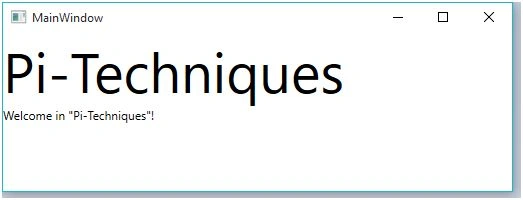
Example of reusable style
Styles in WPF are same as CSS in html.
- Declare new style in Windows Resources,
This style will automatically set for all TextBlocks in current page- <Window.Resources>
- <sys:String x:Key="strTitle">Pi-Techniques</sys:String>
- <Style TargetType="TextBlock">
- <Setter Property="Foreground" Value="DarkRed"/>
- <Setter Property="HorizontalAlignment" Value="Center"/>
- </Style>
- </Window.Resources>

- We Can also Make object for specific Textblock
- <Window.Resources>
- <sys:String x:Key="strTitle">Pi-Techniques</sys:String>
- <Style TargetType="TextBlock">
- <Setter Property="Foreground" Value="DarkRed"/>
- <Setter Property="HorizontalAlignment" Value="Center"/>
- </Style>
- <Style x:Key="Headings" TargetType="TextBlock">
- <Setter Property="FontSize" Value="30"/>
- <Setter Property="Foreground" Value="Blue"/>
- <Setter Property="HorizontalAlignment" Value="Center"/>
- </Style>
- </Window.Resources>
- <StackPanel>
- <TextBlock Text="{StaticResource strTitle}" Style="{StaticResource Headings}"/>
- <TextBlock>Welcome in "<TextBlock Text="{StaticResource strTitle}" />"!</TextBlock>
- </StackPanel>

Ammar ShaukatPosted Jan 26, 2016, 10:03 AM
its very easy and helping , I'm looking for Resources in XAML ( Windows 10 Apps ) . can you help me out ?
Santhakumar MunuswamyPosted Jan 23, 2016, 2:01 AM
Thanks for nice share