
Introduction
This article demonstrates routing in AngularJS with MVC in a single page App. Here, we are going to create a simple SPA, which will explain you that how to do routing to HTML page and routing through Controller action.
Application structure
Here, we have placed all our AngularJS (libraries and controllers) files inside Scripts folder.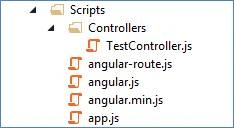
What we are going to do in this example
- Add app.js file and create module SampleApp.
- Configure routes, using the $routeProvider.
- Add a MVC controller HomeController.cs and Angular controller TestController.js.
- Add view Index.cshtml to display the menu.
- Create an array inside TestController, which will be displayed in TestRedirect.cshtml.
Define an Application module
We actually start our Application by defining an Application module SampleApp in app.js file. We will use this module in our view, using the directive ng-app.
ngRoute is a dependent module, which helps for routing in AngularJS.
- var SampleApp = angular.module('SampleApp', ['ngRoute']);
Routing
In the view, we have used three links for home, details and contact. Path has been mentioned in the href attribute of an anchor tag. Thus, when we click on the link, redirection will be performed by the code section given below of our app.js file.
- var SampleApp = angular.module('SampleApp', ['ngRoute']);
- SampleApp.config(['$routeProvider', '$locationProvider', function ($routeProvider, $locationProvider) {
- $routeProvider.when("/home", {
- templateUrl - "/Templates/HtmlPage.html" //Load a HTML template
- })
- .when("/details", {
- templateUrl - "/Home/TestRedirect", //Redirect to action
- controller - "TestCntrl"
- })
- .when("/contact", {
- template - "<h2>Contact</h2><br/><div>Marimuthu Karuppaiah<br/>India</div>" //Render custom design
- })
- .otherwise({
- redirectTo - "/home"
- })
- $locationProvider.hashPrefix('');
- }]);
Config function is used to configure $routeProvider.
$routeProvider
The routing will be taken care by the Angular Service provider $routeProvider. This feature helps us to implement deep linking, which lets us utilize the Browser’s history.
$routeProvider provides two methods when() and otherwise(). These methods are used to define routing of our Angular app.
- when() - It takes a path and a route as the parameters. Routing will be happened on matching the given patch.
- Otherwise() - Default routing path can be configured here.
- Path - Part of the URL (which is mentioned in View) after the # symbol.
- route - It contains two properties - templateUrl and controller.
- templateURL - HTML template(or controller’s action method) configured here will be loaded.
- Controller - It defines which controller should be used with HTML template.
- $locationProvider - HTML5 mode and hashbang mode can be enabled by this service provider. In our example, I have removed hasPrefix and set it as empty (‘’).
In our example, we have used three types of routing.
- Redirect to a HTML page - Display HTML page directly.
- Display custom template - Display custom HTML design.
- Redirect to action - It will redirect to the Action method of the specified MVC controller and from Action method; corresponding view will be displayed.
Using module in View
Here, we've mentioned an Application module, using ng-app directive and Controller, using ng-controller Directive. We've imported app.js and TestController.js in the main view.
- <div id="body" ng-app="SampleApp" ng-controller="TestCntrl">
- <ul>
- <li>
- <a href="/#/home">Home</a>
- </li>
- <li>
- <a href="/#/details">Details</a>
- </li>
- <li>
- <a href="/#/contact">Contact</a>
- </li>
- </ul>
- <br />
- <div ng-view>
- </div>
- </div>
When you click on hyperlink, config method will be called and redirected to the corresponding HTML template/view.
ng-view
We have defined a div with the Directive ng-view. This Directive helps to create a place holder, which will display our content of view.
Summary
In this article, I discussed how we do routing in different ways in AngularJS with MVC. We also saw how to create module and controller. Afterwards, we saw routes configuration in depth. In the end of this article, we went through how to display the content in the View. Along with this article, I have attached the source code of this example, which will help you to know more about routing practically.
Marimuthu KaruppaiahPosted Mar 18, 2017, 10:31 PM
Hi, You should set html5Mode to true. Please refer this link for more details. https://scotch.io/tutorials/pretty-urls-in-angularjs-removing-the-hashtag
Ivasniel ChilePosted Mar 18, 2017, 7:04 PM
Hello, I've been studying angular and i need to know if is possible to make the routing in angularjs and eliminate the # symbol from the browser url bar. Thanks.