

In this article I will describe how to edit a particular row cell in a jq grid.
Now to see how the jq grid is being used in ASP.Net application and how to bind the data in to the jq grid, please see this article:
Now I am going to provide the steps of how to edit the particular cell of a given row.
Step 1:
In Visual Studio 2010 first create a simple ASP.Net web project named "JQgridapplication".
Step 2:
After that add the required JS file and folder for the JQ grid. The folder and file structure will look as shown in the following figure1 marked with red.
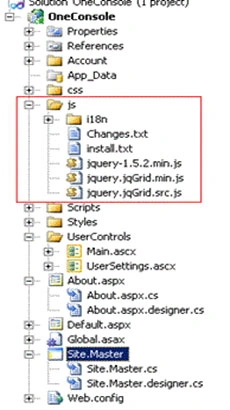
Figure 1:
Step 3:
Now go to the "about.aspx".
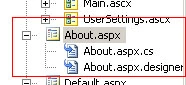
Now paste the following code there:
<asp:Content ID="HeaderContent" runat="server" ContentPlaceHolderID="HeadContent">
<link href="../css/ui-darkness/jquery-ui-1.8.12.custom.css" rel="stylesheet" type="text/css" />
<link href="../css/ui.jqgrid.css" rel="stylesheet" type="text/css" />
<script src="../js/jquery-1.5.2.min.js" type="text/javascript"></script>
<script src="../js/i18n/grid.locale-en.js" type="text/javascript"></script>
<script src="../js/jquery.jqGrid.min.js" type="text/javascript"></script>
<script src="../Scripts/json2-min.js" type="text/javascript"></script>
<script src="../js/jquery.jqGrid.src.js" type="text/javascript"></script>
<script type="text/javascript">
$(document).ready(function () {
jQuery("#list1").jqGrid({
datatype: "local",
colNames: ['Inv No', 'Date', 'Client', 'Amount', 'Tax', 'Total', 'Notes'],
colModel: [
{ name: 'id', index: 'id', width: 60, sorttype: "int" },
{ name: 'invdate', index: 'invdate', width: 90, sorttype: "date" },
{ name: 'name', index: 'name', width: 100 },
{ name: 'amount', index: 'amount', width: 80, align: "right", sorttype: "float" },
{ name: 'tax', index: 'tax', width: 80, align: "right", sorttype: "float" },
{ name: 'total', index: 'total', width: 80, align: "right", sorttype: "float" },
{ name: 'note', index: 'note', width: 150, sortable: false }
],
multiselect: true,
rowNum: 10,
rowList: [5, 10, 20, 50, 100],
pager: jQuery('#pager1'),
sortorder: "desc",
viewrecords: true,
subGrid: true,
subGridUrl: 'Default.aspx',
subGridModel: [{ name: ['No', 'Item', 'Qty', 'Unit', 'Line Total'],
width: [55, 200, 80, 80, 80]
}
],
caption: "Manipulating Array Data"
});
jQuery("#list1").jqGrid('navGrid', '#pager1', { del: false, add: false, edit: false }, {}, {}, {}, { multipleSearch: true });
var mydata = [
{ id: "1", invdate: "2007-10-01", name: "test", note: "note", amount: "200.00", tax: "10.00", total: "210.00" },
{ id: "2", invdate: "2007-10-02", name: "test2", note: "note2", amount: "300.00", tax: "20.00", total: "320.00" },
{ id: "3", invdate: "2007-09-01", name: "test3", note: "note3", amount: "400.00", tax: "30.00", total: "430.00" },
{ id: "4", invdate: "2007-10-04", name: "test", note: "note", amount: "200.00", tax: "10.00", total: "210.00" },
{ id: "5", invdate: "2007-10-05", name: "test2", note: "note2", amount: "300.00", tax: "20.00", total: "320.00" },
{ id: "6", invdate: "2007-09-06", name: "test3", note: "note3", amount: "400.00", tax: "30.00", total: "430.00" },
{ id: "7", invdate: "2007-10-04", name: "test", note: "note", amount: "200.00", tax: "10.00", total: "210.00" },
{ id: "8", invdate: "2007-10-03", name: "test2", note: "note2", amount: "300.00", tax: "20.00", total: "320.00" },
{ id: "9", invdate: "2007-09-01", name: "test3", note: "note3", amount: "400.00", tax: "30.00", total: "430.00" }
];
for (var i = 0; i <= mydata.length; i++)
jQuery("#list1").jqGrid('addRowData', i + 1, mydata[i]);
var lastsel2
jQuery("#rowed5").jqGrid({
datatype: "local",
height: 250,
colNames: ['ID Number', 'Name', 'Stock', 'Ship via', 'Notes'],
colModel: [
{ name: 'id', index: 'id', width: 90, sorttype: "int", editable: true },
{ name: 'name', index: 'name', width: 150, editable: true, editoptions: { size: "20", maxlength: "30"} },
{ name: 'stock', index: 'stock', width: 60, editable: true, edittype: "checkbox", editoptions: { value: "Yes:No"} },
{ name: 'ship', index: 'ship', width: 90, editable: true, edittype: "select", editoptions: { value: "FE:FedEx;IN:InTime;TN:TNT;AR:ARAMEX"} },
{ name: 'note', index: 'note', width: 200, sortable: false, editable: true, edittype: "textarea", editoptions: { rows: "2", cols: "10"} }
],
multiselect: true,
rowNum: 10,
rowList: [5, 10, 20, 50, 100],
pager: jQuery('#pager2'),
sortorder: "asc",
viewrecords: true,
onSelectRow: function (id) {
if (id && id !== lastsel2) {
jQuery('#rowed5').jqGrid('restoreRow', lastsel2);
jQuery('#rowed5').jqGrid('editRow', id, true);
lastsel2 = id;
}
},
editurl: "server.php",
caption: "Input Types"
});
jQuery("#rowed5").jqGrid('navGrid', '#pager2', { del: false, add: false, edit: false }, {}, {}, {}, { multipleSearch: true });
var mydata2 = [
{ id: "12345", name: "Desktop Computer", note: "note", stock: "Yes", ship: "FedEx" },
{ id: "23456", name: "Laptop", note: "Long text ", stock: "Yes", ship: "InTime" },
{ id: "34567", name: "LCD Monitor", note: "note3", stock: "Yes", ship: "TNT" },
{ id: "45678", name: "Speakers", note: "note", stock: "No", ship: "ARAMEX" },
{ id: "56789", name: "Laser Printer", note: "note2", stock: "Yes", ship: "FedEx" },
{ id: "67890", name: "Play Station", note: "note3", stock: "No", ship: "FedEx" },
{ id: "76543", name: "Mobile Telephone", note: "note", stock: "Yes", ship: "ARAMEX" },
{ id: "87654", name: "Server", note: "note2", stock: "Yes", ship: "TNT" },
{ id: "98765", name: "Matrix Printer", note: "note3", stock: "No", ship: "FedEx" }
];
for (var i = 0; i < mydata2.length; i++)
jQuery("#rowed5").jqGrid('addRowData', mydata2[i].id, mydata2[i]);
});
// });
</script>
</asp:Content>
<asp:Content ID="BodyContent" runat="server" ContentPlaceHolderID="MainContent">
<h2>About</h2>
<p></p>
<table id="list1" ></table>
<div id="pager1" ></div>
<br /><br />
<table id="rowed5" ></table>
<div id="pager2" ></div>
</asp:Content>
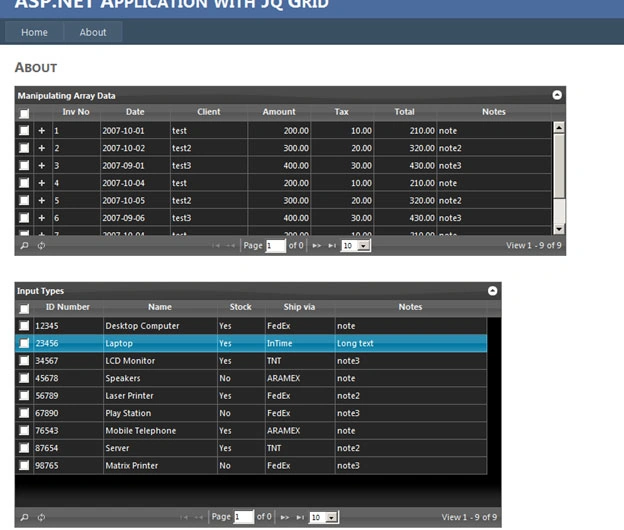
Now run the application. Click the link "about". It will look like the following figure:
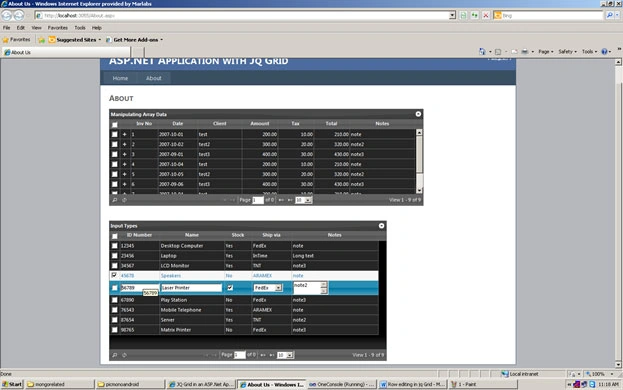
Now click the particular cell or row of a particular grid. It will look like the following figure.
Conclusion: So in this article you have seen how to click the particular cell or row in jq grid.
SIVAPosted Feb 25, 2013, 9:16 AM
Hi, I am trying to bind my array object to jQgrid. But it's taking only and binding only 1st row. Here, I am creating columns dynamically and i created sample data. But when i am binding that array object its taking only 1st row. Please resolve it.. I am new for this...
sumanPosted Apr 2, 2012, 9:43 PM
I have a column called "Status" which has two html controls (texbox & image). on click of image a modal popup will be opened which has one one textbox and two buttons (ok & cancel). if the user enters some value in the textbox and clicks ok button the value should be binded to the jqgrid status column textbox. Issue: As i have two controls in a single cell, i dont know how to get only the textbox id and bind the value to it. My script code is... function getImage(cellvalue, options, rowObject) { return "<input type='text' id='" + options.rowId + "' style=width:300px;/><input type='image' onclick=\"ClickImage('" + options.rowId + "',this);\" id='imgsdfs' title='Edit' class='gridIcons' src='../../Content/images/search.png' onclick=\"LoadModalPopup(this)\" />" } function ClickImage(rowid, event) { debugger; $("#dialog").dialog({ modal: true, autoOpen: false, width: 500, height: 800 }); $("#dialog").dialog("open"); $('#modaldialogokbtn').live('click', function () { if ($(modaldialogText).val() != "") { var result = $(modaldialogText).val(); $("#dialog").dialog("close"); } }); $('#modaldialogcancelbtn').live('click', function () { $("#dialog").dialog("close"); }); } Please help
nmjh ShettyPosted Oct 17, 2011, 3:55 AM
its good Can it be done using sql Databases? if yes can provide the souce code
SuryaKant DixirPosted Sep 1, 2011, 5:48 AM
Hello Sir, I read this article .It is very good but my problem is that how to use arrow key Navigation in cells. and get particular cell value which is focus. Thanks in Advance.