
Introduction : SendActivity, can be used to send requests to WCF services. The SendActivity activity enables you to participate in a conversation with a WCF service using a predefined message exchange pattern. The SendActivity activity is a blocking activity, meaning that workflow execution will be blocked until the activity completes execution. The SendActivity is used to call an operation exposed by a WCF service from an executing workflow instance. The Workflow Service generates a proxy for the call according to properties of the SendActivity, including the selected service contract and associated WCF configuration settings. The response from a SendActivity can be stored and used by the running workflow instance, including reported exceptions.
SendActivity Classes :
- System.Object.
- System.Workflow.ComponentModel.DependencyObject.
- System.Workflow.ComponentModel.Activity.
- System.Workflow.Activities.SendActivity.
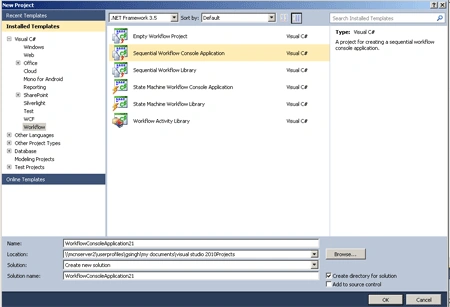
- Go to File->New-> Project.
- Select Workflow->Framework 3.5.
- Select SequentialWorkflowApplication.
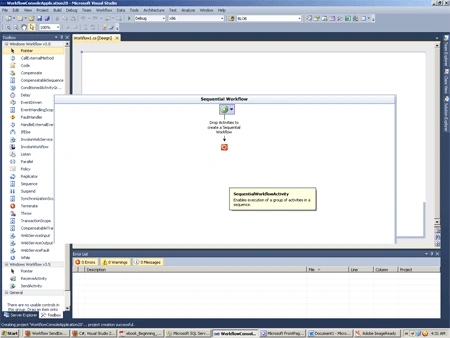
Step 2 : Drag activity from Toolbox.
- Send Activity, Code Activity.
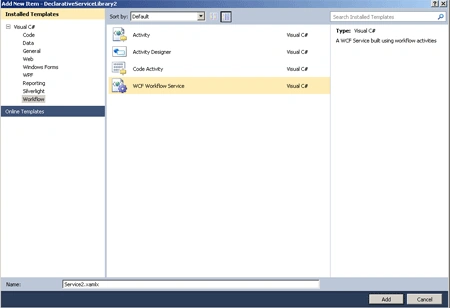
Step 3 : Go to Solution Explorer and Right-click.
- Add->New Item.
- Select WCFServiceApplication.
Step 4 : Write the below code :
Code :
using
System;
using
System.Collections.Generic;
using
System.Linq;
using
System.Text;
using
System.Threading;
using
System.Workflow.Runtime;
using
System.Workflow.Runtime.Hosting;
namespace
WorkflowConsoleApplication1
class
Program
{
public sealed
partial class
Workflow1 : SequentialWorkflowActivity
{
public Workflow1()
{
InitializeComponent();
}
public static
DependencyProperty sendActivity1__ReturnValueProperty = DependencyProperty.Register("sendActivity1__ReturnValue",
ty(System.String),
typeof(SendActivitySample.Workflow1));
public
String sendActivity1__ReturnValue
{
get
{
return ((string)(base.GetValue(SendActivitySample.Workflow1.sendActivity1__ReturnValueProperty)));
}
set
{
base.SetValue(SendActivitySample.Workflow1.sendActivity1__ReturnValueProperty,
value);
}
}
private void
codeActivity1_ExecuteCode(object sender,
EventArgs e)
{
Console.WriteLine(GetValue(Workflow1.sendActivity1__ReturnValueProperty));
}
}
}
}
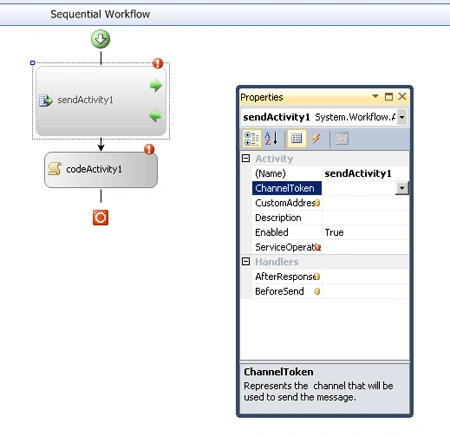
Step 5 : Go to Workflow1.cs and select the Design option.
- Select SendActivity1 property.
- Give the Enabled Value True.
Step 6 : Now go to the program's file and write the below code.
Code :
using
System;
using
System.Collections.Generic;
using
System.Linq;
using
System.Web;
using
System.Runtime.Serialization;
using
System.ServiceModel;
using
System.Text;
namespace
DeclarativeServiceLibrary2
{
public class
Class1
{
public interface
IMyService
{
string GetResponse(string
value);
}
public class
MyService :
IMyService
{
#region
IMyService Members
public string
GetResponse(string value)
{
return
string.Format("Hello {0}!", value);
}
#endregion
}
}
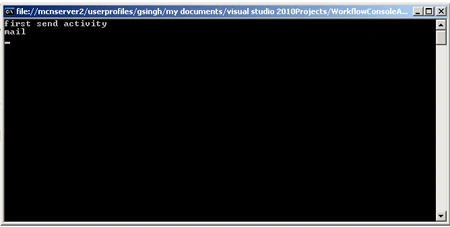
Step 7 : Press F5 to run it.
Join the conversation! Your thoughts help the community grow.