

Session Object:
{
<!DOCTYPE html PUBLIC "-//W3C//DTD XHTML 1.0 Transitional//EN" "http://www.w3.org/TR/xhtml1/DTD/xhtml1-transitional.dtd">
<html xmlns="http://www.w3.org/1999/xhtml" > <asp:Label ID="lblApp" runat="server" Text="Label" Font-Size="X-Large" ForeColor="#C00000"></asp:Label>
</div>
public partial class _Default : System.Web.UI.Page // code for application variable Output :
HTTP is a stateless protocol. That is, the protocol does not have any features that can be used to maintain information about a user. Each page request made by the user is treated as a request from a new user. Once the web server sends the page to the client browser, it closes the connection. Therefore, session comes to overcome this limitation. When a new user request for a web page then server object checks the SessionId. If the user had valid SessionId then the user is treated as 'ACTIVE USER' otherwise server object created a Session object for the user.
The Session object is used to store information about a user. The information is retained for the duration of the user session. Variables stored in the Session object are not discarded when the user browses from one page to another, they only destroyed when the user abandons the session or the session time out.
Application Variables:
Application level variables are used to share common information across several users. An application variable can be accessed by all the pages in the application.
Session Variables:
A new session is created once for each new browser that hits your ASP.NET Web site. If a user stops hitting your Web site, his Session will time out after 20 minutes of inactivity, by default.
Session variables are very similar to Application variables You can create them and store data in them in exactly the same way. The crucial difference between Application and Session variables is that Session variables are specific to each visitor to your site.
The problem that Session variables have to overcome is that the HTTP protocol that you use to browse the web is stateless. Each request for a page is completely independent of earlier requests, so if you want subsequent pages to "remember" the users name that he entered on your front page you have to store that information somewhere. This remembering of user-specific data is called "maintaining state".
Global.asax File:
In any ASP.NET application, you can use the Global.asax file to trap specific application-level events, including startup, shutdown, session lifecycle, request lifecycle, and error messages. This file, much like a Web service file, has a simple shell front page (.asax) and a code-behind file.
Example :
void Session_Start(object sender, EventArgs e)
Session["User_CountSession"]=0;
}
void Application_Start(object sender, EventArgs e)
{
Application["user_countApp"] = 0;
}
<%@ Page Language="C#" AutoEventWireup="true" CodeFile="Default.aspx.cs" Inherits="_Default" %>
<head runat="server">
<title>Untitled Page</title>
</head>
<body>
<form id="form1" runat="server">
<div>
<asp:Label ID="lblsession" runat="server" Text="Label" Font-Size="X-Large" ForeColor="#0000C0"></asp:Label><br />
<br />
<br />
</form>
</body>
</html>
using System;
using System.Data;
using System.Configuration;
using System.Web;
using System.Web.Security;
using System.Web.UI;
using System.Web.UI.WebControls;
using System.Web.UI.WebControls.WebParts;
using System.Web.UI.HtmlControls;
{
protected void Page_Load(object sender, EventArgs e)
{
// code for session variable
Session["User_CountSession"] = Convert.ToInt32(Session["User_CountSession"]) + 1;
lblsession.Text = "Session sate : " + Session["User_CountSession"].ToString();
Application["user_countApp"] = Convert.ToInt32(Application["user_countApp"]) + 1;
lblApp.Text = "Total Views : " + Application["user_countApp"].ToString();
}
}
Once when u run the application initially both the labels will have the initial value same i.e. 1 but when u run your application second time session variable will have the value as 1 but application variable all have 2 as its value. And every time u run your application, application variable will sustain its previous value but session variable wont.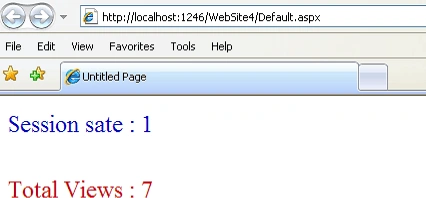
Note:
Session Type
Session.Abandon - Abandons (cancels) the current session.
Session.Remove - Delete an item from the session-state collection.
Session.RemoveAll - Deletes all session state items
Session.Timeout - Set the timeout (in minutes) for a session
Session.SessionID - Get the session ID (read only property of a session) for the current session.
Session.IsNewSession - This is to check if the visitor's session was created with the current request i.e. has the visitor just entered the site. The IsNewSession property is true within the first page of the ASP.NET application.
Application Type
Application.Lock - Locks the application variables
Application.Unlock - Unlocks the application variables
Example for session variable :
Source Code:
<%@ Page Language="C#" AutoEventWireup="true" CodeFile="Default.aspx.cs" Inherits="_Default" %>
<!DOCTYPE html PUBLIC "-//W3C//DTD XHTML 1.0 Transitional//EN" "http://www.w3.org/TR/xhtml1/DTD/xhtml1-transitional.dtd">
<html xmlns="http://www.w3.org/1999/xhtml" >
<head runat="server">
<title>Untitled Page</title>
</head>
<body>
<form id="form1" runat="server">
<table width="100%">
<tr>
<td style="text-align: center">
<asp:Label ID="Label1" runat="server" Font-Bold="True" Font-Size="XX-Large" ForeColor="DarkBlue"
Text="Label"></asp:Label></td>
</tr>
<tr>
<td>
</td>
</tr>
<tr>
<td style="text-align: center">
<asp:Button ID="Button1" runat="server" BackColor="LightSteelBlue" ForeColor="Red"
OnClick="Button1_Click" Text="Click The Button To Change The State" Width="328px" /></td>
</tr>
</table>
</form>
</body>
</html>
Code:
using System;
using System.Data;
using System.Configuration;
using System.Web;
using System.Web.Security;
using System.Web.UI;
using System.Web.UI.WebControls;
using System.Web.UI.WebControls.WebParts;
using System.Web.UI.HtmlControls;
public partial class _Default : System.Web.UI.Page
{
protected void Page_Load(object sender, EventArgs e)
{
Label1.Text = Session["user_status"].ToString();
}
protected void Button1_Click(object sender, EventArgs e)
{
if (Session["user_status"].ToString() == "Sign In")
{
Session["user_status"] = "Sign Out";
Label1.Text = Session["user_status"].ToString();
}
else if (Session["user_status"].ToString() == "Sign Out")
{
Session["user_status"] = "Sign In";
Label1.Text = Session["user_status"].ToString();
}
}
}
Code of Global.asax:
void Session_Start(object sender, EventArgs e)
{
// Code that runs when a new session is started
Session["user_status"] = "Sign In";
}
Output: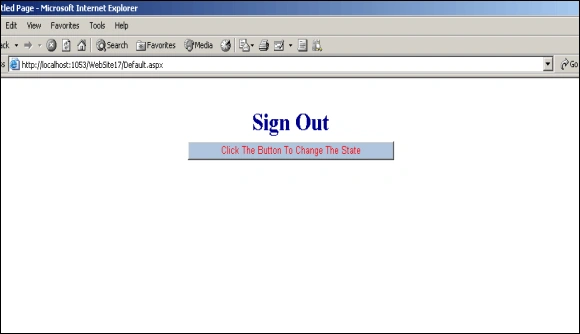
Sachin Singh RajputPosted Aug 24, 2017, 2:26 AM
Rekha thank you so much... Clear the confusion... Keep posting...
Rekha SinghPosted Aug 10, 2009, 6:06 AM
:) thnx dear
Former memberPosted Aug 10, 2009, 3:39 AM
Have u wriitten this ???? hehehhehehhe :) you are turing great dear with passing articles... Really informative :) Keep it up :)