

SharePoint Content DataBase
Content Databases need to be set up carefully to attain the maximum performance. We need to take different performance issues into consideration.
- Only create files in the primary filegroup for the database.
- Distribute the files across separate disks.
- The number of data files should be less than or equal to the number of core CPUs. Count dual core processors as two CPUs for this purpose. Count each processor that supports hyper-threading as a single CPU.
- Create data files of equal size.
- Limit content database size (200 GB)
- Limit site collection size (100 GB)
- Enable BLOB caching
- Transaction logs on separate physical hard disks
TempDB
SharePoint Server 2010 farm performance can be significantly impeded by insufficient disk I/O for tempdb. We could see 20 - 45% of i/o traffic with Tempdb in Medium to large size SharePoint farm installations.
- Only create files in the primary filegroup for the database.
- Distribute the files across separate disks.
- Place the tempdb on a RAID 10 array (RAID 10 uses all the drives in the array to gain higher I/O rates so more drives in the array higher performance)
- Create data files of equal size
Disk I/O
One of the important factors is a well-performing I/O subsystem, which is a critical component of any SQL Server application. We need to consider is the disk I/O workload generated by SharePoint on the database-tier ( Microsoft IT's standard). If we are seeing disk average response time is .20 to .35 seconds (should be less than 20 second) , then we need to re look at the distribute the files across separate disks and Separate database data and transaction log files across different disks.
Gather storage and SQL Server space and I/O requirements
SQLIO Disk Subsystem Benchmark Tool
Memory
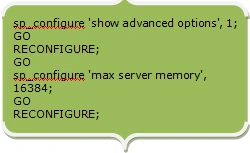
Memory needs to be managed wisely for better performance. When the SQL Server starts, it dynamically determines how much memory to allocate based on how much memory the operating system and other applications are currently using. If there is substantial memory pressure like PLE is consistently below 350 (50 -200 which is very low) then the memory needs to be bumped for the performance of the application. Fine tuning the following configuration settings of SQL server will help in improving the performance.
-
min server memory (min value 0)
-
max server memory (min value 16MB)
-
max worker threads
-
index create memory
-
min memory per query
16GB Memory Memory SetupOptimizing Server Performance Using Memory Configuration Options
How to: Set a Fixed Amount of Memory (SQL Server Management Studio)
Hardware and software requirements
Processor
-
64-bit, four cores for small deployments
-
64-bit, eight cores for medium deployments
RAM
-
8 GB for small deployments
-
16 GB for medium deployments
ShyjuPosted Feb 27, 2013, 3:14 PM
@Sam : This recommendations for RAID Server
Sam HobbsPosted Jul 24, 2011, 7:45 PM
If SSDs are used as disk drives, is it still necessary to use separate physical drives?