

When you click on the "Manage Content Database" link, you will land on the "Content Database" page. This page will let you add a new content database or remove a content database from this web application. You will also set the properties of the content database i.e changing the database status, maximum number of sites or warning limit etc.

Direct Link for Manage Content Database (/_admin/defaultcontentdb.aspx)
Content Database page will let SharePoint Administrator manage the content databases of the web applications. The administrator can create new content databases, remove the existing content database from the web application, take the database offline, set the maximum number of site collection, and warning level of a content database.
On this page, you will get the following information:
- Database name
This will list the name of the content database for the web application in the selection. - Database Status
This column will tell the status of the database; i.e., whether it is started or stopped. Stop status means no new site collection can be provisioned in this content database. User profile sync also stops working once the content database status is offline, which means user information list will not be updated. - Database Read Only
This column will tell the status of content database if it is in read-only state at SQL Server. - Current Number of site collections
This column will tell how many site collections are currently provisioned in this content database - Site collection level warning
This will tell the what is the warning level set for the content database. If the number of site collections reaches that number, then the owner will get an alert. - Maximum number of site collection
This will tell how many site collections can be provisioned in this content database. We can set the maximum number of site collections to a valid number as per our requirement. - Preferred timer server
This will tell, if there is any preferred server associated with this content database. This option is configurable, if for some reason we want to run all timer jobs related to a content database for a specific server then we can set it. - Web Applications
From this option you can switch between the web applications
Add New Content Database
With add options, you can either add an existing content database to the web application or create a brand new content database. When you enter the required information, SharePoint checks on the SQL if a valid SharePoint database exists with the same name and it will add it, otherwise it will provision a brand new content database. To create a new content database please follow the steps below.
- Log on with farm admin account and browse to content database page
- Click on the Add a Content Database
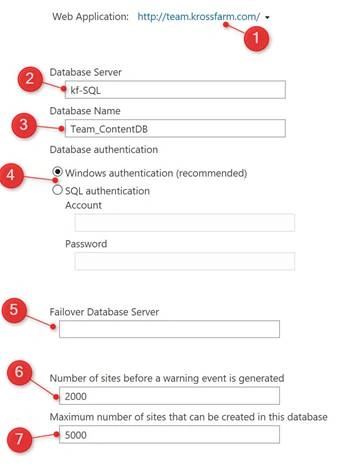
- On this page enter the following information,
- Web Application Make sure correct web application is selected
- Database Server Specify the DB server name i.e. Kf-SQL
- Database Name Specify the Database Name I.e. Team_ContentDB
- Database Authentication Select between Windows or SQL Authentication. For windows authentication there is no need to give the credentials.
- Failover Database Server if you are using the mirroring then you can provide the fail over server. In our case No, so leave it blank.
- Number of sited before warning event generated Enter the number after that warning event is generated.
- Maximum Number of Site that can be created in this database Enter the maximum number of site collections you want to be provisioned in this DB. In our case we will use default i.e 5000
- Click OK.
Remove a Content Database
In order to remove a content database, you have to follow the below instructions.
- Log on with farm admin account and browse to content database page
- Click on the Content Database Name (which you want to remove)
- Make Sure You Select the correct Web Application
- Click on the Correct Database

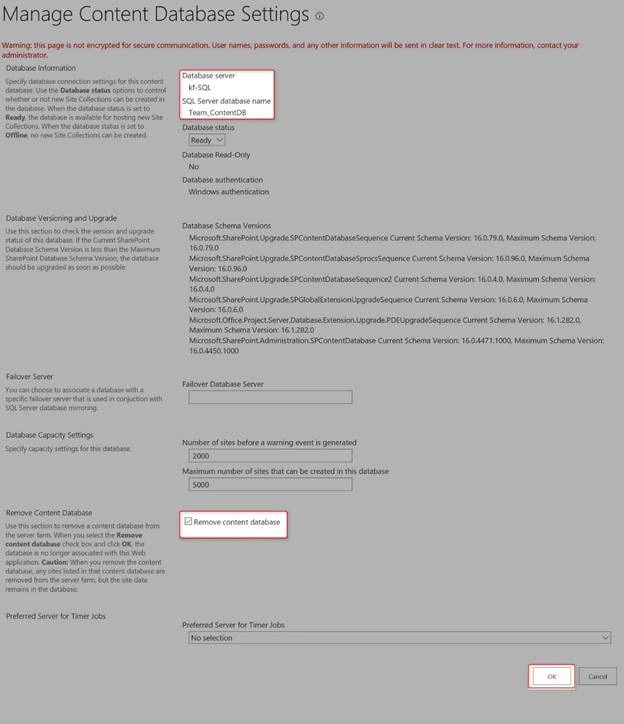
- On Manage Content Database Settings Page.
- Make Sure of the the Database Server and DB name one more time as mentioned in the picture
- In Remove Content Database Section, Please Check the Check Box
- Click Ok.
Change the Properties of a Content Database
In order to remove a content database, you have to follow the below instructions.
- Log on with farm admin account and browse to content database page
- Click on the Content Database Name (which you want to remove)
- Make Sure You Select the correct Web Application
- Click on the Correct Database

- On Manage Content Database Settings Page, you change a couple of things.
- To Change Database Status from Ready to Offline.
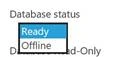
- From the Database Status Drop, Select the Offline and Click
- On next page you will see the Team_ContentDB’s Status is

- To Change the Maximum Number of Site Collections & Warning Level.
- In the Database Capacity Settings, enter the number in the warning Text box and higher number for the Maximum Sites text ( Make Sure the Warning level is always lower than maximum; i.e., in our example, 90 for warning and maximum sites will be 100). Click Ok

- On the next page you will the Site collection Level Warning value is changed to 90 and Maximum Number of Site collection value is also set as 100.

- In the Database Capacity Settings, enter the number in the warning Text box and higher number for the Maximum Sites text ( Make Sure the Warning level is always lower than maximum; i.e., in our example, 90 for warning and maximum sites will be 100). Click Ok
- To Change the Preferred Server for the Timer Jobs.
- On the Database Settings page, in the Preferred Server for Timer Jobs section click on the dropdown and select the server you want to use. ( we want to use KF-SP). Click Ok.
- On Content Database Page, you will see the KF-SP listed as preferred Timer Server


- To Change Database Status from Ready to Offline.
Nanddeep NachanPosted Jan 16, 2017, 5:59 AM
Nice share. The options are very much similar to SP2013. Is there any significant change to highlight from previous versions?