
Introduction:
SPDisposeCheck is a tool used by SharePoint Developers to check the custom
SharePoint solutions that use the SharePoint Object Model for proper memory
leaks. For more information on Disposing Objects in SharePoint Object Model you
can refer
http://msdn.microsoft.com/en-us/library/ee557362.aspx . In this article we
will be seeing how to use SharePoint Dispose Check tool in Visual Studio 2010.
SharePoint Dispose Check tool in Visual Studio 2010:
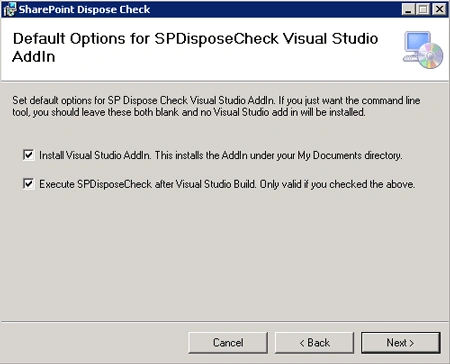
When you install SharePoint Dispose Check, there will be some default options to
select so that Visual Studio 2010 AddIn will be installed.
Default Options for SPDisposeCheck Visual Studio AddIn
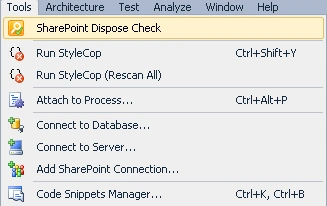
When you use Visual Studio 2010 you could be able to see SPDisposeCheck AddIn.
Go to tools menu you could be able to see the SPDisposeCheck AddIn as shown in
the following.
How to use it:
- Open Visual Studio 2010.
- Go to File => New => Project.
- Select Console Application template, enter the Name and then click on Ok.
- Add the following reference
i) Microsoft.SharePoint.dll
- Add the following namespace
i) Using Microsoft.SharePoint ;
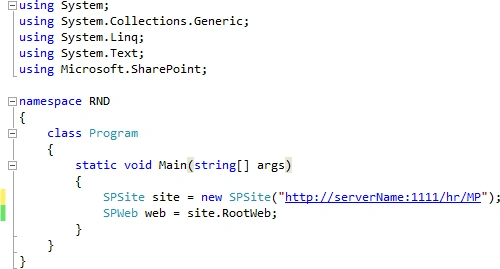
- Replace Program.cs with the following
code.
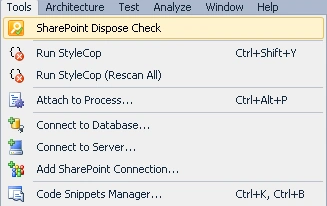
- Go to Tools menu and then click on
SharePoint Dispose Check as shown in the following
- SPDisposeCheck configuration menu will pop up.
- Select Execute After Build and in Select
the assemblies to analyze section select the exe as shown in the following
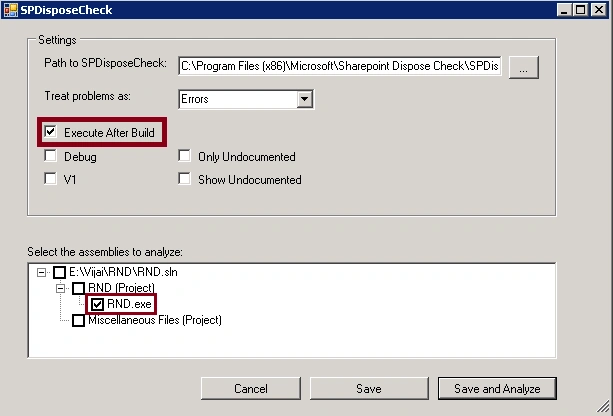
- Click on Save.
- Right click on the solution and then click on Build.
- Go to View menu and click on Error List.
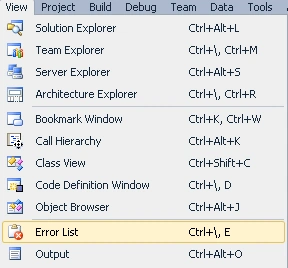
- You could see the following errors in the
Error List
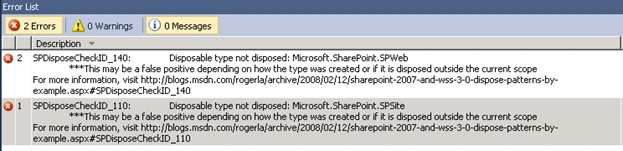
- The reason is in the code I have not
disposed the objects properly.
When you install SharePoint Dispose Check, if you have not selected any default
options for SPDisposeCheck Visual Studio AddIn, you can use command window.
Go to Start => Run =>Type as cmd. In the Command window type the following
command
"C:\Program Files (x86)\Microsoft\SharePoint Dispose Check\SPDisposeCheck.exe"
"E:\Vijai\RND\RND\bin\Debug\RND.exe" –debug
Error messages can be seen as shown in the following
| Microsoft Windows [Version 6.1.7600] Copyright (c) 2009 Microsoft Corporation. All rights reserved. C:\Users\aaaa>"C:\Program Files (x86)\Microsoft\SharePoint Dispose Check\SPDis poseCheck.exe" "E:\Vijai\RND\RND\bin\Debug\RND.exe" -debug Note: This tool may report errors which are not actually memory leaks, otherwise known as false positives. Further investigation should be done to identify and correct real errors. It is designed to assist developers in making sure their code adheres to best practices for memory allocation when using SharePoint APIs. Please see the following for more information: http://blogs.msdn.com/rogerla/ http://msdn2.microsoft.com/en-us/library/aa973248.aspx http://msdn2.microsoft.com/en-us/library/bb687949.aspx ---------------------------------------------------------- Processing file: RND.exe Visiting module: RND.exe Method: RND.Program.Main(System.String[]) Assignment: site := new Microsoft.SharePoint.SPSite("http://serverName:1111/hr/M P") Constructor: new Microsoft.SharePoint.SPSite("http://serverName:1111/hr/MP") Assignment: web := site.{Microsoft.SharePoint.SPSite}get_RootWeb() MethodCall: site.{Microsoft.SharePoint.SPSite}get_RootWeb() Method: RND.Program.#ctor ExpressionStatement: this.{System.Object}.ctor()| MethodCall: this.{System.Object}.ctor() Processing Method Traces... ID: SPDisposeCheckID_110 Module: RND.exe Method: RND.Program.Main(System.String[]) Statement: site := new Microsoft.SharePoint.SPSite("http://serverName:1111/hr/MP ") Source: E:\Vijai\RND\RND\Program.cs Line: 13 Notes: Disposable type not disposed: Microsoft.SharePoint.SPSite ***This may be a false positive depending on how the type was created o r if it is disposed outside the current scope More Information: http://blogs.msdn.com/rogerla/archive/2008/02/12/sharepoint-20 07-and-wss-3-0-dispose-patterns-by-example.aspx#SPDisposeCheckID_110 ---------------------------------------------------------- ID: SPDisposeCheckID_140 Module: RND.exe Method: RND.Program.Main(System.String[]) Statement: web := site.{Microsoft.SharePoint.SPSite}get_RootWeb() Source: E:\Vijai\RND\RND\Program.cs Line: 14 Notes: Disposable type not disposed: Microsoft.SharePoint.SPWeb ***This may be a false positive depending on how the type was created o r if it is disposed outside the current scope More Information: http://blogs.msdn.com/rogerla/archive/2008/02/12/sharepoint-20 07-and-wss-3-0-dispose-patterns-by-example.aspx#SPDisposeCheckID_140 ---------------------------------------------------------- Total Found: 2 ---------------------------------------------------------- Modules Checked: 1 ---------------------------------------------------------- RND.exe ---------------------------------------------------------- Modules Ignored: 0 ---------------------------------------------------------- ---------------------------------------------------------- Methods Ignored: 0 ---------------------------------------------------------- |
You can manually add SharePoint Dispose Check
tool to the tools menu in Visual Studio 2010.
Steps Involved:
- Go to Tools and then click on External
tools…
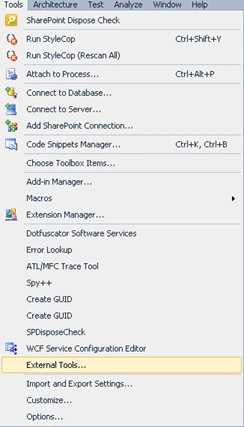
- In the External Tools wizard, click on
Add.
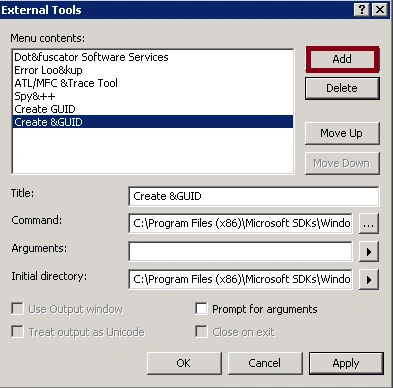
- Enter the Title as SPDisposeCheck.
- In the Command give the path of SPDisposeCheck.exe (C:\Program Files (x86)\Microsoft\SharePoint Dispose Check\SPDisposeCheck.exe)
- Note:
The SharePoint Dispose Checker Tool when it is installed is placed by default at:
32-bit operating system:
C:\Program Files\Microsoft\SharePoint Dispose Check
64-bit operating system:
C:\Program Files (x86)\Microsoft\SharePoint Dispose Check
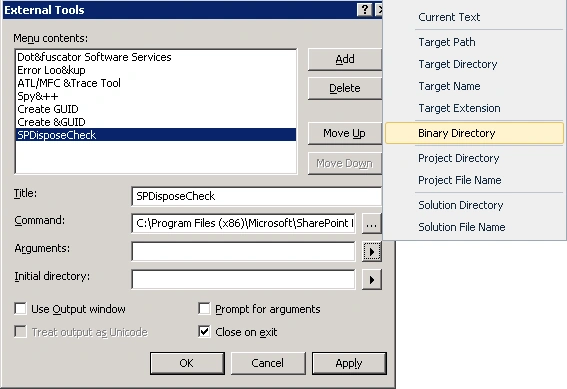
- Select Binary Directory as Arguments.
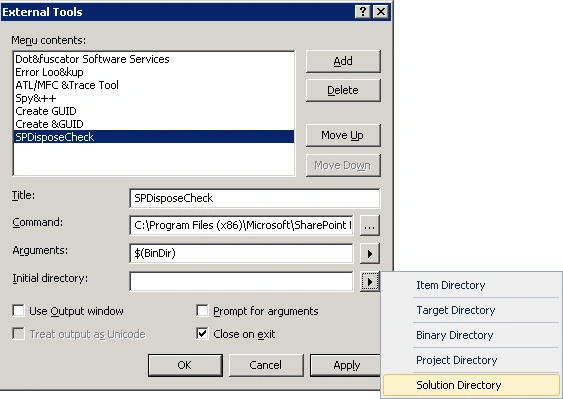
- Select Solution Directory as Initial
Directory.
- Check Use Output Window.
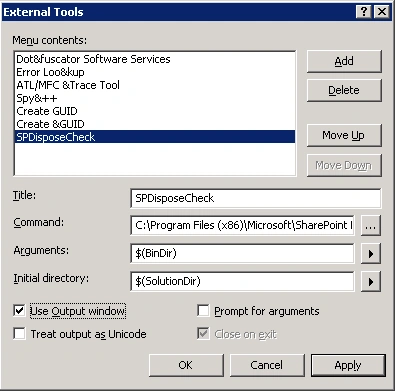
- Click on Ok.
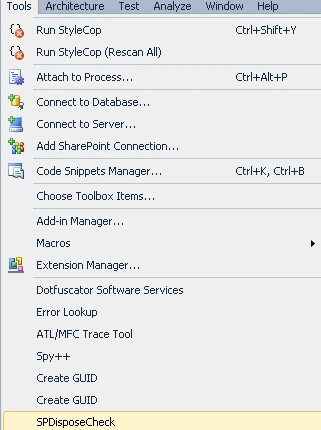
- Now you could see SPDisposeCheck option in
the Tools menu.
- Right click the solution and click on Build.
- Go to Tools menu and click on SPDisposeCheck.
- You could see the errors in Output window as shown in the following
| Note: This tool may report
errors which are not actually memory leaks, otherwise known as false
positives. Further investigation should be done to identify and correct real errors. It is designed to assist developers in making sure their code adheres to best practices for memory allocation when using SharePoint APIs. Please see the following for more information: http://blogs.msdn.com/rogerla/ http://msdn2.microsoft.com/en-us/library/aa973248.aspx http://msdn2.microsoft.com/en-us/library/bb687949.aspx ---------------------------------------------------------- ID: SPDisposeCheckID_110 Module: RND.exe Method: RND.Program.Main(System.String[]) Statement: site := new Microsoft.SharePoint.SPSite("http://serverName:1111/hr/MP") Source: E:\Vijai\RND\RND\Program.cs Line: 13 Notes: Disposable type not disposed: Microsoft.SharePoint.SPSite ***This may be a false positive depending on how the type was created or if it is disposed outside the current scope More Information: http://blogs.msdn.com/rogerla/archive/2008/02/12/sharepoint-2007-and-wss-3-0- dispose-patterns-by-example.aspx#SPDisposeCheckID_110 ---------------------------------------------------------- ID: SPDisposeCheckID_140 Module: RND.exe Method: RND.Program.Main(System.String[]) Statement: web := site.{Microsoft.SharePoint.SPSite}get_RootWeb() Source: E:\Vijai\RND\RND\Program.cs Line: 14 Notes: Disposable type not disposed: Microsoft.SharePoint.SPWeb ***This may be a false positive depending on how the type was created or if it is disposed outside the current scope More Information: http://blogs.msdn.com/rogerla/archive/2008/02/12/sharepoint-2007-and-wss-3-0-dispose-patterns-by-example.aspx#SPDisposeCheckID_140 ---------------------------------------------------------- Total Found: 2 ---------------------------------------------------------- Modules Checked: 2 ---------------------------------------------------------- RND.exe RND.vshost.exe ---------------------------------------------------------- Modules Ignored: 0 ---------------------------------------------------------- ---------------------------------------------------------- Methods Ignored: 0 ---------------------------------------------------------- |


John DepthPosted Feb 2, 2012, 9:13 AM EST
Interesting.... it's similar to deleaker...