
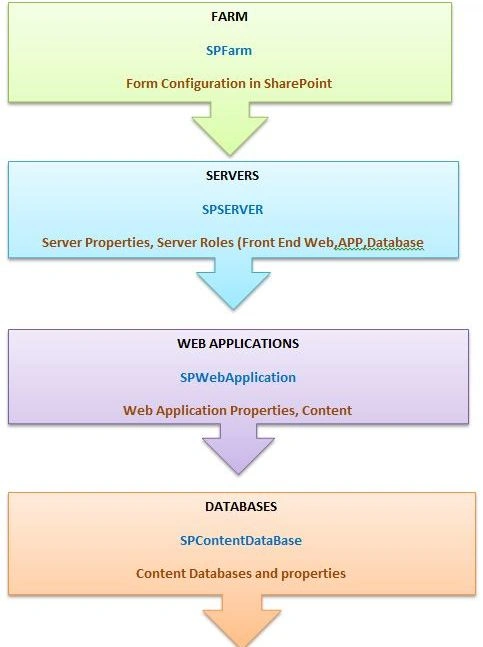
SPFarm: The SPFarm object is the highest object within the Windows SharePoint Services object model hierarchy. The servers property gets a collection representing all the servers in the deployment and the services property gets a collection representing all the services.
SP SERVER: The Server object represents a physical server computer. The service instances property provides access to the set of individual service instances that run on the individual computer.
SPWebApplication: Each SPWebApplication object represents a load-balanced web application based in Internet Information Services (IIS). The SPWebApplication object provides access to credentials and other server Farm-wide application settings. The Sites property gets the collection of site collections within the web application and theContentDatabases property collection of content databases is used in the web application. The SPWebApplication class replaces the obsolete SPVirtualServer class but it can still be helpful to think of a SPWebApplication object as a virtual server; that is, a set of one or more physical servers that appear as a single server to users.
SP Content Database: the SPContentDatabase object inherits from the Database class and represents a database that contains user data for a SharePoint web application. The Sites property gets the collection of site collections for which the content database stores data and the WebApplication property gets the parent web application.
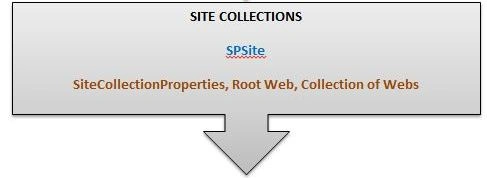
SPSiteCollection: An SPSiteCollection object represents the collection of site collections within the web application. The Item property or indexer gets a specified site collection from the collection and the Add method creates a site collection within the collection.
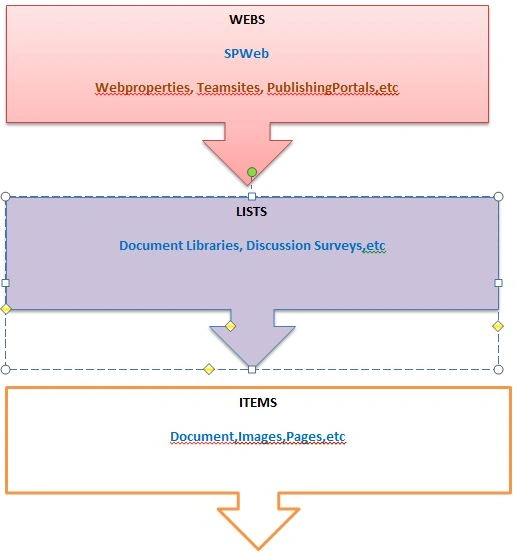
SPWEB: Each site collection includes any number of SPWeb objects and each object has members that can be used to manage a site, including its template and theme, as well as to access files and folders on the site.
SPLIST: Each SPList object has members that are used to manage the list or access items in the list.
ITEMS: Each SPListItem object represents a single row in the list.
Reference:
MSDN


Former memberPosted Feb 2, 2016, 5:11 AM EST
More content STOLEN from MSDN: https://msdn.microsoft.com/en-us/library/ms473633%28v=office.12%29.aspx?f=255&MSPPError=-2147217396
NitinPosted Apr 2, 2015, 7:45 AM EDT
good show
Karthik Muthu KaruppanPosted Apr 2, 2015, 7:05 AM EDT
simple and great
Gowtham RajamanickamTOP 100Posted Apr 2, 2015, 3:09 AM EDT
sure rakesh ..we will help you....more articles are avaible in C# Corner site...so you can read all articles ....i will tell u later how to start your career in sharepoint
Gowtham RajamanickamTOP 100Posted Apr 2, 2015, 3:08 AM EDT
thsnku rakesh
Gowtham RajamanickamTOP 100Posted Apr 2, 2015, 3:08 AM EDT
thank u Tom mohan
Gowtham RajamanickamTOP 100Posted Apr 2, 2015, 3:08 AM EDT
thanku vijay
Rakesh KalluriPosted Apr 2, 2015, 2:23 AM EDT
Hi Gowtham i am new to Sharepoint how to start journey in sharepoint. canyou please suggest me..
Tom MohanPosted Apr 1, 2015, 10:45 PM EDT
good
Vijay SPosted Apr 1, 2015, 10:32 PM EDT
Good
Gowtham RajamanickamTOP 100Posted Apr 1, 2015, 6:58 PM EDT
thank u
Santhakumar MunuswamyPosted Apr 1, 2015, 6:34 PM EDT
Good work