

We will learn about ICommands Interface and also see how actually the view knows about its ViewModel and how the view invokes the events on ViewModel which can be done by using ICommands.
Let’s see the steps.
Create new Windows 10 UWP app with MVVM Pattern like the following image:
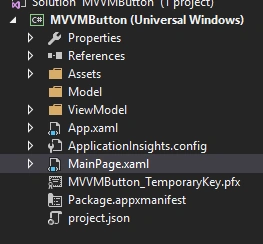
Create a class called SimpleCommand which implements ICommand interface. This class acts as Enhancement for the ICommand and extracts the code to a separate class.
Icommand interface looks like the following code,
- bool CanExecute(object parameter);
- void Execute(object parameter);
- event EventHandler CanExecuteChanged;
Now Create ViewModel class called ViewModelBase and write one method to show the message dialog; it looks like the following code.
- public class ViewModelBase
- {
- public SimpleCommand SimpleCommand
- {
- get;
- set;
- }
- public ViewModelBase()
- {
- this.SimpleCommand = new SimpleCommand(this);
- }
- public async void show()
- {
- var dialog = new MessageDialog("Learn to build windows 10 UWP app!");
- await dialog.ShowAsync();
- }
- }
- public class SimpleCommand: ICommand
- {
- public ViewModelBase Viemodel
- {
- get;
- set;
- }
- public SimpleCommand(ViewModelBase viewmodel)
- {
- this.Viemodel = viewmodel;
- }
- public event EventHandler CanExecuteChanged;
- public bool CanExecute(object parameter)
- {
- return true;
- }
- public void Execute(object parameter)
- {
- this.Viemodel.show();
- }
- }
- xmlns:vm="using:MVVMButton.ViewModel"
- <Page.Resources>
- <vm:ViewModelBase x:Key="viewModel"></vm:ViewModelBase>
- </Page.Resources>
- <Button Content="Click" HorizontalAlignment="Center" Command="{Binding Path=SimpleCommand,Source={StaticResource viewModel}}"></Button>

For more information on Windows 10 UWP, refer to my e-book,
Debasis SahaPosted May 30, 2016, 3:01 AM
Nice share..
Bhuvanesh MohankumarPosted May 29, 2016, 12:47 PM
Good one
Liêm NguyễnPosted May 28, 2016, 11:11 PM
Thank you for your sample!