

Xaml:
<sdk:TabControl/>
Steps Involved:
Creating a Silverlight Application:
· Open Visual Studio 2010.
· Go to File => New => Project.
· Select Silverlight from the Installed templates and choose the Silverlight Application template.
· Enter the Name and choose the location.
· Click OK.
· In the New Silverlight Application wizard check the "Host the Silverlight Application in a new Web site".
· Click OK.
Creating the UI:
TabControl:
<sdk:TabControl
Height="300"
Width="400">
</sdk:TabControl>
TabItem:
StackPanel:
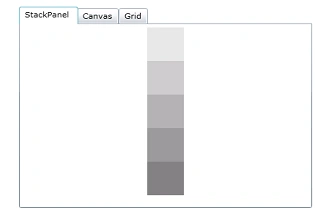
<sdk:TabItem
Header="StackPanel">
<StackPanel
Orientation="Vertical">
<Rectangle
Height="50"
Width="50"
Fill="Gray"
Opacity="0.2"></Rectangle>
<Rectangle
Height="50"
Width="50"
Fill="Gray"
Opacity="0.4"></Rectangle>
<Rectangle
Height="50"
Width="50"
Fill="Gray"
Opacity="0.6"></Rectangle>
<Rectangle
Height="50"
Width="50"
Fill="Gray"
Opacity="0.8"></Rectangle>
<Rectangle
Height="50"
Width="50"
Fill="Gray"
Opacity="1"></Rectangle>
</StackPanel>
</sdk:TabItem>
Canvas:
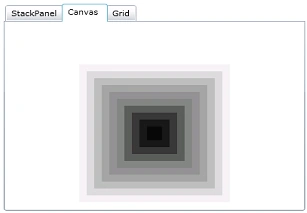
<sdk:TabItem
Header="Canvas">
<Canvas
Height="250"
Width="300"
Background="White">
<Rectangle
Height="200"
Width="200"
Canvas.Left="50"
Canvas.Top="50"
Fill="Gray"
Opacity="0.1"
/>
<Rectangle
Height="180"
Width="180"
Canvas.Left="60"
Canvas.Top="60"
Fill="Gray"
Opacity="0.2"
/>
<Rectangle
Height="160"
Width="160"
Canvas.Left="70"
Canvas.Top="70"
Fill="Gray"
Opacity="0.3"
/>
<Rectangle
Height="140"
Width="140"
Canvas.Left="80"
Canvas.Top="80"
Fill="Gray"
Opacity="0.4"
/>
<Rectangle
Height="120"
Width="120"
Canvas.Left="90"
Canvas.Top="90"
Fill="Gray"
Opacity="0.5"
/>
<Rectangle
Height="100"
Width="100"
Canvas.Left="100"
Canvas.Top="100"
Fill="Gray"
Opacity="0.6"
/>
<Rectangle
Height="80"
Width="80"
Canvas.Left="110"
Canvas.Top="110"
Fill="Black"
Opacity="0.3"
/>
<Rectangle
Height="60"
Width="60"
Canvas.Left="120"
Canvas.Top="120"
Fill="Black"
Opacity="0.4"
/>
<Rectangle
Height="40"
Width="40"
Canvas.Left="130"
Canvas.Top="130"
Fill="Black"
Opacity="0.5"
/>
<Rectangle
Height="20"
Width="20"
Canvas.Left="140"
Canvas.Top="140"
Fill="Black"
Opacity="0.6"
/>
</Canvas>
</sdk:TabItem>
Grid:

<sdk:TabItem
Header="Grid">
<Grid
x:Name="layoutRoot"
ShowGridLines="True"
Height="200"
Width="350"
Background="Orange">
<Grid.RowDefinitions>
<RowDefinition
Height="32*"
/>
<RowDefinition
Height="121*"
/>
</Grid.RowDefinitions>
<TextBlock
Text="PROFILE"
FontFamily="Verdana"
FontSize="14"
FontWeight="Bold"
Foreground="White"
Margin="14,20,-14,99"
Grid.RowSpan="2">
</TextBlock>
<Grid
Grid.Row="1"
ShowGridLines="True"
Background="White">
<Grid.ColumnDefinitions>
<ColumnDefinition
Width="144*"
/>
<ColumnDefinition
Width="256*"
/>
</Grid.ColumnDefinitions>
<Grid.RowDefinitions>
<RowDefinition
Height="50*"
/>
<RowDefinition
Height="50*"
/>
<RowDefinition
Height="50*"
/>
<RowDefinition Height="50*" />
</Grid.RowDefinitions>
<TextBlock Text="Name :" FontFamily="Verdana" Grid.Row="1" Grid.Column="0" FontSize="14" FontWeight="Bold" Foreground="Green" Margin="14,10,-14,21" Grid.RowSpan="2" ></TextBlock>
<TextBlock Text="About Me :" FontFamily="Verdana" Grid.Row="2" Grid.Column="0" FontSize="14" FontWeight="Bold" Foreground="Green" Margin="14,10,-14,21" Grid.RowSpan="2" ></TextBlock>
<TextBlock Text="Country :" FontFamily="Verdana" Grid.Row="3" Grid.Column="0" FontSize="14" FontWeight="Bold" Foreground="Green" Margin="14,10,-14,21" Grid.RowSpan="2" ></TextBlock>
<TextBlock Text="Vijai Anand.R" FontFamily="Verdana" Grid.Row="1" Grid.Column="1" FontSize="14" FontWeight="Bold" Foreground="Green" Margin="14,10,-14,21" Grid.RowSpan="2"></TextBlock>
<TextBlock Text="SharePoint Developer" FontFamily="Verdana" Grid.Row="2" Grid.Column="1" FontSize="14" FontWeight="Bold"Foreground="Green"
Margin="14,10,-14,21" Grid.RowSpan="2"></TextBlock>
<TextBlock Text="India" FontFamily="Verdana" Grid.Row="3" Grid.Column="1" FontSize="14" FontWeight="Bold" Foreground="Green"Margin="14,10,-14,21" Grid.RowSpan="2"></TextBlock>
</Grid>
</Grid>
</sdk:TabItem>
satham hussainPosted Apr 16, 2012, 1:59 AM
Hi, Tab Control Selected Tab Property is not working. How to get the selected tab in silverlight 3 ?