
Introduction
As we know on internet world without security we can not expect any thing. At
least on every website we use to face such like to create account but as far we
concern to learn how to create it then without any good guidelines we can't.
Let's take a look on this article to create such project.
Perquisite
This article expect something from you as
- You should know MS-SQL Server
- You should have the basic knowledge of ASP.Net controls
Creating Database
To store the user's credentials for future login, we should have database. So,
let's create it.
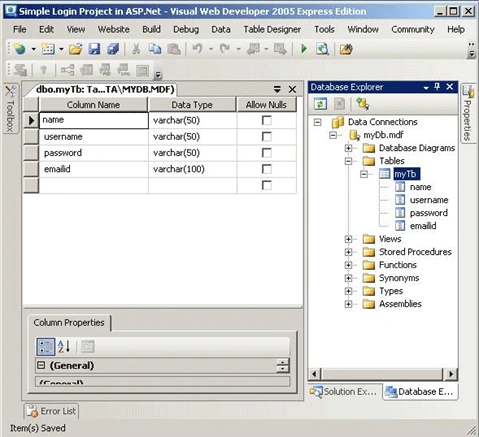
Database Name: myDb.mdf
Table Name: myTb
Column Names:
| Column Name | Data Type | Required or Not |
| name | varchar(50) | Not Checked |
| username | varchar(50) | Not Checked |
| password | varchar(50) | Not Checked |
| emailed | varchar(100) | Not Checked |
Creating Database Configuration in web.config file
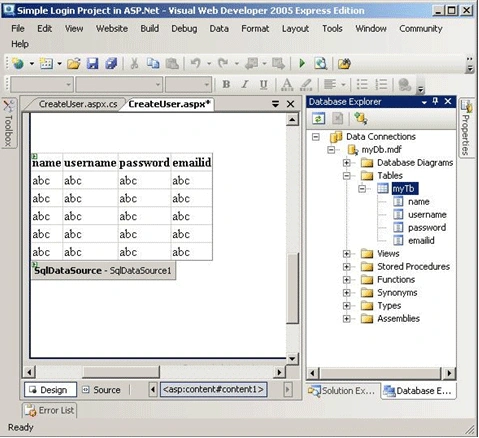
To create database configuration in web.config file, simply drag the 'myTb'
table from Database Explorer on any form and now delete the dragged item from
web page, it will create the configuration settings for your database in web.config file automatically.
Here is your configuration in web.config file
<connectionStrings>
<add
name="myDbConnectionString1"
connectionString="Data
Source=.\SQLEXPRESS;AttachDbFilename=|DataDirectory|\myDb.mdf;Integrated
Security=True;User Instance=True"
providerName="System.Data.SqlClient"
/>
</connectionStrings>
Create User Form Designing
To create or register new user we should have a form as given below. You can
ignore the side links, top banner and footer texts because they are occurring
from master page.

| Control Name | ID | Other |
| TextBox | name | |
| TextBox | username | |
| TextBox | password | Textmode=password |
| TextBox | emailed | |
| Button | create | Text=Create User |
To call for the database configuration setting from web.config file I have used
a function
public
string GetConnectionString()
{
return System.Configuration.ConfigurationManager.ConnectionStrings["myDbConnectionString1"].ConnectionString;
}
I have used a execute named function in code behind to perform the insertion
task when 'Create User' named button clicked
private
void execution(string
name, string username,
string password, string emailid)
{
SqlConnection conn =
new SqlConnection(GetConnectionString());
string sql =
"INSERT INTO myTb (name, username, password, emailid) VALUES "
+ " (@name, @username, @password, @emailid)";
try
{
conn.Open();
SqlCommand
cmd = new SqlCommand(sql,
conn);
SqlParameter[] pram =
new SqlParameter[4];
pram[0] =
new SqlParameter("@name",
SqlDbType.VarChar, 50);
pram[1] = new
SqlParameter("@username",
SqlDbType.VarChar, 50);
pram[2] = new
SqlParameter("@password",
SqlDbType.VarChar, 50);
pram[3] = new
SqlParameter("@emailid",
SqlDbType.Char, 10);
pram[0].Value = name;
pram[1].Value = username;
pram[2].Value = password;
pram[3].Value = emailid;
for
(int i = 0; i < pram.Length; i++)
{
cmd.Parameters.Add(pram[i]);
}
cmd.CommandType = CommandType.Text;
cmd.ExecuteNonQuery();
}
catch (System.Data.SqlClient.SqlException
ex_msg)
{
string msg =
"Error occured while inserting";
msg += ex_msg.Message;
throw new
Exception(msg);
}
finally
{
conn.Close();
}
}
Finally I have used to following code in 'Create User' button click event. In
this event we have to check the database for the duplication. Because in login
project duplications are never assumed even. If there is no any duplication
found in code behind will create a new account. Here it is
protected
void create_Click(object
sender, EventArgs e)
{
SqlDataSource sds =
new SqlDataSource();
sds.ConnectionString = ConfigurationManager.ConnectionStrings["myDbConnectionString1"].ToString();
sds.SelectParameters.Add("name",
TypeCode.String, this.name.Text);
sds.SelectParameters.Add("username",
TypeCode.String, this.username.Text);
sds.SelectParameters.Add("password",
TypeCode.String, this.password.Text);
sds.SelectParameters.Add("emailid",
TypeCode.String, this.emailid.Text);
sds.SelectCommand = "SELECT * FROM [myTb] WHERE [username] = @username";
DataView dv = (DataView)sds.Select(DataSourceSelectArguments.Empty);
if (dv.Count
!= 0)
{
this.lblinfo.ForeColor =
System.Drawing.Color.Red;
this.lblinfo.Text =
"The user already Exist!";
return;
}
else
{
execution(name.Text,username.Text,password.Text,emailid.Text);
this.lblinfo.Text =
"New User Profile has been created you can login now";this.name.Text
= "";
this.username.Text =
"";
this.password.Text =
"";
this.emailid.Text =
"";
}
}
Login User Form Designing
To create or register new user we have created a form but still we don't have
any login form. So let's create the login form.
| Control Name | ID | Other |
| TextBox | username | |
| TextBox | password | |
| Button | log | Text=Login |
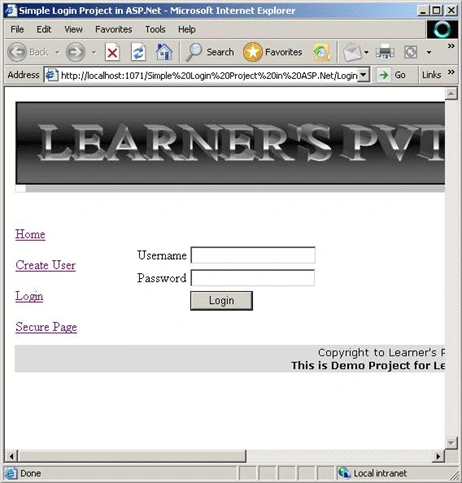
Now we have to write some codes which will select the values from database @
values in textboxes. And if any values are not being selected (retrieved) in
code behind then show the error message like 'Invalid username or password!'.
And if it matches any record then will redirect to the secure page. Here one
more big concept arises, is know as 'membership'. But his is out of this
article. Let's take a look at code behind of login form.
protected
void log_Click(object
sender, EventArgs e)
{
SqlDataSource sds =
new SqlDataSource();
sds.ConnectionString = ConfigurationManager.ConnectionStrings["myDbConnectionString1"].ToString();
sds.SelectParameters.Add("username",
TypeCode.String, this.username.Text);
sds.SelectParameters.Add("password",
TypeCode.String, this.password.Text);
sds.SelectCommand = "SELECT * FROM [myTb] WHERE [username] = @username AND [password] = @password";
DataView dv = (DataView)sds.Select(DataSourceSelectArguments.Empty);
if (dv.Count
== 0)
{
this.lblinfo.ForeColor =
System.Drawing.Color.Red;
this.lblinfo.Text =
"Invalid username and password!";
return;
}
else
{
this.Session["username"]
= dv[0].Row["username"].ToString();
Response.Redirect("securepage/SecurePage.aspx");
}
}
Almost we have done everything but still we are missing a major thing. If you
run your project at this time will open the SecurePage.aspx without login also.
But if you want to redirect the user for login and then with authentication can
access the SecurePage.aspx we have to deny the access in SecurePage.aspx page or
directly in particular directory. And also when user enters credentials then
session variables remember it until user close his browser or click on logout
button or link (generally we prefer to click on logout).
So let's take a look to deny the access:
:::::::::::
:::::::::::
<location
path="securepage">
<system.web>
<authorization>
<deny
users="?"/>
</authorization>
</system.web>
</location>
</configuration>
And we also have to change the authentication mode to "Forms" like:
::::::::::::::
<system.web>
<authentication
mode="Forms">
<forms
loginUrl="Login.aspx"
/>
</authentication>
<compilation
debug="true"/>
</system.web>
::::::::::::::
Conclusion
We can also place our logins to MasterPage so that can be visible entirely in
website.
HAVE A GOOD CODING!


Pankaj KadamPosted Jan 11, 2016, 8:59 PM EST
Abhimanyu can u please share the same in MVC 4 with master page with nice look and feel
Pankaj KadamPosted Jan 11, 2016, 8:59 PM EST
Abhimanyu K Vatsa@Abhimanyu K Vatsa
muhamaad waqasPosted Feb 27, 2015, 3:57 AM EST
how to create discussion forum in asp.net
muhamaad waqasPosted Feb 27, 2015, 3:57 AM EST
Nice
hothorasman panjaitanPosted Nov 30, 2014, 9:39 PM EST
how to save a multi files at once in asp.net
Manish Kumar ChoudharyPosted Nov 19, 2014, 1:12 AM EST
Nice Abhimanyu K Vatsa sir..
hothorasman panjaitanPosted May 11, 2014, 11:29 AM EDT
hello Abhimanyu K Vatsa. what if the user is not logged in then the user can not access the pages in the next
Emanuel SherpaPosted Jun 5, 2013, 12:17 AM EDT
well nice but ....keep it up
Kaneshapillai SathulanPosted Apr 24, 2013, 5:37 AM EDT
can you explain c#.net 2010 and mssql 2008 windows form desin and give me full source code
Abhimanyu K VatsaTOP 100Posted Mar 15, 2013, 4:30 AM EDT
@Tim G: no its not, the textbox data is hardcoded
Tim GPosted Feb 14, 2013, 4:13 AM EST
Is this method of creating a user/logging in protected from sql injection?
Former memberPosted Oct 1, 2012, 10:39 PM EDT
Hi....This is really nice article. http://dotnetpools.com/Article/ArticleDetiail/?articleId=24&title=Ajax%20Login%20Example%20Using%20Jquery%20%20In%20Asp.net
John LiamirasPosted May 11, 2012, 4:20 AM EDT
Hello Rahul, I try to log in but the proggram not connected in UserDetails page.When put to Log In Button all it does refresh the log in page
Abhimanyu K VatsaTOP 100Posted Mar 13, 2012, 10:50 PM EDT
Buddy, the project I have attached here is fully tested by many guys, i can't think that has any error. I'll recommend you to check the coding or come with the error msg in forum section here. Thanks.
Shrisha S BhatPosted Mar 13, 2012, 10:12 PM EDT
When I execute the Default.aspx page on Visual Studio 2010 it gives me this error "This page contains the following errors: error on line 1 at column 2: StartTag: invalid element name Below is a rendering of the page up to the first error." How do I fix it?
DungxkPosted Nov 7, 2011, 11:14 PM EST
thanks very much
kumar yateenPosted Aug 25, 2011, 12:38 AM EDT
which version of visual studio and sql is best and available free for a fresher... wants to create a simple project..
EggyPosted Mar 18, 2011, 11:25 AM EDT
Hi, I would like to know why I entered the correct User Name and Password, but I still have the error message, "Invalid UserName and Passwor"? Thank you
shashika sameeraPosted Jan 30, 2011, 10:48 PM EST
Thank you for youre kind attention,still am not good in cording,can send an example how to set it in win forms, Thank you
shashika sameeraPosted Jan 30, 2011, 4:26 AM EST
Can you Explain that how can implement it in windows form
harsh desPosted Dec 12, 2010, 11:46 PM EST
i like the way u r teching good 1 dude