

Introduction
In this article, we are going to describe some important modifiers which are used with method data members, etc. We also describe separate examples of each modifier. In Java, there are many modifiers used for various purposes. The following list gives all the modifiers. In the following table, some of the modifiers are used very commonly in all languages such as public, protected, static, volatile, etc. And most of you know about the use of these common modifiers. So now we describe only three of the modifiers; native, transient and volatile.
Java Modifier Name and Description Table
| Modifier Name | Used on | Description |
| public | class
|
|
| private | member | Accessibility only in its class (which defines it). |
| protected | member | Accessibility only within its package and its subclasses |
| none
|
class
|
Accessible only in its package |
| final | class
|
Cannot be subclassed
|
| abstract | class
|
Contains unimplemented methods and cannot be instantiated.
|
| static | class
|
Make an inner class a top-level class
|
| strictfp | class
|
All methods in the class are implicitly strictfp.
|
| synchronized | method | For a static method, a lock for the class is acquired before
|
| volatile | field | Accessible by unsynchronized threads, very rarely used. |
| transient | field | Not be serialized with the object, used with object serializations. |
| native | member | Accessible only in its class(which defines it). |
Native Modifier
Note- System.loadLibrary("libraryName");
This line is used to load the library libraryName loadLibrary() is the method of the System class and this line is written in a static block because all the static blocks are loaded at class loading time. This library will load first of requesting by another run the method of this library.
Example(Scenario)
public class NativeDemo
{
native voidNativeMethod();
static
{
System.loadLibrary("NativeMethodLibrary");
}
}
Transient Modifier
In the Java technology, while any Java program is in a running state, the objects are put in the RAM of the System. That determines the scope and life of the object. However an object may be stored in persistent storage outside the JVM, for later use by the same application or by some another application. The process of storing an object is called serialization. For an object to be serialized, the corresponding class must implement the interface Serialization. Thus, the transient modifier is related to storing an object in persistent storage. Such storage is called the object's persistent state. A variable declared transient is not stored, and hence does not become part of the object's persistent state. So a transient modifier is used to prevent a security-sensitive piece of data from copying to a source where there is no security mechanism exists.
The transient modifier can only be applied to instance variables. When you are declaring an instance variable transient, you are telling the Java Virtual Machine not to store this variable when the object, in which it is declared, is serialized. Thus, when an instance variable is declared as transient, then its value need not persist when an object is stored.
Example
public classTransientDemo implementsSerializable
{
// variable will not persist
transient int num1;
// variable will persist
int num2;
}
{
// variable will not persist
// variable will persist
int num2;
}
Volatile Modifier
Example
- class VolatileDemo extends Thread {
- // declared a volatile variable
- private volatile static int someVal;
- VolatileDemo(String str) {
- super(str);
- }
- // implementing the run method for threads
- public void run() {
- for (int j = 0; j < 7; j++)
- {
- try {
- System.out.println(getName() + "->" + j);
- if (getName().equals("Abhishek thread 1"))
- {
- someVal = 101;
- }
- if (getName().equals("Abhishek thread 2"))
- {
- System.out.println("The value of volatile variable is :" + someVal);
- }
- Thread.sleep(1000);
- } catch (InterruptedException e) {
- e.printStackTrace();
- }
- }
- }
- }
- public class VolatileModifierDemo {
- public void main(String args[]) {
- // creating a thread object
- Thread t1 = new VolatileDemo("Abhishek thread 1");
- // starting the execution of thread
- Thread t2 = new VolatileDemo("Abhishek thread 2");
- t1.start();
- t2.start();
- }
- }
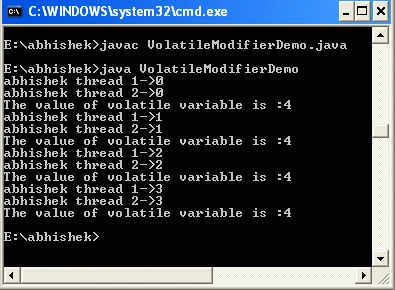
OUTPUT
Resources
Join the conversation! Your thoughts help the community grow.