

Introduction
In this article, we will learn how to create a pipe to split camelcase with space in Angular Application.
Prerequisites
- Basic Knowledge of Angular 2 or higher
- Visual Studio Code
- Node and NPM installed
- Bootstrap (Optional)
Create an Angular project by using the following command.
Bash
ng new angappNow install Bootstrap by using the following command.
Bash
npm install bootstrap --saveNow open the styles.css file and add the Bootstrap file reference. To add a reference in the styles.css file, add this line.
Bash
@import '~bootstrap/dist/css/bootstrap.min.css';Create a Pipe
Now, create a custom pipe by using the following command.
Bash
ng generate pipe CamelCaseToSpacesPipeNow open the camelCaseToSpaces.pipe.ts file and add the following code.
JavaScript
import { Pipe, PipeTransform } from '@angular/core';

@Pipe({ name: 'camelCaseToSpaces' })
export class CamelCaseToSpacesPipe implements PipeTransform {
  transform(camelCaseText: string): string {
    if (!camelCaseText) return '';
    return camelCaseText.replace(/([a-z])([A-Z])/g, '$1 $2');
  }
}
Now open app.component.html file and add the following code.
HTML / XML
<div class="container" style="margin-top:10px;margin-bottom: 24px;">
  <div class="col-sm-12 btn btn-info">
    Split camel case  to  space using Angular  Pipe
  </div>
</div>
<div class="container">
  <p>{{ 'camelCasePipe' | camelCaseToSpaces }}</p>
</div>
Now, import this pipe into the app module. Add the following code in app.module.ts.
JavaScript
import { NgModule } from '@angular/core';
import { BrowserModule } from '@angular/platform-browser';
import { FormsModule } from '@angular/forms';
import { HttpClientModule } from '@angular/common/http';
import { AppRoutingModule } from './app-routing.module';
import { AppComponent } from './app.component';
import { CamelCaseToSpacesPipe } from './CamelCase.pipe';


@NgModule({
  declarations: [
    AppComponent,CamelCaseToSpacesPipe
  ],
  imports: [
    BrowserModule,
    AppRoutingModule,
    FormsModule,
    HttpClientModule
  ],
  providers: [],
  bootstrap: [AppComponent],

})
export class AppModule { }
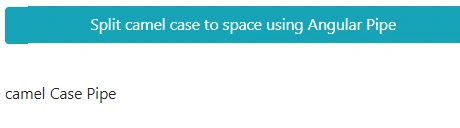
Now run the application using npm start and check the result.
Join the conversation! Your thoughts help the community grow.