

Do not name your procedures with the prefix ‘sp_’
The following script returns all system procedures; 1390 system procedures in this case and all starting with prefix ‘sp_’.
- SELECT QUOTENAME(SCHEMA_NAME(SCHEMA_ID))+'.'+QUOTENAME(NAME)) AS SystemProcedures
- FROM sys.all_objects
- WHERE TYPE='P' AND is_ms_shipped=1
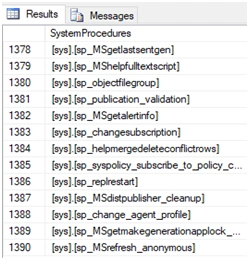
Now, if we create procedures with the same prefix, then there are two things that will happen within the system.
- While executing your procedure, the system will first scan through all system procedures and then user-defined procedures. This means that the procedure might take more time for execution, thus decreasing system performance.
- If while scanning the system procedure, a match is found, i.e., the name of your procedure is the same as that of a system procedure, then the system procedure will always get executed.
Because of this, you will get an unexpected output which can be an exception, error, some system related information etc.; and you might never understand the reason behind this.
Consider the following example where we have created a procedure named sp_add_agent_parameter.
- CREATE PROCEDURE sp_add_agent_parameter
- AS
- BEGIN
- SELECT 'Creating procedure with prefix ''sp_'''
- END

NOTE
You can avoid both the problems mentioned above by executing the procedure as schema_name.procedure_name. But still, it is better to avoid using the prefix ‘sp_’.
Stop using select(*)
Selecting all columns from a table becomes easy by using Select (*) because then, we don't need to list the column names individually. But using this approach can lead to some problems.
- Select (*) returns columns in the same order as defined in the table design. So, if the desired output needs the columns to be in some other order, using this approach won't work.
- Suppose, we have a table ‘Product’ having the following columns.

- INSERT INTO ElectronicProducts SELECT * FROM ProductMaster WHERE ProductType='Electric'


- INSERT INTO ElectronicProducts
- SELECT ProductID,ProductName,ProductType,ProductCost FROM ProductMaster WHERE ProductType='Electric'
Then, it would have worked in all situations.
Never use column number with ‘order by’ clause
The ‘order by’ clause is used to sort the records in ascending or descending order. Either of the column numbers and column names can be used with the ‘order by’ clause.
Now, consider that we have a table ‘Employee’ having columns EmployeeID, EmployeeName, EmployeeSalary; and we want to find the Employee who earns the lowest. And for doing so we write the following script,
- SELECT TOP 1 * FROM Employee ORDER BY 3
- By just looking at the script, we can never understand according to which column the records are being sorted. The person who is trying to understand the script needs to do an extra step of checking the table design to understand what column 3 is. To avoid this extra step and make it simple for anyone to understand the script it is better to use column name with ‘order by’.
- Consider a situation where due to some reason we need to add a new column ‘EmployeeDepartment’ to the ‘Employee’ table, but this column is to be added after the EmployeeName column. So now the table has columns in the order- EmployeeID, EmployeeName, EmployeeDepartment, EmployeeSalary.
Instead, if we had written column name with the ‘order by’ clause then modifying the table structure would not have caused an issue.
- SELECT TOP 1 * FROM Employee ORDER BY EmployeeSalary
Suppose you are designing an Employee management system in which there is an option to search employees by their name.
You write the following script for searching and displaying employee details.
- SELECT EmployeeID, EmployeeName, EmployeeSalary, EmployeeDepartment FROM Employee WHERE EmployeeName='Jacob'
The answer is NO, as it takes more time to scan a table having millions of records than a table having just 1000 records. Therefore we should always think about future performance while writing a script even if it's an easy one.
In this case, for faster search, we should create the index on EmployeeName. The index can be created using the script.
- CREATE INDEX EmployeeNameIndex ON Employee(EmployeeName)
Consider the following procedure ‘InsertData’ , which is used to insert data into the Employee table.
- ALTER PROCEDURE [dbo].[InsertData] @employeeName varchar(30),
- @employeeDepartment varchar(15),
- @employeeSalary money
- AS
- BEGIN
- INSERT INTO Employee (EmployeeName, EmployeeDeprtment, EmployeeSalary)
- VALUES (@employeeName, @employeeDepartment, @employeeSalary)
- END

When a client sends a request to insert data; this output is stored in the packet DONE_IN_PROC and sent back to the client, but it is of no use on the client.
Also, sending this information leads to more network usage. To avoid this, we should use ‘nocount’.
It can be used in the above procedure as,
- ALTER PROCEDURE [dbo].[InsertData] @employeeName varchar(30),
- @employeeDepartment varchar(15),
- @employeeSalary money
- AS
- BEGIN
- SET NOCOUNT ON;
- INSERT INTO Employee (EmployeeName, EmployeeDeprtment, EmployeeSalary)
- VALUES (@employeeName, @employeeDepartment, @employeeSalary)
- END
If we do need to know the number of rows returned/affected, we can use @@ROWCOUNT with ‘nocount’.
Table aliases- good or bad?To be honest, table aliases are both good and bad; it all depends on the way you use them. The following code snippet returns employee names with their respective boss names.
- SELECT e1.EmployeeName, e2.EmployeeName as BossName from Employee e1 inner join Employee as e2 ON e1.BossID=e2.EmployeeID
Table aliases like this (e1 and e2) make it difficult for anyone to understand the code. Even table aliases should be meaningful for fast understanding and to improve the readability. Mostly, using table aliases should be avoided unless you need to do a self-join.
The above code can be re-written as follows to improve its readability.
- SELECT Employee .EmployeeName, Boss.EmployeeName as BossName from Employee inner join Employee as Boss ON Employee .BossID=Boss.EmployeeID
Joginder BangerPosted Mar 10, 2018, 11:06 PM
I Believe many index on single table very harmful for performance wise, agree with that?
Satish Kumar VadlavalliPosted Mar 7, 2018, 2:48 AM
Nice tips. Thank you.
Rufaro KatsambaPosted Feb 26, 2018, 1:54 PM
Great Article .Thanks
Hiten PandyaPosted Feb 15, 2018, 6:14 AM
Good share with simple explanation.
Ankit SharmaPosted Feb 15, 2018, 2:24 AM
Great article. Thanks for sharing
Dharmraj ThakurPosted Feb 14, 2018, 11:14 PM
Well explained... good job
Bhavesh JadavPosted Feb 14, 2018, 10:57 PM
Superb explanation with example and easy way,, thanks to share Mr. Karishma Gajula
Mahesh ChandPosted Feb 14, 2018, 9:25 PM
Nice tips. Thank you. Feedback on article formatting. Headings should not have bullets and they should start with same left side alignment as a new paragraph. Heading can have a number and may be larger font. Thanks!
Khaja MoizuddinPosted Feb 14, 2018, 11:09 AM
Great Start..........