
Whenever we want to backup or move SQL Server database, most of us prefer to use regular backup utility which is available through Enterprise Manager in SQL Server 2000 or Management Studio in SQL Server 2005. Limitation of using Enterprise Manager or Management Studio is we have to use either complete or differential backups. This is a very tedious task when we want to backup only a small portion of a large database. For example, in my database I would like to take backup of only 15 tables out of 100 tables or I may want to backup only a few records from these selected tables. For that reason I was looking for a small utility which allows me to do so. After searching through hundreds of utility programs, I have decided to write my own utility.
New Release (1.1.0)
It has been a year since I wrote this article. I got many responses for this backup utility. So I decided to update this program and made major changes to make it more stable in terms of functionality and performance. Here is a list of changes I have made in this program.
- Backup file extension is now .ZIP instead of .SQLBackup. This is to avoid any confusion.
- Old version was having issue with restoring data in certain conditions. It should have been fixed in this version.
- Multi threading is added with backup and restore processes. This way program won't freeze during long operations.
- UI is improved to display proper status of backup and restore.
- Included GNU license.
Download Source (941KB)
Download Setup (2MB)
Features
- Backup of selected objects
- Backup of selected data
- Backup of only scripts
- Backup of only data
- Backup of both scripts and data
- Supports backup from remote severs over web, LAN or even local pc.
Using Program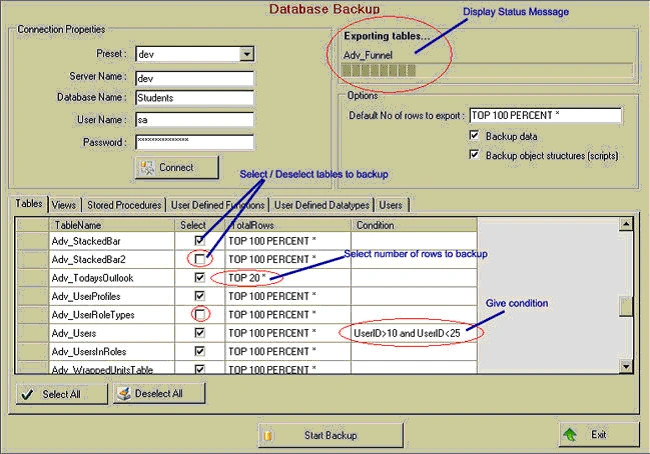
To backup database
- Open database backup window from tools menu.
- Enter server name, database name, user name and password for SQL Server.
- Click on Connect. This will display all available tables, views, stored procedures, user defined functions, user defined datatypes and users from database.
- If you want to backup only data, check Backup Data and remove checkmark from Backup object structures (Scripts).
- If you want to backup only scripts, check Backup object structures (Scripts) and remove checkmark from Backup Data.
- Select objects that you want to backup from list. By default all objects are selected. In above picture, Adv_StackedBar2 and Adv_UserRoleTypes tables will be excluded from backup.
- Apply any condition on table data. For example 'UserID > 10 and UserID < 25' in above picture. It means only those records will be exported which satisfy this condition.
- Modify number of rows to export on a particular 'table'. For example in above picture Top 20, means only top 20 rows will be exported for 'Adv_TodaysOutlook' table.
- Click on Start Backup. It will ask you to enter a file name and location. Note that backup file has extension *.zip. Remeber this is not a standard sql server backup file. It's just a zip file which contains scripts for tables, views, stored procedures etc. It also includes data in row (.dat) files.
To restore backup
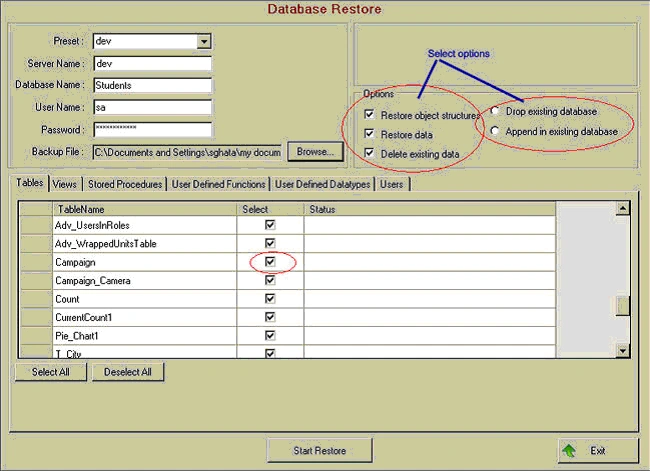
- Open Database restore window from tools menu.
Using other features
As you can see both backup and restore forms include Preset combo box. What it does is it records server name, database name, user name and password information every time you backup or restore a database. Next time when you want to use same server you don't need to enter all these parameters again. You can select it from Preset combo list. It also remembers last accessed sql server name.
Using Code
I am not writing description of code in much detail. Most of the code is self explanatory and commented. Just a few quick notes. I have used SQL-DMO library for all database related tasks. For SQL-DMO library either SQL Express or SQL Server 2000 client tools must be installed on your computer.
Objects from SQL-DMO Library
'Server object from SQL-DMO library
Dim oServer As New SQLServer2
'Database object from SQL-DMO library
Dim db As SQLDMO.Database2
'BCP Utility from SQL-DMO Library
Dim objBCP As New SQLDMO.BulkCopy2
Function for exporting data to a file from SQL Server
objBCP.DataFilePath = "c:\temp\EmployeeData.dat"
db.Tables.Item("Employee").ExportData(objBCP)
Generating SQL Script for an SQL Server object.
'Generate script with drop statement
Dim SQL As String = db.GetObjectByName("Employee").Script(SQLDMO_SCRIPT_TYPE.SQLDMOScript_Drops) + db.GetObjectByName("Employee").Script()
Limitations
This utility can not take backup of user roles and triggers.
Backup file is in zip format. (You can extract it using winzip or other zip utility and view its content.). It can not be restored using SQL Server Enterprise Manager.
Enhancements
This program can be enhanced further to include a windows service which can take regular backups for SQL Server without user interactions. Thus this utility can be utilized for your regular backups.
Acknowledgments
I have used SharpZipLib(ICSharpCode.SharpZipLib.dll), a free open source zip utility library available from http://www.icsharpcode.net, for zipping backup directory. This file is included in Bin\Release folder.
Requirements
Visual Studio.Net 2005 (For source code)
.Net Framework 2.0
MS SQL Server 2000 or MS SQL Express 2005 or MS SQL Server 2005 client components (For SQL-DMO Library)
How to install utility
- Make sure that you have either SQL Server 2000 or 2005 client components installed on your computer. If you do not want to install these components, you can install Microsoft SQL Server 2005 Backward Compatibility Components. You can download it from following link,Download Microsoft SQL Server 2005 Backward Compatibility Components These components are needed for SQL-DMO library
- Download setup zip file from link provided on top of this article. Extrace and run setup.exe. It should create icons in your programs menu and desktop
How to use source code
Download source code zip file from link provided on top of this article and run DatabaseBackup.sln solution file with Visual Studio 2005.
Download Source (941KB)
Download Setup (2MB)
d.gratpainPosted Feb 16, 2008, 5:04 AM
good code but why do you use sql dmo (obsolete) and not sql smo (new with VS 2005) ?