

SQL Create Stored Procedure
SQL stored procedure is a prepared SQL code that you can save, so the code can be reused over and over again. So if you have a query that you write over and over again, save it as a stored procedure, and then just call it to execute it in SQL. We can also pass parameters to a stored procedure so that the stored procedure can act based on the parameter values that are passed.
SQL stored procedure creates a Common Language Runtime (CLR) stored
procedure in SQL Server, Azure SQL database. Stored procedures are similar to procedures
in other programming languages in that they can follow:
-
Accept input parameters and return multiple values in the form of output parameters to the calling procedure or batch.
-
Contain programming statements that perform operations in the database, including calling other procedures.
-
Return a status value to a calling procedure or batch to indicate success or failure (and the reason for failure).
Use the following statement to create a permanent procedure in the current database or a temporary procedure in the sample database.
Syntax
- CREATE PROCEDURE procedure_name
- AS
- sql_statement
- GO;
To execute a Stored Procedure
Syntax
- EXEC procedure_name;
Creating a simple Stored_ Procedure
The following example creates a stored procedure that returns all OrderDetails (OrderName,OrderAddress, and OrderDate supplied), their name, Address, Date, and names from a view in the Sample database, this
procedure does not use any parameters.
The following example demonstrates
three methods of executing the procedure.
Syntax
- CREATE PROCEDURE sp_GetAllOrderDetails
- AS
- SET NOCOUNT ON;
- SELECT OrderName, orderAddress, OrderDate
- FROM OrderDetails
- GO
- SELECT * FROM OrderDetails
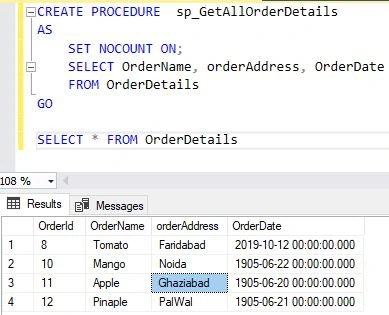
The Sp_GetOrderDetail procedure can be executed in the following ways
Syntax
- EXECUTE Sp_GetOrderDetail ;
- GO
- -- Or
- EXEC Sp_GetOrderDetail ;
- GO
- -- Or, if this procedure is the first statement within a batch:
- Sp_GetOrderDetail
Returning more than one result set in Stored Procedure
The following procedure returns two result sets in sp.
Syntax
- CREATE PROCEDURE SP_multipleOrderDetails
- AS
- SELECT TOP(10) OrderId, OrderName, orderAddress, OrderDate FROM OrderDetails
- SELECT TOP(10) EmpId, EmpAddress, EmpCity FROM EmployeeDetail ;
- GO
Creating a CLR procedure
This example creates the sp_GetNewPhotoDetails procedure that references the GetPhotoFromDB method of the LargeObjectBinary class in the HandlingLOBUsingCLR assembly. Before the procedure is created, the HandlingLOBUsingCLR assembly is registered in the local database.
Syntax
- CREATE ASSEMBLY HandlingLOBUsingCLR
- FROM '\\MachineName\HandlingLOBUsingCLR\bin\Debug\HandlingLOBUsingCLR.dll';
- GO
- CREATE PROCEDURE sp_GetNewPhotoDetails
- (
- @NewPhotoID int,
- @CurrentDirectory nvarchar(1024),
- @FileName nvarchar(1024)
- )
- AS EXTERNAL NAME HandlingLOBUsingCLR.LargeObjectBinary.GetPhotoFromDB;
- GO
Passing Parameters
This section demonstrates how to use input and output parameters to pass values to and from a stored procedure in SQL.
Creating a procedure with input parameters
The following example creates a stored procedure that returns information for a specific EmployeeDetails by passing values for the employee's Empname and EmpAddress. This procedure accepts only exact matches for the parameters passed.
Syntax
- IF OBJECT_ID ( 'Sp_GetEmployeeDetails', 'P' ) IS NOT NULL
- DROP PROCEDURE Sp_GetEmployeeDetails
- GO
- CREATE PROCEDURE Sp_GetEmployeeDetails
- @EmpName nvarchar(50),
- @EmpAddress nvarchar(50)
- AS
- SET NOCOUNT ON;
- SELECT EmpId, EmpName,EmpAddress,EmpCity
- FROM EmployeeDetail
- WHERE EmpName = @EmpName AND EmpAddress= @EmpAddress ;
- GO
-
The Sp_GetEmployeeDetailsprocedure can be executed in the following ways.
Syntax
- EXECUTE Sp_GetEmployeeDetail N'Rohit', N'Noda';
- -- Or
- EXEC sp_GetEmployeeDetail @EmpName = N'Rohit', @EmpAddress = N'Noida';
- GO
- -- Or
- EXECUTE sp_GetEmployeeDetail @EmpName = N'Rohit', @EmpAddress = N'Noida';
- GO
- -- Or, if this procedure is the first statement within a batch:
- sp_GetEmployeeDetail N'Rohit', N'Noida';
Using a procedure with wildcard parameters in SQL
The following example creates a stored procedure that returns information for employees by passing full or partial values for the OrderDetails OrderName and OrderDetail. This procedure pattern matches the parameters passed or, if not supplied, uses the preset default (last names that start with the letter
N).Syntax
- IF OBJECT_ID ( 'OrderDetails', 'P' ) IS NOT NULL
- DROP PROCEDURE Sp_OrderDetails2 ;
- GO
- CREATE PROCEDURE sp_OrderDetail2
- @OrderName nvarchar(50) = N'A%',
- @OrderAddress nvarchar(50) = N'%'
- AS
- SET NOCOUNT ON;
- SELECT OrderName, OrderAddress
- FROM OrderDetails
- WHERE OrderName LIKE OrderName AND orderAddress LIKE @OrderAddress;
The Sp_OrderDetails2 procedure can be executed in many combinations. Only a few possible combinations are shown here.
- EXECUTE Sp_OrderDetails2;
- -- Or
- EXECUTE Sp_OrderDetails N'Wi%';
- -- Or
- EXECUTE Sp_OrderDetails @OrderName = N'%';
- -- Or
- EXECUTE Sp_OrderDetails N'[AP]ars[MN]n';
- -- Or
- EXECUTE Sp_OrderDetails N'AP', N'MN';
- -- Or
- EXECUTE Sp_OrderDetails N'A%', N'M%';
Using output parameters in stored_porcedure
The following example creates the Get_OrderDetails
Select statements and multiple output parameters. Output parameters enable an external procedure, a batch, or more than one SQL statement to access a value set during the procedure execution. Syntax
- IF OBJECT_ID ( 'Get_OrderDetails', 'P' ) IS NOT NULL
- DROP PROCEDURE Production.uspGetList;
- GO
- CREATE PROCEDURE GetUserDetails
- @OrderId varchar(50),
- @OrderName varchar(50),
- @OrderAddress varchar(50),
- @OrderDate datetime
- AS
- SET NOCOUNT ON;
- SELECT p.[EmpName] AS Product, p.EmpName AS 'Noida'
- FROM EmployeeDetail AS p
- JOIN OrderDetails AS s
- ON OrderId = EmpId
- WHERE s.[orderAddress] LIKE @OrderName AND p.EmpName < @OrderName;
Note
The output variable must be defined when the procedure is created and also when the variable is used. The parameter name and variable name do not have to match; however, the data type and parameter positioning must match, unless OrderName = variable is used.
Using a Table-Valued Parameter
The following example uses a table-valued parameter type to insert multiple rows into a table. The example creates the parameter type, declares a table variable to reference it, fills the parameter list, and then passes the values to a stored procedure. The stored procedure uses the values to insert multiple rows into a table in SQL.
Syntax
- /* Create a table type. */
- CREATE TYPE OrderType AS TABLE
- ( Ordername VARCHAR(50)
- , CostRate INT );
- GO
- /* Create a procedure to receive data for the table-valued parameter. */
- CREATE PROCEDURE usp_InsertProductionLocation
- @TVP OrderType READONLY
- AS
- SET NOCOUNT ON
- INSERT INTO [sample].[Production].[Location]
- ([Name]
- ,[CostRate]
- ,[Availability]
- ,[ModifiedDate])
- SELECT *, 0, GETDATE()
- FROM @TVP;
- GO
- /* Declare a variable that references the type. */
- DECLARE @LocationTVP
- AS OrderType oRDER ;
- /* Add data to the table variable. */
- INSERT INTO @LocationTVP (LocationName, CostRate)
- SELECT [Name], 0.00
- FROM
- [sample].[Person].[StateProvince];
- /* Pass the table variable data to a stored procedure. */
- EXEC usp_InsertProductionLocation @LocationTVP;
- GO
Using an OUTPUT cursor parameter in StoredProcedure
The following example uses the Output cursor parameter to pass a cursor that is local to a procedure back to the calling batch, procedure, or trigger. First, create the procedure that declares and then opens a cursor on the
OrderDetails table.Syntax
- CREATE PROCEDURE dbo.uspCurrencyCursor
- @CurrencyCursor CURSOR VARYING OUTPUT
- AS
- SET NOCOUNT ON;
- SET @CurrencyCursor = CURSOR
- FORWARD_ONLY STATIC FOR
- SELECT OrderName, orderAddress
- FROM OrderDetails ;
- OPEN @CurrencyCursor;
- GO
Next, run a batch that declares a local cursor variable, executes the procedure to assign the cursor to the local variable, and then fetches the rows from the cursor.
Modifying data by using a Stored Procedure
Examples in this section demonstrate how to insert or modify data in tables or views by including a Data Manipulation Language (DML) statement in the definition of the procedure.
Using Update data in a stored procedure
The following example uses an UPDATE statement in a stored procedure. The procedure takes one input parameter, @NewHours, and one output parameter @RowCount. The @NewHours parameter value is used in the UPDATE statement to update the column VacationHours in the table OrderDetails The @RowCount output parameter is used to return the number of rows affected to a local variable. The CASE expression is used in the SET clause to conditionally determine the value that is set for NewHours. When the employee is paid hourly (OrderId = 0), VacationHours is set to the current number of hours plus the value specified in @NewHours otherwise, OrderId is set to the value specified in @NewHours.
Syntax
- CREATE PROCEDURE Order_Details
- @NewHours smallint
- AS
- SET NOCOUNT ON;
- UPDATE OrderDetails
- SET OrderId =
- ( CASE
- WHEN OrderId = 0 THEN OrderId + @NewHours
- ELSE @NewHours
- END
- )
- WHERE OrderId = 1;
- GO
- EXEC Order_Details 40;
Error Handling
Examples in this section demonstrate methods to handle errors that might occur when the stored procedure is executed.
Using TRY...CATCH statement
The following example using the TRY...CATCH construct to return error information caught during the execution of a stored procedure.
Syntax
- CREATE PROCEDURE OrderDetails ( @WorkOrderID int )
- AS
- SET NOCOUNT ON;
- BEGIN TRY
- BEGIN TRANSACTION
- DELETE FROM OrderDetails
- WHERE OrderId = @OrderID;
- -- Delete the rows from the parent table, orderdetails, for the specified OrderDetails.
- DELETE FROM OrderDetails
- WHERE OrderId = @OrderID;
- COMMIT
- END TRY
- BEGIN CATCH
- -- Determine if an error occurred.
- IF @@TRANCOUNT > 0
- ROLLBACK
- -- Return the error information.
- DECLARE @ErrorMessage nvarchar(4000), @ErrorSeverity int;
- SELECT @ErrorMessage = ERROR_MESSAGE(),@ErrorSeverity = ERROR_SEVERITY();
- RAISERROR(@ErrorMessage, @ErrorSeverity, 1);
- END CATCH;
- GO
- EXEC OrderDetails 13;
- /* Intentionally generate an error by reversing the order in which rows
- are deleted from the parent and child tables. This change does not
- cause an error when the procedure definition is altered, but produces
- an error when the procedure is executed.
- */
- ALTER PROCEDURE OrderDetails ( @OrderID int )
- AS
- BEGIN TRY
- BEGIN TRANSACTION
- -- Delete the rows from the parent table, OrderDetails, for the specified work order.
- DELETE FROM OrderDetails
- WHERE OrderId = @OrderID;
- -- Delete rows from the child table, OrderDetails, for the specified work order.
- DELETE FROM OrderDetails
- WHERE OrderId = @OrderID;
- COMMIT TRANSACTION
- END TRY
- BEGIN CATCH
- -- Determine if an error occurred.
- IF @@TRANCOUNT > 0
- ROLLBACK TRANSACTION
- -- Return the error information.
- DECLARE @ErrorMessage nvarchar(4000), @ErrorSeverity int;
- SELECT @ErrorMessage = ERROR_MESSAGE(),@ErrorSeverity = ERROR_SEVERITY();
- RAISERROR(@ErrorMessage, @ErrorSeverity, 1);
- END CATCH;
- GO
- -- Execute the altered procedure.
- EXEC OrderDetails 15;
- DROP PROCEDURE OrderDetails
Obfuscating the Procedure Definition in SQL
Examples in this section show how to obfuscate the definition of the stored procedure.
Using the WITH ENCRYPTION option
Syntax
- CREATE PROCEDURE Sp_Employee_Name
- WITH ENCRYPTION
- AS
- SET NOCOUNT ON;
- SELECT EmpId,EmpName,EmpAddress,EmpCity
- FROM EmployeeDetail ;
- GO
The following example creates the Sp_Employee_Name procedure.
Forcing the Procedure to Recompile in SQL
Examples in this section use the Recompile clause to force the procedure to recompile every time it is executed.
Using the WITH RECOMPILE option in Stored_porcedure
The WITH RECOMPILE clause is helpful when the parameters supplied to the procedure are not typical, and when a new execution plan should not be cached or stored in memory.
Syntax
- IF OBJECT_ID ( 'dbo.uspProductByVendor', 'P' ) IS NOT NULL
- DROP PROCEDURE dbo.uspProductByVendor;
- GO
- CREATE PROCEDURE dbo.uspProductByVendor @Name varchar(30) = '%'
- WITH RECOMPILE
- AS
- SET NOCOUNT ON;
- SELECT v.Name AS 'Vendor name', p.Name AS 'Product name'
- FROM Purchasing.Vendor AS v
- JOIN Purchasing.ProductVendor AS pv
- ON v.BusinessEntityID = pv.BusinessEntityID
- JOIN Production.Product AS p
- ON pv.ProductID = p.ProductID
- WHERE v.Name LIKE @Name;
Setting the Security Context
Examples in this section use the Execute as a clause to set the security context in which the stored procedure executes.
Using the Execute as clause statement
The following example shows using the execute as a clause to specify the security context in which a procedure can be executed. In the example, the option Caller specifies that the procedure can be executed in the context of the user that calls it.
Syntax
- CREATE PROCEDURE sp_EmpoyeeDetails
- WITH EXECUTE AS CALLER
- AS
- SET NOCOUNT ON;
- SELECT v.EmpName AS Vendor, p.EmpAddress AS 'Product name',
- v.EmpAddress AS 'Address',
- v.EmpCity AS Availability
- FROM EmployeeDetails v
- INNER JOIN OrderDetails pv
- ON v.OrderId = pv.EmpId
- ORDER BY v.EmpName ASC;
- GO
Creating custom permission sets in storedprocedure
The following example uses Execute to create custom permissions for a database operation. Some operations such as a truncate table, do not have grantable permissions. By incorporating the truncate table statement within a stored procedure and specifying that procedure execute as a user that has permissions to modify the table, you can extend the permissions to truncate the table to the user that you grant execute permissions on the stored procedure.
Syntax
- CREATE PROCEDURE SP_EmployeeDetails
- WITH EXECUTE AS SELF
- AS TRUNCATE TABLE sample..EmployeeDetails;
Raj KumarPosted Jan 8, 2020, 8:40 AM
Nice article with good explanation.