

Abstract
Periodic SqlServer database maintenance steps, like 1)updating statistics and 2)defragment indexes, can contribute to query performance.
1. Query performance problem – check DB maintenance
Our application is ASP.NET MVC on the SqlServer database, and we received complaints from one of our customers that some queries are timing out in the production system. So, we have a query performance problem.
We, of course, looked into a number of places for potential improvements, like rewriting C#/EF queries, Indexing strategies for the Tables involved in the query Execution plan, activating the “Query Store” tool, etc.
But also, one area appeared as a candidate for improvement, which is typically in the domain of the customer’s DBA/Database Analysts. Some database maintenance steps can contribute to query performance.
1.1. DB maintenance steps of interest
We identified 2 potential steps of interest.
- Update database statistics
- Defragment Indexes
Step 1. While doing query execution plan analysis via different tools available on our test system, we noticed that some statistics were not updated in 2 years. Database statistics are important since the query optimizer uses info like table cardinality to create an optimal execution plan. So, there is no harm in triggering the update procedure periodically by ourselves.
Step 2. Some tables in our database are growing very fast due to the number of daily transactions. So, indexes could become fragmented over time. Periodic index examination for fragmentation and rebuild can be beneficial. Only rebuilding an index can interfere with the regular operation of a database. Typically, it locks the table whose index is rebuilt against writes.
1.2. Automatic or manual execution
Depending on the customers' specific situation, we are considering 2 strategies for execution of the above steps.
- Manual maintenance execution
- Automatic periodic execution
Approach 1. The idea is to enable the ASP.NET application administrator to manually activate maintenance execution, based on need, via the application menu option at the time when he/she thinks is suitable for that environment. App administrators might not have DBA access or skills to run necessary stored procedures manually.
Approach 2. The idea is to schedule periodic execution of the maintenance steps above, for example, once a week when the database workload is low. Rebuilding an index can interfere with the regular operation of a database. Typically it locks the table whose index is rebuilt against writes.
2. Update database statistics
Based on [1]
- In some cases, you can improve query performance by using UPDATE STATISTICS or the stored procedure sp_updatestats to update statistics more frequently than the default updates.
- Updating statistics causes queries to recompile. We recommend not updating statistics too frequently.
- If using UPDATE STATISTICS or making changes through SQL Server Management Studio, it requires ALTER permission on the table or view.
- If using sp_updatestats requires membership in the sysadmin fixed server role or ownership of the database (dbo).
-- Update all statistics in a table
USE AdventureWorks2022;
GO
-- The following example updates the statistics for all indexes on the SalesOrderDetail table.
UPDATE STATISTICS Sales.SalesOrderDetail;
GO
-----------------------------------------
-- Update all statistics in a database
USE AdventureWorks2022;
GO
-- The following example updates the statistics for all tables in the database.
EXEC sp_updatestats;
3. Index defragmentation
Based on [2]
- Use solutions such as “Adaptive Index Defrag” to automatically manage index defragmentation and statistics updates.
- This procedure automatically chooses whether to rebuild or reorganize an index according to its fragmentation level, among other parameters, and update statistics with a linear threshold.
- An intelligent defrag on one or more indexes, as well as required statistics update.
- You need to 1) create the usp_AdaptiveIndexDefrag and its supporting objects by using script form [2]; 2) then execute the script with custom parameters.
Typical Usage
- EXEC dbo.usp_AdaptiveIndexDefrag: The defaults are to defragment indexes with fragmentation greater than 5%; rebuild indexes with fragmentation greater than 30%; defragment ALL indexes; commands WILL be executed automatically; defragment indexes in DESC order of the RANGE_SCAN_COUNT value; time limit was specified and is 480 minutes (8 hours); ALL databases will be defragmented; ALL tables will be defragmented; WILL be rescanning indexes; the scan will be performed in LIMITED mode; LOBs will be compacted; limit defrags to indexes with more than 8 pages; indexes will be defragmented OFFLINE; indexes will be sorted in the DATABASE; indexes will have its ORIGINAL Fill Factor; only the right-most populated partitions will be considered if greater than 8 page(s); statistics WILL be updated on reorganized indexes; defragmentation will use system defaults for processors; does NOT print the t-sql commands; does NOT output fragmentation levels; waits 5s between index operations;
- EXEC dbo.usp_AdaptiveIndexDefrag @dbScope = 'AdventureWorks2014': Same as above, except its scope is only the 'AdventureWorks2014' database.
- EXEC dbo.usp_AdaptiveIndexDefrag @dbScope = 'AdventureWorks2014', @tblName = 'Production.BillOfMaterials': Same as above but only acting on the BillOfMaterials table.
4. Sample execution
4.1. Update statistics
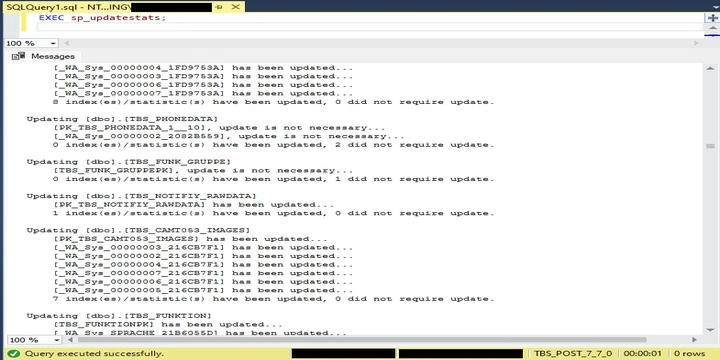
Here is a run on my test database, SqlServer version 15.0 (Microsoft SQL Server 2019).
4.2. Index Defrag
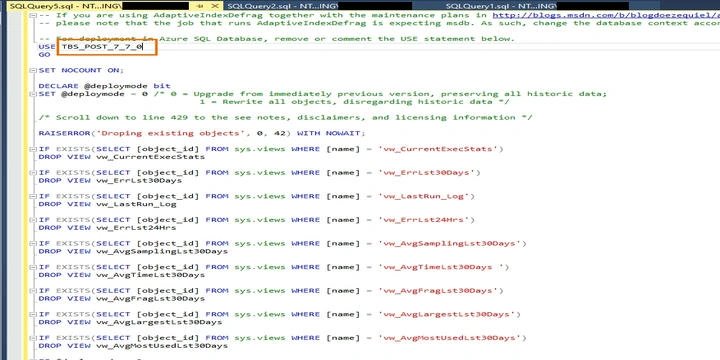
Here, we first use the script from [2] to create usp_AdaptiveIndexDefrag.
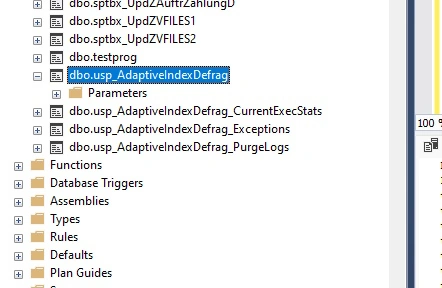
Then verify that new objects are there.
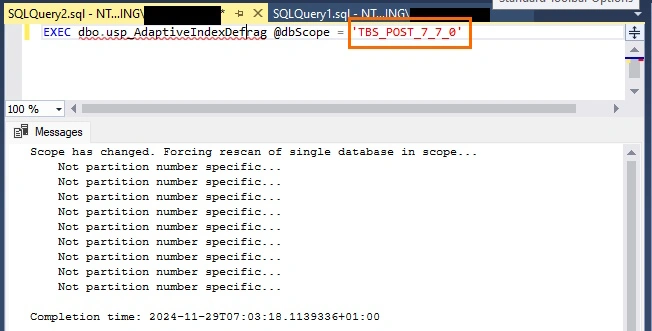
Then, execute the script.
5. References
[1] Update Statistics
[2] AdaptiveIndexDefrag
https://github.com/Microsoft/tigertoolbox/tree/master/AdaptiveIndexDefrag
Join the conversation! Your thoughts help the community grow.