

Introduction
This article demonstrates an interesting and very useful concept in ASP.NET.
Question: What is substitution control?
In simple terms "This enables the dynamic update of a portion of a page based on a value received from the method".
Step 1: Create a new web application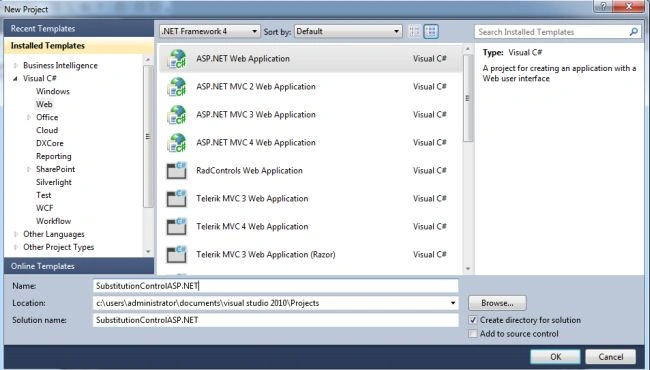
Step 2: Add a method name for the substitution control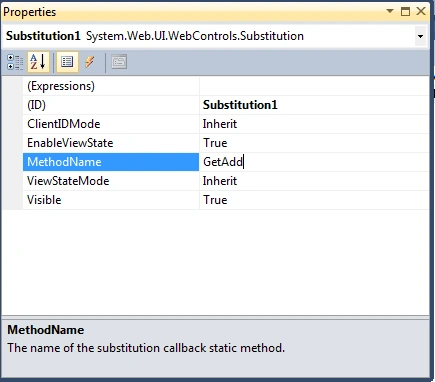
Step 3: The complete code of WebForm1.aspx is as in the following:
- <%@ Page Language="C#" AutoEventWireup="true" CodeBehind="WebForm1.aspx.cs" Inherits="SubstitutionControlASP.NET.WebForm1" %>
- <!DOCTYPE html PUBLIC "-//W3C//DTD XHTML 1.0 Transitional//EN" "http://www.w3.org/TR/xhtml1/DTD/xhtml1-transitional.dtd">
- <html xmlns="http://www.w3.org/1999/xhtml">
- <head id="Head1" runat="server">
- <title></title>
- </head>
- <body>
- <form id="form1" runat="server">
- <center>
- <div>
- <table>
- <tr>
- <td colspan="2" align="center">
- <asp:Label ID="Label1" runat="server" Text="Substitution Control - ASP.NET" Font-Bold="true"
- Font-Size="Large" Font-Names="Verdana" ForeColor="Maroon"></asp:Label>
- </td>
- </tr>
- <tr>
- <td>
- <asp:Label ID="Label6" runat="server" Text="Please Enter FirstNumber" Font-Size="Large"
- Font-Names="Verdana" Font-Italic="true"></asp:Label>
- </td>
- <td>
- <asp:TextBox ID="TextBox4" runat="server"></asp:TextBox>
- </td>
- </tr>
- <tr>
- <td>
- <asp:Label ID="Label2" runat="server" Text="Please Enter SecondNumber" Font-Size="Large"
- Font-Names="Verdana" Font-Italic="true"></asp:Label>
- </td>
- <td>
- <asp:TextBox ID="TextBox1" runat="server"></asp:TextBox>
- </td>
- </tr>
- <tr>
- <td colspan="2" align="center">
- <asp:Button ID="Button1" runat="server" Text="Addition" Font-Names="Verdana" Width="213px"
- BackColor="Orange" Font-Bold="True" OnClick="Button1_Click" />
- </td>
- </tr>
- <tr>
- <td colspan="2" align="center">
- <asp:Substitution ID="Substitution1" runat="server" MethodName="GetAdd" />
- </td>
- </tr>
- <tr>
- <td colspan="2" align="center">
- <asp:Label ID="Label5" runat="server" Font-Bold="true" Font-Names="Verdana"></asp:Label>
- </td>
- </tr>
- </table>
- </div>
- </center>
- </form>
- </body>
- </html>
Step 4: The complete code of WebForm1.aspx.cs is as in the following:
- using System;
- using System.Collections.Generic;
- using System.Linq;
- using System.Web;
- using System.Web.UI;
- using System.Web.UI.WebControls;
- namespace SubstitutionControlASP.NET
- {
- public partial class WebForm1 : System.Web.UI.Page
- {
- protected void Page_Load(object sender, EventArgs e)
- {
- }
- protected void Button1_Click(object sender, EventArgs e)
- {
- if (string.IsNullOrEmpty(TextBox4.Text) || string.IsNullOrEmpty(TextBox1.Text))
- {
- Label5.Text = "Please Enter Some Values";
- Label5.ForeColor = System.Drawing.Color.Red;
- }
- else
- {
- a = int.Parse(TextBox4.Text);
- b = int.Parse(TextBox1.Text);
- }
- }
- static int a, b;
- public static String GetAdd(HttpContext context)
- {
- return (a + b).ToString();
- }
- }
- }
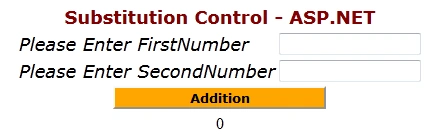
Step 5: The output of the application is as in the following:
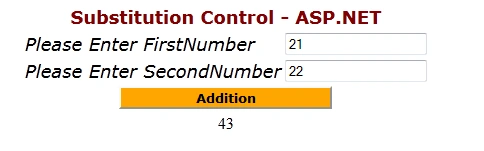
Step 6: The updated data output of the application is as in the following:
I hope this article was useful for you.
Vipul MalhotraPosted Jul 6, 2015, 6:44 AM
Good
Gowtham RajamanickamPosted Mar 11, 2015, 8:34 AM
good....
Deepu RPosted Feb 26, 2015, 2:23 AM
Great.