
Term Store Manangement
How to access SharePoint Site Term Store Management?
Go to SharePoint Site, then Site Settings and select Term Store Management.
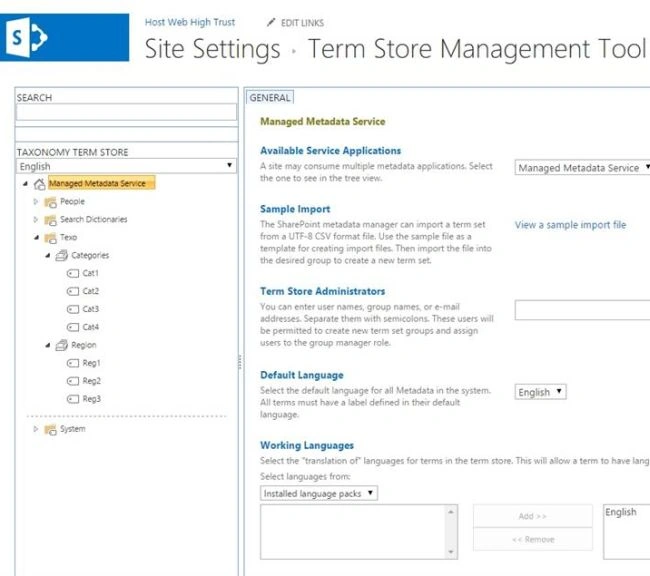
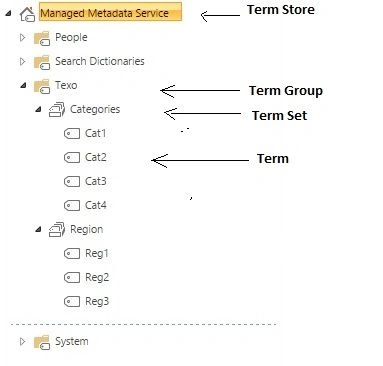
Term Store Management Concept
SharePoint APP Model
Step 1: Add Permission in AppManifest.xml file to read Taxonomy as follows.

Step 2: User Interface Design Page.
Taxonomy.aspx
- <%@ Page Language="C#" AutoEventWireup="true" CodeBehind="Texonomy.aspx.cs" Inherits="SP_TexonomyProWeb.Pages.Texonomy" %>
- <!DOCTYPE html>
- <html xmlns="http://www.w3.org/1999/xhtml">
- <head runat="server">
- <title></title>
- </head>
- <body>
- <form id="form1" runat="server">
- <div>
- <table>
- <tr>
- <td>
- <asp:Label ID="Label1" runat="server" Text="Region"></asp:Label></td>
- <td>
- <asp:DropDownList ID="ddlDepartment" runat="server"></asp:DropDownList></td>
- </tr>
- <tr>
- <td colspan="2"> </td>
- </tr>
- <tr>
- <td>
- <asp:Label ID="Label2" runat="server" Text="Division"></asp:Label></td>
- <td>
- <asp:DropDownList ID="ddlJobTitle" runat="server"></asp:DropDownList></td>
- </tr>
- </table>
- </div>
- </form>
- </body>
- </html>
- using Microsoft.SharePoint.Client.Taxonomy;
- using System;
- using System.Collections.Generic;
- using System.Data;
- using System.Linq;
- using System.Web;
- using System.Web.UI;
- using System.Web.UI.WebControls;
- namespace SP_TexonomyProWeb.Pages
- {
- public partial class Texonomy : System.Web.UI.Page
- {
- protected void Page_Load(object sender, EventArgs e)
- {
- string TermStoreName = "Managed Metadata Service";
- string TermGroupName = "Texo";
- BindTermstoDropdown(TermStoreName, TermGroupName, "Region", ddlDepartment);
- BindTermstoDropdown(TermStoreName, TermGroupName, "Categories", ddlJobTitle);
- }
- protected void BindTermstoDropdown(string TermStoreName, string TermGroupName, string TermSetName, DropDownList ddl)
- {
- var spContext = SharePointContextProvider.Current.GetSharePointContext(Context);
- using (var clientContext = spContext.CreateUserClientContextForSPHost())
- {
- clientContext.Load(clientContext.Web, web => web.Title);
- clientContext.ExecuteQuery();
- Response.Write(clientContext.Web.Title);
- // Get the TaxonomySession
- TaxonomySession taxonomySession = TaxonomySession.GetTaxonomySession(clientContext);
- // Get the term store by name
- TermStore termStore = taxonomySession.TermStores.GetByName(TermStoreName);
- // Get the term group by Name
- TermGroup termGroup = termStore.Groups.GetByName(TermGroupName);
- // Get the term set by Name
- TermSet termSet = termGroup.TermSets.GetByName(TermSetName);
- // Get all the terms
- TermCollection termColl = termSet.Terms;
- clientContext.Load(termColl);
- // Execute the query to the server
- clientContext.ExecuteQuery();
- // Loop through all the terms
- DataTable dt = new DataTable();
- dt.Columns.Add("TermName");
- DataRow row = null;
- foreach (Term term in termColl)
- {
- row = dt.NewRow();
- row["TermName"] = term.Name;
- dt.Rows.Add(row);
- }
- ddl.DataSource = dt;
- ddl.DataTextField = "TermName";
- ddl.DataValueField = "TermName";
- ddl.DataBind();
- }
- }
- }
- }

Thank you! If you have any query, then please mention it in the comment section.


F MoserPosted Aug 21, 2019, 5:57 AM EDT
What would the assembly or name space be for SharePointContextProvider?
Venkatesh KumarPosted Apr 25, 2016, 3:31 AM EDT
is it possible to build/get term group data as tree structure or parent/child relationship using CSOM?
Santhakumar MunuswamyPosted Oct 17, 2015, 11:17 PM EDT
Good one
Rupali ShindePosted Oct 13, 2015, 8:18 PM EDT
Thanks
Nilesh JadavPosted Oct 13, 2015, 8:10 PM EDT
Good Share mam !!
RakeshPosted Oct 13, 2015, 6:17 AM EDT
Good article Share
Rahul SuryawanshiPosted Oct 13, 2015, 4:46 AM EDT
Nice share!
Harshad PansuriyaPosted Oct 13, 2015, 4:42 AM EDT
Nice one