
We’ve all been there. You launch a project, and it feels like a dream. Every page loads instantly, and you feel like a coding god. Then, users actually start using it. The data piles up, and suddenly, that “instant” dashboard takes five seconds to load.
The first instinct? “We need a bigger server.”
Wait. Before you go throwing money at AWS or Google Cloud, you need to understand that hardware is rarely the real fix. Making a database go faster is about being smart, not just being powerful. Here is how you fix the “Database Wall” in the real world.
Stop Making the Database “Read the Whole Book”
Imagine walking into a library and looking for a book on “Indian Cooking.” If the library has no organisation, you have to look at every single spine on every single shelf until you find it. That is a Full Table Scan, and it’s the #1 reason apps feel slow.
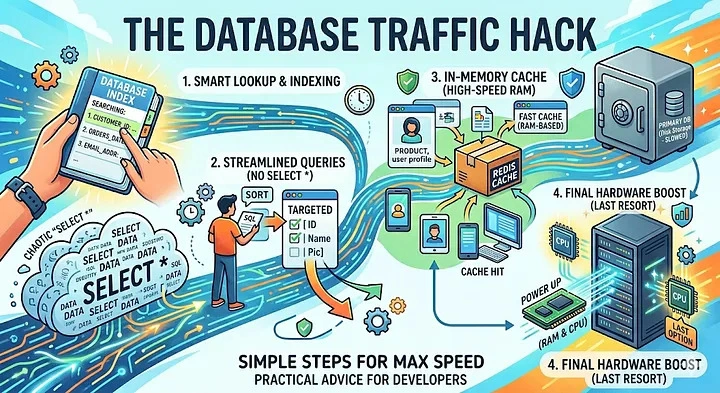
The Solution: Indexes. An index is essentially a “shortcut list” for your database. If you frequently search for users by their email, you need an index on that column.
The Catch: Don’t index everything. Every index makes “reading” faster, but it makes “writing” (saving new data) slower because the database has to update its shortcut list every time.
The SELECT * Bad Habit
Most of us are lazy. We write SELECT * FROM users because it’s easy. But if your user table has 40 columns including long bios and profile settings and you only need the username, you’re wasting massive amounts of energy.
The Solution: Be Specific. When you fetch only the columns you need, you reduce the “payload.” It’s the difference between carrying a single key and carrying the whole heavy door. It saves memory, CPU, and network bandwidth.
Use a “Waiting Room” (Caching)
The fastest database query is the one you don’t have to run at all. If 1,000 people are looking at the same “Top 10 Trending Products” list, why ask the database 1,000 times?
The Solution: Redis. Put a “cache” like Redis in front of your database. It stores data in RAM (which is incredibly fast).
Check Redis first.
If it’s there, send it to the user.
If not, go to the database, grab it, and save a copy in Redis for the next person.
Know When to Break Things Up (Partitioning)
Once a table hits 50 million rows, it gets “heavy.” Even with indexes, the database has to work hard to manage that much metadata.
The Solution: Partitioning. Think of this as splitting a giant filing cabinet into smaller drawers based on a category like “Year” or “Region.” If you’re looking for an invoice from 2023, the database can completely ignore the “drawers” for 2021, 2022, and 2024. It focuses only on a fraction of the data.
N+1 Query Problem (The Delivery Driver)
The Scenario: you want to display 10 blog posts and the name of the author for each.
The Slow Way (N+1):
Get 10 posts. (1 query)
For each post, ask the database: “Who is the author?” (10 separate queries) Total: 11 queries.
The Fast Way (Joining): Use a JOIN to get the posts and the author names in one single trip. Total: 1 query.
The Result: You avoid the “overhead” of talking to the database multiple times. It’s like sending one truck with 10 packages instead of 10 trucks with one package each.
Connection Pooling: Don’t Knock on the Door Every Time
Opening a connection to a database is expensive. It takes time and “handshaking.” If your app opens a new connection for every single click a user makes, you’ll hit a limit very fast.
The Solution: Connection Pools. Instead of opening and closing doors, you keep a “pool” of 10 or 20 connections open and ready to go. When a request comes in, it grabs an open connection, does its job, and hands it back to the pool for the next person.
The Real-World Priority List
If you’re wondering where to start, follow this order:
Check your indexes: Are you searching for things that aren’t indexed?
Fix your queries: Are you asking for too much data?
Add a cache: Can you store common results in memory?
Optimise hardware: Okay, now you can buy a bigger server.
Building for speed isn’t about one “magic button.” It’s about reducing the work the database has to do. Every row you don’t have to read is a win for your users and your sanity.

Join the conversation! Your thoughts help the community grow.