
Introduction: A Transactions group is a set of tasks in a single execution unit. Each transaction begins with a specific task and ends when all the tasks in the group successfully complete. If any of the tasks fail, the transaction fails therefore, a transaction has only two results: success or failure.
Transact-SQL statements into a single transaction using the following statements:
- Begin Transaction.
- Rollback Transaction.
- Commit Transaction.
"A Windows Workflow Foundation workflow may
contain one or more blocks of activities that should be seen as atomic tasks.
Once you wrap such activities in an outermost transactional block, the Windows
Workflow Foundation runtime ensures that all the contained activities either
succeed or fail. Such transactions are referred to as ACID transactions, drawing
from the description of the expected behavior-atomic, consistent, isolated, and
durable."
- Atomic: Either all of the operations of the transaction are successfully completed or none of them are completed.
- Consistent: Resources involved with the transaction must be in a legal state when the transaction begins and when it ends. The transaction cannot violate integrity constraints or business rules.
- Isolated: Operations in the transaction appear isolated from all other operations. No operation outside the transaction sees the data in an intermediate state.
- Durable: Once the transaction has been successfully completed, the effects are persistent and cannot be done.
Note: A whole Windows Workflow Foundation workflow may also be treated as a single long-running transaction (LRT).
Step 1: Open Visual Studio 2010.
- Go to View option and click.
- Select Server Explorer.
- Right-click->Data Connection->Create New SQL Server Database.
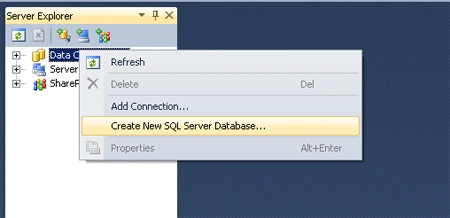
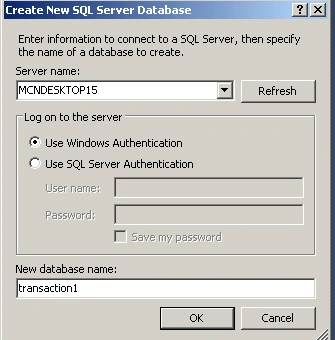
Create Table:
Step 2: Expand the new Database name->Right-click.
- Table->Add New Table.
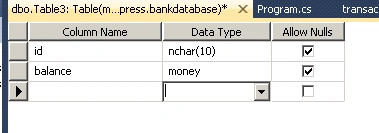
Step 3: Define the field for new table.
- Click Save icon and name the table.
Step 4: Right-click on the table.
- Table-> Show Table Data.
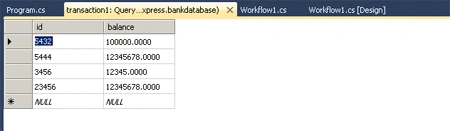
Creation the Application:
Step 5: Go to File->New->Project.
- Select Sequential Workflow Console Application.
- Workflow1.Design open.
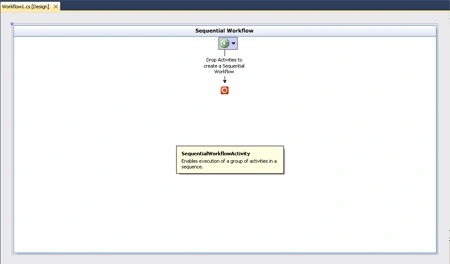
Step 6: Drag Activity from Toolbox.
- Select Code Activity from Toolbox.
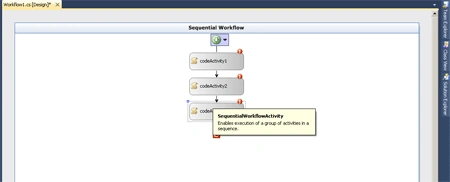
Step 7: Double click on Code activity and write the below code.
Code :
using System;
using
System.ComponentModel;
using
System.ComponentModel.Design;
using
System.Collections;
using
System.Collections.Generic;
using
System.Linq;
using
System.Workflow.ComponentModel.Compiler;
using
System.Workflow.ComponentModel.Serialization;
using
System.Workflow.ComponentModel;
using
System.Workflow.ComponentModel.Design;
using
System.Workflow.Runtime;
using
System.Workflow.Activities;
using
System.Workflow.Activities.Rules;
using
System.Data;
using
System.Data.SqlClient;
using
System.Configuration;
namespace sequ1
{
public sealed
partial class
Workflow1 :
SequentialWorkflowActivity
{
public Workflow1()
{
InitializeComponent();
}
string aa =
@"Data Source=.\SQLEXPRESS;Initial Catalog=tranasction1;Integrated Security=True;Pooling=False";
private void
debit_ExecuteCode(object sender,
EventArgs e)
{
SqlConnection conn =
new SqlConnection(@"Data
Source=.\SQLEXPRESS;Initial Catalog=tranasction1;Integrated Security=True;Pooling=False");
SqlCommand command =
new SqlCommand("UPDATE
Accounts SET Balance = Balance - 100 WHERE ID='5432'", conn);
command.Connection.Open();
command.ExecuteNonQuery();
Console.WriteLine("---Account
debited from 5432---");
conn.Close();
}
private void
credit_ExecuteCode(object sender,
EventArgs e)
{
SqlConnection conn =
new SqlConnection(aa);
SqlCommand command =
new SqlCommand("UPDATE
Accounts SET Balance = Balance + 100 WHERE UserID='5444'", conn);
command.Connection.Open();
command.ExecuteNonQuery();
Console.WriteLine("---Account
credited into 5444---");
conn.Close();
}
private void
transaction_ExecuteCode(object sender,
EventArgs e)
{
SqlConnection conn =
new SqlConnection(aa);
SqlCommand command =
new SqlCommand("SELECT
Balance FROM Accounts WHERE UserID='5444'", conn);
command.Connection.Open();
double balance =
Convert.ToDouble(command.ExecuteScalar());
Console.WriteLine("---Balance
in account 5444is $" + balance);
command.CommandText = "SELECT Balance
FROM Accounts WHERE UserID='5444'";
balance = Convert.ToDouble(command.ExecuteScalar());
Console.WriteLine("---Balance
in account 5444 is $" + balance);
conn.Close();
}
}
}
Add Connection String from
Database:
Step 8: Go to Solution Explorer-> Project Name->Right -click.
- Select Properties option.
- Go to Setting option.
- Define Name and Value.
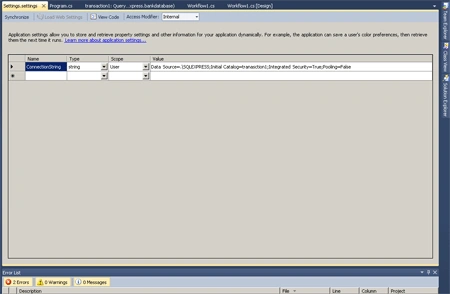
Step 9: Go to the Program.cs file and write the below code.
Code:
using System;
using
System.Collections.Generic;
using
System.Linq;
using
System.Text;
using
System.Threading;
using
System.Workflow.Runtime;
using
System.Workflow.Runtime.Hosting;
namespace sequ1
{
class Program
{
public static
void Main(string[]
args)
{
using (WorkflowRuntime
workflowRuntime = new
WorkflowRuntime())
{
AutoResetEvent waitHandle =
new AutoResetEvent(false);
workflowRuntime.WorkflowCompleted +=
delegate(object sender,
WorkflowCompletedEventArgs e) {
waitHandle.Set(); };
workflowRuntime.WorkflowTerminated +=
delegate(object sender,
WorkflowTerminatedEventArgs e) {
waitHandle.Set(); }
workflowRuntime.AddService(new
SqlWorkflowPersistenceService("Initial
Catalog=SqlPersistenceService;"
+"DataSource=.\\SQLEXPRESS;IntegratedSecurity=
True;"));
WorkflowInstance
workflowInstance = default(WorkflowInstance);
workflowInstance = workflowRuntime.CreateWorkflow(typeof(sequ1.Workflow1));
workflowInstance = workflowRuntime.CreateWorkflow(typeof(Workflow1));
instance.Start();
waitHandle.WaitOne();
Console.ReadLine();
}
}
}
}
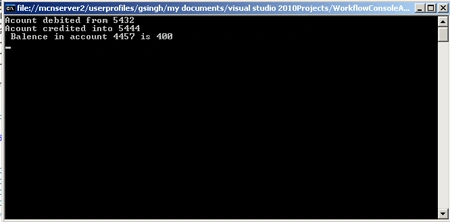
Step 10: Press F5 run the
application.
Join the conversation! Your thoughts help the community grow.