

Introduction
In Silverlight we can apply transparency either by using Alpha Channel or Opacity. In this article you will learn how to apply trnsparency using Opacity.
I have discussed the Alpha Channel in my previous article 'Alpha Channels in XAML Silverlight'; take a little look there too.
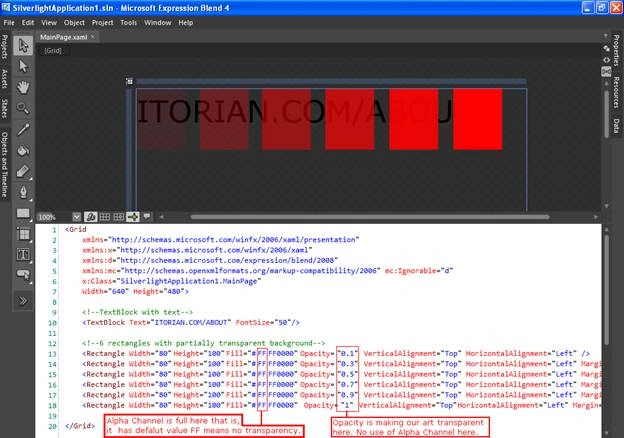
Opacity is nothing more than an additional element attribute; it is very different from Alpha Channel where we applied an additional color code in hexadecimal color code to create transparency. But in Opacity we use an Opacity attribute with a decimal value varying from 0 to 1. So, to apply opacity we can use 0 or 0.1, 0.2, 0.3 …, 0.9 or 1 (1 is the default which means no opacity or in other words no transparency). Let's take a look at a screenshot where I will be using opacity.
<!--[endif]-->
In the above screenshot, I marked out the Alpha Channel and Opacity.
In the above example, I have used a textblock and 6 rectangles overlapped on text to show the transparency.
XAML Code
<Grid
xmlns="http://schemas.microsoft.com/winfx/2006/xaml/presentation"
xmlns:x="http://schemas.microsoft.com/winfx/2006/xaml"
xmlns:d="http://schemas.microsoft.com/expression/blend/2008"
xmlns:mc="http://schemas.openxmlformats.org/markup-compatibility/2006" mc:Ignorable="d"
x:Class="SilverlightApplication1.MainPage"
Width="640" Height="480">
<!--TextBlock with text-->
<TextBlock Text="ITORIAN.COM/ABOUT" FontSize="50"/>
<!--6 rectangles with partially transparent background-->
<Rectangle Width="80" Height="100" Fill="#FFFF0000" Opacity="0.1" VerticalAlignment="Top" HorizontalAlignment="Left" />
<Rectangle Width="80" Height="100" Fill="#FFFF0000" Opacity="0.3" VerticalAlignment="Top" HorizontalAlignment="Left" Margin="104,0,0,0"/>
<Rectangle Width="80" Height="100" Fill="#FFFF0000" Opacity="0.5" VerticalAlignment="Top" HorizontalAlignment="Left" Margin="206,0,0,0"/>
<Rectangle Width="80" Height="100" Fill="#FFFF0000" Opacity="0.7" VerticalAlignment="Top" HorizontalAlignment="Left" Margin="310,0,250,0"/>
<Rectangle Width="80" Height="100" Fill="#FFFF0000" Opacity="0.9" VerticalAlignment="Top" HorizontalAlignment="Left" Margin="415,0,0,0"/>
<Rectangle Width="80" Height="100" Fill="#FFFF0000" Opacity="1" VerticalAlignment="Top" HorizontalAlignment="Left" Margin="520,0,0,0"/>
</Grid>
Be tuned for the next article.
HAVE A HAPPY CODING!!
Join the conversation! Your thoughts help the community grow.