

Azure Cosmos DB is Microsoft’s globally-distributed, multi-model database service "for managing data at planet-scale." It builds upon and extends the earlier Azure DocumentDB, which was released in 2014.It is schema-less and generally classified as a NoSQL database.
In this article I am going to create an Azure Cosmos DB using SQL. In the case if you want to read my two details article than please check
Let me briefly summarize before I proceeed:
- Global Distribution
Established globally distributed database system driven by the cloud-computing power of Azure. Data can be automatically replicated in Azure data centers around the world.
Or in other words, you can distribute your data to any number of Azure regions, with the click of a button. This enables you to put your data where your users are, ensuring the lowest possible latency to your customers.
- Scalability
Customers can independently scale storage and throughput. Easily scale database throughput at a per second granularity, and change it anytime you want. Scale storage size transparently and automatically to handle your size requirements now and forever. - Highly Responsive
Cosmos DB guarantees end-to-end latency of reads under 10 ms and indexed writes under 15 ms at the 99th percentile, within the same Azure region. The median latencies are significantly lower (under 5 ms). - Multiple Data Models
Customers can use key-value, graph, and document data without worrying about schema or index management. The atom-record-sequence (ARS) based data model that Azure Cosmos DB is built on natively supports multiple data models, including but not limited to document, graph, key-value, table, and columnar data models.
APIs for the following data models are supported with SDKs available in multiple languages,
- DocumentDB API (This API will be used in the article)
- MongoDB API
- Table API
- Graph (Gremlin) API
- Five consistency levels
Defined consistency levels include strong, bounded staleness, consistent-prefix, session, and eventual. - Latency
Guaranteed less than 10-ms latencies on reads and less than 15-ms latencies on (indexed) writes at the 99th percentile. - Reliability
Offered service level agreements (SLAs) include 99.99% high availability, with latency at the 99th percentile.
In Cosmos DB, SLA guarantee is very high, 99.9% for the following.
- Availability assurance 99.9%
- Throughput guarantee 99.9%
- Latency guarantee 99.9% (99% is latency less than 10 ms)
- Consistency assurance 100% of read requests guarantee consistency of the required consistency level
Let start Hello Cosmos DB using DocumentDB API (SQL)
- Creating Cosmos DB on Azure Portal
Open " https://portal.azure.com " in your browser. Select "New" from the side menu. Click “New”, then select “Databases”, and then click on “Azure CosmosDB”. Fill in all the entries like id, API (That is the important part. Here, we are going to use Key-Value) , subscription, resource group, location, and then click “Create”.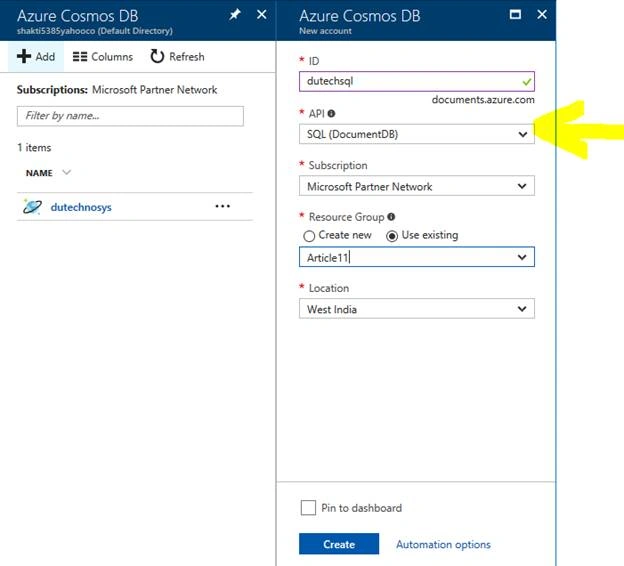
This completes the Cosmos DB (DocumentDB data model) of the database account "dutechsql".
- Data operation with Azure portal
The data of Cosmos DB is manipulated from the Azure portal and the atmosphere is felt and then perform operations such as data creation, retrieval, updating, etc. are performed from the programs.
- Preparation of data container (database and collection)
Here is the screen showing the created Cosmos DB on the Azure portal.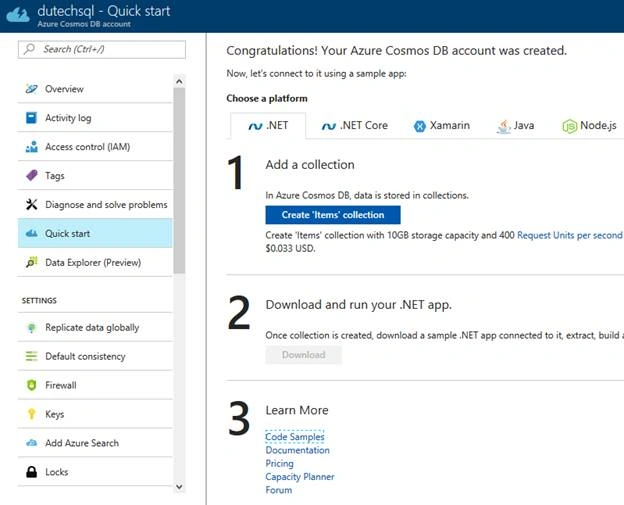
When "Data Explorer (Preview)" is selected, the following screen will be displayed. You can do data manipulation like a SQL Server Management Studio.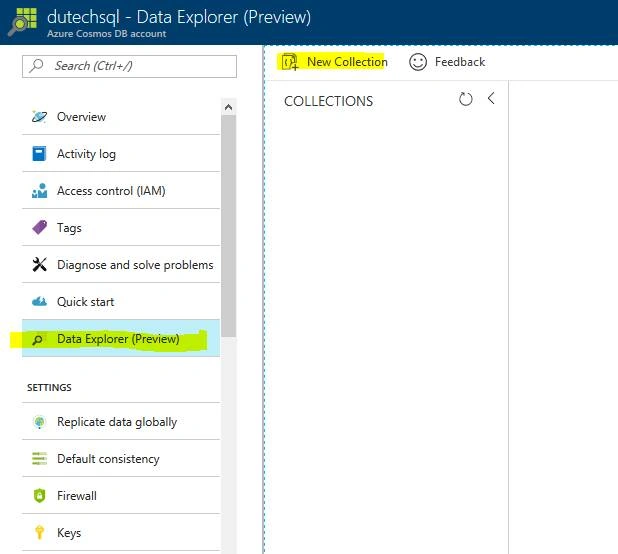
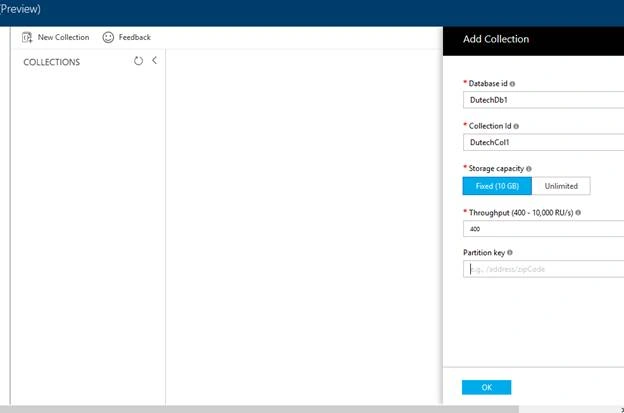
Click "New Collection", the following screen will be displayed.For this database account " dutechsql ", create "database" → "collection". The collection will be a container to contain "data items" (details are described below).
Here we create a database and collection with the following contents.
Database id = DutechDb1
Collection id = DutechCol1
Storage capacity = Fixed (10GB)
Throughput = 400
Partition key = none
A container to store the data is completed. (When you create a collection, resources for providing performance "Throughput = 400" are secured on Azure. Since it will be subject to billing, create → Please leave it → negotiate · · ·).
Creation of data (document)
The display of "Data Explorer (Preview)" after creating the database collection is as follows.
Select Documents from the tree on the left and select New Document.
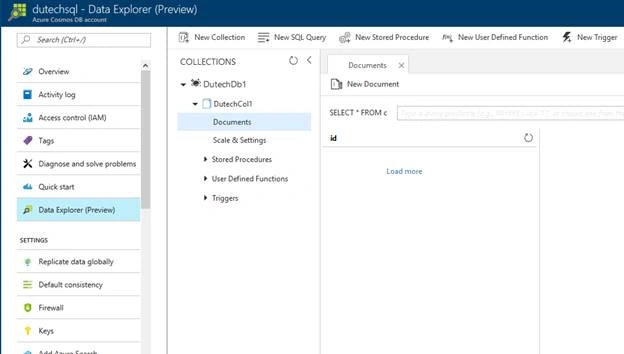
Since the JSON editor is displayed, edit the data as appropriate and click the Save button.In this article , since " SQL (DocumentDB)" was selected as API when creating Cosmos DB, the data model is "document (i.e. JSON data model)".
The created data is as follows. Items " rid", " self", " etag", " attachments" "_ ts" other than those edited by himself are added, but these are added automatically by Cosmos DB internally.
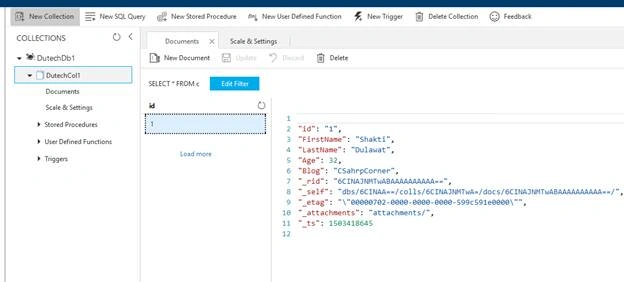
Repeat the above procedure and create 5 appropriate data.Data retrieval
Continue using "Data Explorer (Preview)". Click the "Edit Filter" button.
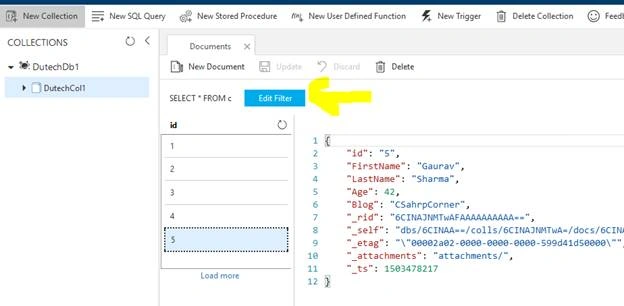
Since the filter input text box becomes effective, set the extraction condition as follows and click the "Apply Filter" button. The extraction condition can be described in SQL- like.Where c.Age> 30
Below are two records that have Age greater than 30.
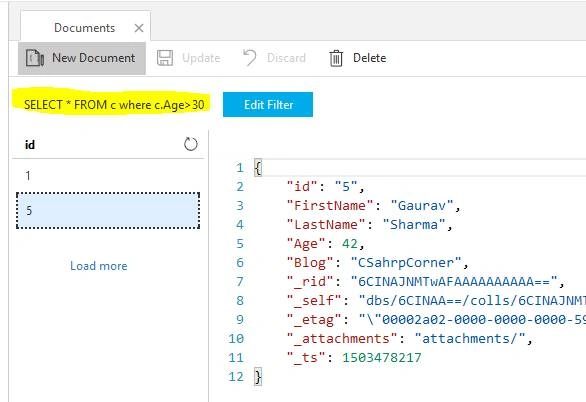
"Document as a tool that has a function like that of the Explorer over", "query explorer thing called over" has been provided on the Azure portal.Cleaning up
If you leave the collection created, it will be charged, so let's delete it. We will delete each database on the collection neatly. When you click "..." on the right side of the database (DutechDb1) in "Data Explorer (Preview)", a popup menu will be displayed. Select "Delete Database".
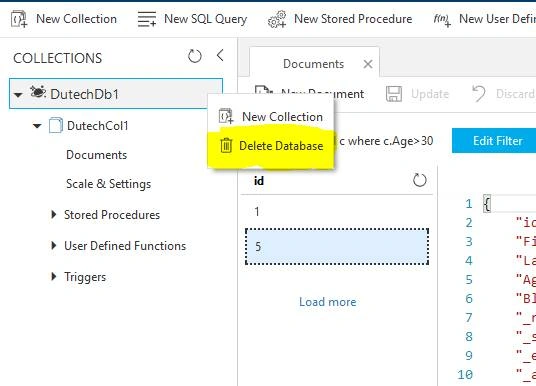
As the confirmation screen is displayed, enter the name of the database to be deleted and click on ok.
Thanks for reading in my coming article, I will explain how you can do data manipulations with a program on Azure Cosmos DB – SQL. Please do not forgot to check Azure Cosmos DB: How to query using SQL? At MSDN.
Join the conversation! Your thoughts help the community grow.