
Introduction
I hope you all are fine. Today we will learn how to perform upload and download operations in MVC. Please refer to the step-by-step approach in learning Model View Controller if you are new to MVC. Our MVC Master, Shivprasad koirala has explained the concepts in a perfect way.
Please see this article in my blog here
This article has been selected as Article Of The Day for October 6th 2015 in Asp.net Community
Please see this article in my blog here
Download the source code
You can always download the source code from Uploading and Downloading in MVC Step-by-Step
Background
Some days earlier, I got a requirement to develop a upload and download mechanism in my MVC application. After completing it perfectly, I decided to share it with you all.
Using the code
Before moving further into the details, let us first list the key points we will explain in this article:
- Create a MVC application.
- Create a controller.
- Create View depending on the controller.
- Change the RouteConfig as needed.
- Create ActionResult for the actions.
- Create a folder where we need to save the downloaded files.
- using System;
- using System.Collections.Generic;
- using System.IO;
- using System.Linq;
- using System.Web;
- using System.Web.Mvc;
- namespace UploadDownloadInMVC.Controllers
- {
- public class myActionController : Controller
- {
- //
- // GET: /myAction/
- }
- }
As you can see that the controller is empty; we will be writing the action results next.
- public ActionResult Index()
- {
- foreach (string upload in Request.Files)
- {
- if (Request.Files[upload].FileName != "")
- {
- string path = AppDomain.CurrentDomain.BaseDirectory + "/App_Data/uploads/";
- string filename = Path.GetFileName(Request.Files[upload].FileName);
- Request.Files[upload].SaveAs(Path.Combine(path, filename));
- }
- }
- return View("Upload");
- }
The action result shown above is for index. So, whenever the application loads, the action result will be fired. For that, the following changes should be done for RouteCofig.
- public class RouteConfig
- {
- public static void RegisterRoutes(RouteCollection routes)
- {
- routes.IgnoreRoute("{resource}.axd/{*pathInfo}");
- routes.MapRoute(
- name: "Default",
- url: "{controller}/{action}/{id}",
- defaults: new { controller = "myAction", action = "Index", id = UrlParameter.Optional }
- );
- }
- }
/App_Data/uploads/ (that we need to manually create in our application). After returning to the view Upload, we need to set the Upload view.
Upload View
The following is the code for the Upload view.
- @{
- ViewBag.Title = "Upload";
- }
- <h2>Upload</h2>
- <script src="~/Scripts/jquery-1.11.1.min.js"></script>
- <script>
- $(document).ready(function () {
- $('#btnUploadFile').on('click', function () {
- var data = new FormData();
- var files = $("#fileUpload").get(0).files;
- // Add the uploaded image content to the form data collection
- if (files.length > 0) {
- data.append("UploadedImage", files[0]);
- }
- // Make Ajax request with the contentType = false, and procesDate = false
- var ajaxRequest = $.ajax({
- type: "POST",
- url: "myAction/Index",
- contentType: false,
- processData: false,
- data: data
- });
- ajaxRequest.done(function (xhr, textStatus) {
- // Do other operation
- });
- });
- });
- </script>
- <input type="file" name="FileUpload1" id="fileUpload" /><br />
- <input id="btnUploadFile" type="button" value="Upload File" />
- @Html.ActionLink("Documents", "Downloads")
- File uploader
- Upload button
- Ajax call to the controller ( myAction/Index)
Here, we are adding the uploaded image content to the form data collection.
- var data = new FormData();
- var files = $("#fileUpload").get(0).files;
- // Add the uploaded image content to the form data collection
- if (files.length > 0) {
- data.append("UploadedImage", files[0]);
- }
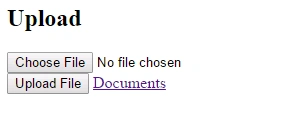
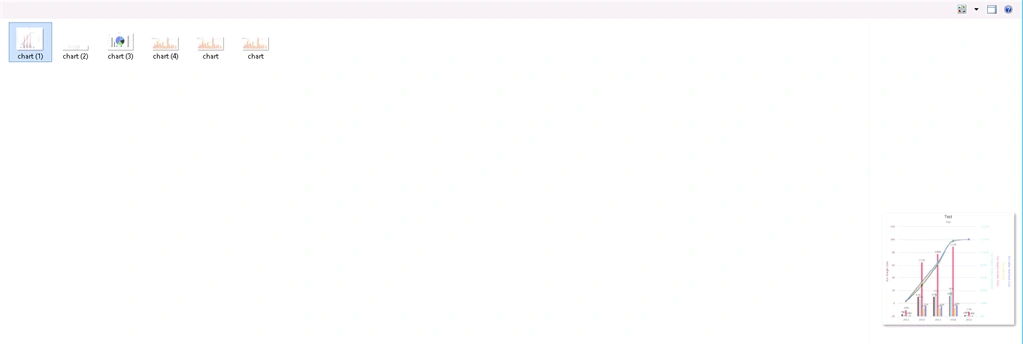
When you choose the file and click upload, your selected file will be uploaded to the folder "uploads" as we have set it in the controller.
We have finished the process of uploading files. We will now move to the downloading section. This is the right time to add the remaining actions to our controller. The following is the code.
- public ActionResult Downloads()
- {
- var dir = new System.IO.DirectoryInfo(Server.MapPath("~/App_Data/uploads/"));
- System.IO.FileInfo[] fileNames = dir.GetFiles("*.*"); List<string> items = new List<string>();
- foreach (var file in fileNames)
- {
- items.Add(file.Name);
- }
- return View(items);
- }
- public FileResult Download(string ImageName)
- {
- var FileVirtualPath = "~/App_Data/uploads/" + ImageName;
- return File(FileVirtualPath, "application/force-download", Path.GetFileName(FileVirtualPath));
- }
- @Html.ActionLink("Documents", "Downloads")
Next, if we click on the "Documents" link, our Action Result Downloads will be fired, right? Now, the following code will explain what is happening here.
- var dir = new System.IO.DirectoryInfo(Server.MapPath("~/App_Data/uploads/"));
- System.IO.FileInfo[] fileNames = dir.GetFiles("*.*"); List<string> items = new List<string>();
- foreach (var file in fileNames)
- {
- items.Add(file.Name);
- }
- return View(items);
Download View
- @{
- ViewBag.Title = "Downloads";
- }
- <h2>Downloads</h2>
- @model List<string>
- <h2>Downloads</h2>
- <table>
- <tr>
- <th>File Name</th>
- <th>Link</th>
- </tr>
- @for (var i = 0; i <= Model.Count - 1; i++)
- {
- <tr>
- <td>@Model[i].ToString() </td>
- <td>@Html.ActionLink("Download", "Download", new { ImageName = @Model[i].ToString() }) </td>
- </tr>
- }
- </table>
Please note that we are adding the Image name to the action. Here is the output after performing the operations.
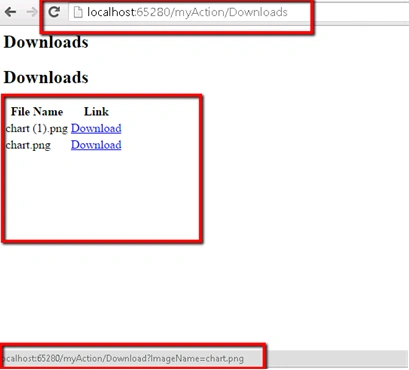
As in the preceding image, when you mouse over the link, it will show the image name along with the controller URL. Click on the link to download the file. So simple, right?
Conclusion
I hope you liked the article. Please provide your valuable feedback; it matters a lot. You can download the source code to determine more.
Point of interest
MVC, MVC Upload, MVC Download, File Uploading Using MVC, File Downloading Using MVC


Mohamedasiq ShajahanPosted Feb 10, 2020, 10:39 PM EST
This Article doesn't have a complete Solution for Upload and Download. It has few bugs. For a beginner it is quite challenging to debug and run this code. Finally, I have fixed the code and it works perfectly. One change is replacing url: "myAction/Index", with url: '@Url.Action("Index", "<ControllerName>")' as mentioned by Marlin. Another Change is, have the Upload.cshtml and Download.cshtml in the same shared folder or same controller folder.
DomiPosted Aug 22, 2019, 4:14 AM EDT
Link to download is broken !
Marlin XPosted May 19, 2018, 2:38 PM EDT
Replace url: "myAction/Index", with url: '@Url.Action("Index", "myAction")', in Upload view it may help
shahnawaz shaikhPosted May 11, 2018, 11:12 PM EDT
Nothing to achieve by wasting 1 hour
shahnawaz shaikhPosted May 11, 2018, 11:11 PM EDT
Where is the post action controller where the data is passed as a parameter other member who like the tutorial can anyone tell me where the post action controller which is called in Ajax call
Kirankumar ShindePosted Jun 17, 2017, 1:21 AM EDT
Nice one but data is download as i put already to that folder but i am facing problem for upload the files
Sibeesh VenuTOP 100Posted Mar 14, 2016, 8:51 PM EDT
Pawan Tiwari Thanks much
Sibeesh VenuTOP 100Posted Mar 14, 2016, 8:51 PM EDT
Sr Karthiga Thanks much
Pawan TiwariPosted Mar 14, 2016, 8:37 PM EDT
Helpful. Nice explain (y)
Sr KarthigaPosted Feb 23, 2016, 2:53 PM EST
good one
Sr KarthigaPosted Feb 23, 2016, 2:53 PM EST
Nice explanation
Sibeesh VenuTOP 100Posted Oct 14, 2015, 12:50 AM EDT
Vinod TG Thanks a lot
Sibeesh VenuTOP 100Posted Oct 14, 2015, 12:50 AM EDT
Mukesh Kumar Thanks a lot
Sibeesh VenuTOP 100Posted Oct 14, 2015, 12:49 AM EDT
Harpreet Singh Thanks a lot
Sibeesh VenuTOP 100Posted Oct 14, 2015, 12:49 AM EDT
Shridhar Sharma Thanks a lot
Vinod TGPosted Oct 13, 2015, 9:41 PM EDT
Good one
Mukesh KumarPosted Oct 6, 2015, 6:57 PM EDT
Nice article
Harpreet SinghPosted Oct 6, 2015, 3:28 PM EDT
Congrats for article of the day
Shridhar SharmaPosted Oct 5, 2015, 9:49 PM EDT
Congratulations for article of the day.
Sibeesh VenuTOP 100Posted May 12, 2015, 11:21 PM EDT
Nitin Tyagi thanks buddy
Sibeesh VenuTOP 100Posted May 12, 2015, 11:20 PM EDT
vinod kumar thank you
Sibeesh VenuTOP 100Posted May 12, 2015, 11:19 PM EDT
Santhakumar Munuswamy thank you mate.
Sibeesh VenuTOP 100Posted May 12, 2015, 11:18 PM EDT
Gowtham Rajamanickam thank you buddy
Santhakumar MunuswamyPosted May 12, 2015, 11:20 AM EDT
Thanks for good work
Gowtham RajamanickamTOP 100Posted May 12, 2015, 9:16 AM EDT
good
NitinPosted May 12, 2015, 8:51 AM EDT
good one
vinod kumarPosted May 12, 2015, 4:46 AM EDT
nice
Sibeesh VenuTOP 100Posted May 12, 2015, 2:25 AM EDT
Abhishek :) Jaiswal Thank you buddy
Abhishek JaiswalPosted May 12, 2015, 1:23 AM EDT
Nice article, keep sharing! :)