
I think all of us , developing some .NET application (it doesn't matter ASP.Net or Windows forms) with SQL Server as database, sooner or later face the next task.
You have some grid ( DataGrid or something like that ) which should be filled dynamically: or Employee table should be "loaded" , or - Cities table, or - Countries table, and so on. Of course every time you have to update "header text" of each column. One more situation. In order to edit (update, insert ...) ten tables ( may be much more - one hundred tables !) you have to build only one form. All these tables have the same design , for example : the first column has data type "int" and the second - "char(50)" . Thus, to edit these tables there should be at least two textBoxes and two labels on your form and every time with changing of edited table you have to change "text" of the labels. It is clear that in these situations you must use "something" to fill and/or change text properties (or column headers) automatically according to change of the table. And this "something" is the system function fn_listextendedproperty .
In this article, divided into two parts, I will compare the system function fn_listextendedproperty of SQL Server 2005 with the similar function of SQL Server 2000 (Part 1), describe using the function for .NET applications (Part 2). The examples are written using Transact-SQL and C#.
The system function fn_listextendedproperty returns extended property values of database objects and has the following syntax (see also Table 1.):
fn_listextendedproperty (arg_name, arg0_type, arg0_name, arg1_type, arg1_name,
arg2_type, arg2_name).
Table 1. Argument symbols and arguments.
| Argument symbol | Argument |
| arg_name | default | 'property_name' | NULL |
| arg0_type | default | 'level0_object_type' | NULL |
| arg0_name | default | 'level0_object_name' | NULL |
| arg1_type | default | 'level1_object_type' | NULL |
| arg1_name | default | 'level1_object_name' | NULL |
| arg2_type | default | 'level2_object_type' | NULL |
| arg2_name | default | 'level2_object_name' | NULL |
The comparison of the function of SQL Server 2000 edition with SQL Server 2005 edition are given in table 2.
Table 2. Valid inputs for arguments (SQL Server 2000 / 2005).
| Argument | Valid inputs [2000] | Valid inputs [2005] |
| arg_name | default, NULL, property name | default, NULL, property name |
| arg0_type | USER, TYPE, default, NULL | ASSEMBLY, CONTRACT, EVENT NOTIFICATION, FILEGROUP, MASSAGE TYPE, PARTITION FUNCTION, PARTITION SCEME, REMOTE SERVICE BINDING, ROUTE, SCEMA, SERVICE, TRIGGER, TYPE, USER, NULL |
| arg0_name | default, NULL, object name | default, NULL, object name |
| arg1_type | TABLE,VIEW, PROCEDURE, FUNCTION, DEFAULT, RULE, NULL | AGGREGATE, DEFAULT, FUNCTION, LOGICAL FILE NAME, PROCEDURE, QUEUE, RULE, SYNONYM, TABLE, TYPE, VIEW, XML SCHEMA COLLECTION, NULL |
| arg1_name | default, NULL, object name | default, NULL, object name |
| arg2_type | COLUMN, CONSTRAINT, INDEX, PARAMETER, TRIGGER, NULL, DEFAULT | COLUMN, CONSTRAINT, EVENT NOTIFICATION, INDEX, PARAMETER, TRIGGER, NULL, DEFAULT |
| arg2_name | default, NULL, object name | default, NULL, object name |
Microsoft asks to pay attention that USER and TYPE as level-0 types will be removed in a future version of SQL Server. We have to avoid using these features in new development work, and plan to modify applications that currently use these features. SCEMA as the level-0 type must be used instead of USER .
Using the AdventureWorks database (SQL Server 2005) you can test "work" of function with various arguments :
--query 1
--displaying extended properties on the database itself
select objtype,objname,[name],[value]
from fn_listextendedproperty (null,null,null,null,null,null,null)
The result is shown in figure 1.

Figure 1.
--query 2
--displaying extended properties on all schemas
select objtype,objname,[name],[value]
from fn_listextendedproperty (null,'schema',null,null,null,null,null)
The result is shown in figure 2.

Figure 2.
--query 3
--displaying extended properties on the HumanResources schema
select objtype,objname,[name],[value]
from fn_listextendedproperty (null,'schema','HumanResources',null,null,null,null)
The result is shown in figure 3.

Figure 3.
--query 4
--displaying extended properties on all tables
--in the HumanResources schema
select objtype,objname,[name],[value]
from fn_listextendedproperty (null,'schema','HumanResources','TABLE',null,null,null)
The result is shown in figure 4.
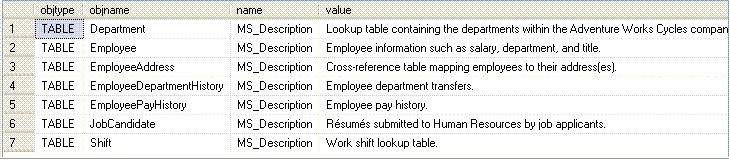
Figure 4.
--query 5
--displaying extended properties on the Employee table
--in the HumanResources schema
select objtype,objname,[name],[value]
from fn_listextendedproperty (null,'schema','HumanResources','TABLE','Employee',null,null)
The result is shown in figure 5.
Figure 5.

--query 6
--displaying extended properties on all columns of the Employee table
--in the HumanResources schema
select objtype,objname,[name],[value]
from fn_listextendedproperty (null,'schema','HumanResources','TABLE','Employee','COLUMN',null)
The result is shown in figure 6.
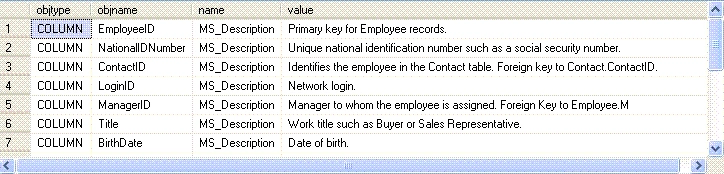
Figure 6.
--displaying extended properties on the EmployeeID column
--of the Employee table in the HumanResources schema
select objtype,objname,[name],[value]
from fn_listextendedproperty (null,'schema','HumanResources','TABLE','Employee','COLUMN','EmployeeID')
The result is shown in figure 7.

Figure 7.
--query 8
--displaying extended properties on the MaritalStatus column
--of the Employee table in the HumanResources schema
select objtype,objname,[name],[value]
from fn_listextendedproperty (null,'schema','HumanResources','TABLE','Employee','COLUMN','MaritalStatus')
The result is shown in figure 8.

Figure 8.
OK ! I think, that we have worked well enough. Let's drink a cup of coffee before we shall pass to the second part .
Good luck in programming !
Join the conversation! Your thoughts help the community grow.