Hi,
this article not working for me. It displaying error like
Message: 'undefined' is null or not an object
Line: 176
Char: 13
Code: 0
where can i download your article related JQuery script files? could you please upload your code to download.
hi..! your article is very useful to me...! thanks....!
But, i want to know about how to show the error message or alert message in button click
Introduction
Validation is an important requirement in every enterprise application and every platform has its own implementation to this regards. In this article, I will illustrate how to implement client-side validation in ASP.NET using jQuery. Getting started with the solution
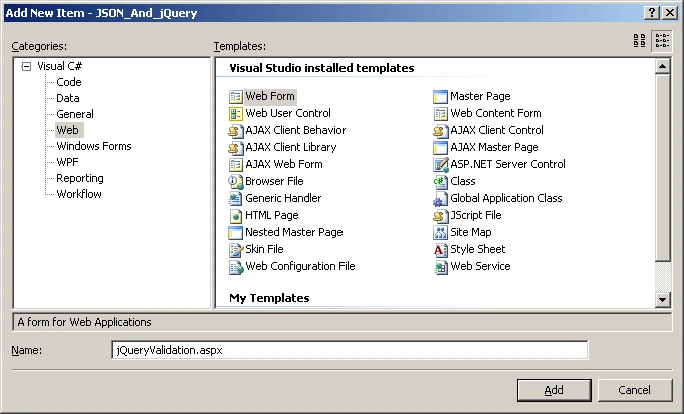
Now let's open the Visual Studio.NET and create a Web project for the example. Then add a new Web form for the user to enter some data (see Figure 1).
Figure 1
This form contains three required fields: name, email and postal address. We're going to use jQuery validation techniques to prevent the user submitting the form data without filling these required fields by prompting an error message. The first step is to add the jquery-1.3.2.js and jquery.validate.js files into the "js" directory in the solution as well as to include both files in the jQueryValidation.aspx file (see Listing 1).
Next step is to initialize the validation rules using the Validation function. Although this function can take several parameters, we're going to use just two of them: rules and message.
The rules parameter enables to specify the fields to validate. In this case, the fields are named as txtName, txtEmail and txtPostalAddress. For each field, we specify that it's required by using the predicate "required:true". There are other predicates for example to validate the format of the an email address such as "email:true", "remote" to specify a remote resource to check if the field is valid, "min" to set a minimum value for the field, "date" to indicate that the field value is a date, "equalTo" to indicate that the field value is the same than another one. The message parameter enables to specify the error message for a particular field. If you don't provide a custom message, then the default error message "this field is required" is displayed.
The implementation of the Validation function for this example is shown in the Listing 2.
He’s a senior Integration Solutions Architect and Consultant. His primary area of involvement is in Object-Oriented Analysis and Design, Database design , Enterprise Application Integration, Unified Modeling Language, Design Patterns and Software Development Process. He has knowledge and extensive experience in the…


N.JeganathanPosted Jan 19, 2013, 11:45 AM
Not Supported in IE
Sandeep Singh ShekhawatPosted Oct 4, 2012, 11:07 AM
Thanks its good for me
vinay kumarPosted Feb 3, 2012, 7:34 AM
Hi, this article not working for me. It displaying error like Message: 'undefined' is null or not an object Line: 176 Char: 13 Code: 0 where can i download your article related JQuery script files? could you please upload your code to download.
SairamPosted Dec 8, 2010, 3:22 AM
can u provide feedback form validation in jquery with csharp code
ManiKandanPosted Nov 15, 2010, 6:58 AM
hi..! your article is very useful to me...! thanks....! But, i want to know about how to show the error message or alert message in button click