

Now most of the time the user needs validation in a Windows application, so before the user enters a wrong value (such as instead of text the user enters an integer) we can validate it using an event and some sort of coding.
For example in the following screen, a KeyPress event is created for the TextBox.
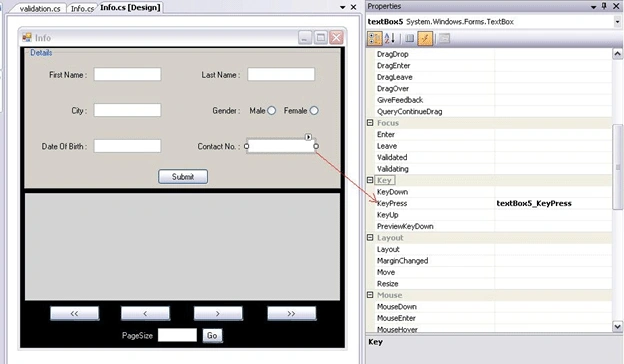
Now Create one Class Validation.cs and write the following code in it:
public void charonly(KeyPressEventArgs e)
{
if (Char.IsNumber(e.KeyChar) || Char.IsSymbol(e.KeyChar) || Char.IsWhiteSpace(e.KeyChar) || Char.IsPunctuation(e.KeyChar))
{
MessageBox.Show("Only Char are allowed");
e.Handled = true;
}
}
public void digitonly(KeyPressEventArgs e)
{
try
{
if (!(char.IsDigit(e.KeyChar) || char.IsControl(e.KeyChar) || char.IsPunctuation(e.KeyChar)))
{
e.Handled = true;
MessageBox.Show("Enter only digit and decimal point.", "Alert!");
}
}
catch { }
}
Now call these two methods as per validation type (char or int) from the TextBox KeyPress Event:
validation v = new validation();
private void textBox5_KeyPress(object sender, KeyPressEventArgs e)
{
v.digitonly(e); // allowing interger only
}
private void textBox1_KeyPress(object sender, KeyPressEventArgs e)
{
v.charonly(e); // allowing character only
}
Agasaud khanPosted Apr 11, 2014, 2:01 AM
good
Asif KhanPosted Jan 18, 2012, 12:48 AM
good one
Mahamod GodaPosted Nov 10, 2011, 8:32 PM
it is good example
Shilpa KatrePosted Mar 28, 2011, 8:52 AM
Good One
KayleighPosted Feb 24, 2011, 11:38 PM
Pretty useful...looking for your next post!
Sam HobbsPosted Feb 24, 2011, 9:39 PM
I think Microsoft's Windows Forms mislead developers into using code that is not the most object-oriented solutions. I don't know if someone has written an article showing an object-oriented design but if not then I hope someone does. Also, I think the catch block that just is "catch { }" is a bad example for beginners. I wish there was a comment someplace telling beginners not to use a catch block like that.
knightsPosted Feb 24, 2011, 3:58 PM
Good reference.Please spell check the code also to make it more readable. MessageBox.Show("Only Char are allwod"); "allowed" is misspelled in the previous line.Thank you.
Dinesh BeniwalPosted Feb 24, 2011, 4:21 AM
Welcome to the C-sharp corner community.