

Please refer to my earlier article:
http://www.c-sharpcorner.com/UploadFile/sanks/1733/Default.aspx
Step 1: View Unit Test Code
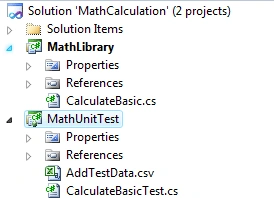
Here we have a MathLibrary project having Add, Multiply, Divide and Subtract methods in the CalculateBasic.cs class file. In the MathUnitTest project we have CalculateBasicTest.cs file for unit testing.
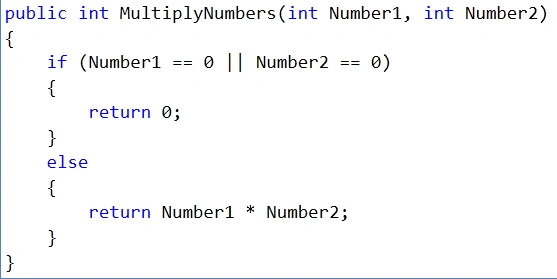
We are going to do a data driven unit test on the following MultiplyNumbers method.
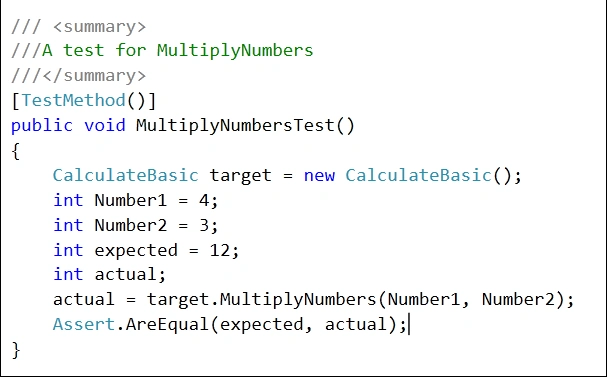
The following is the Unit Test code for the above method.
Step 2: Create CSV file
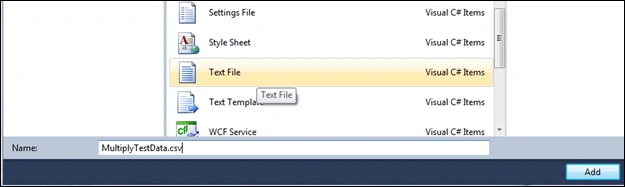
To add a new CSV file to the Unit Test Project, right-click the MathUnitTest project and click Add -> New Item.
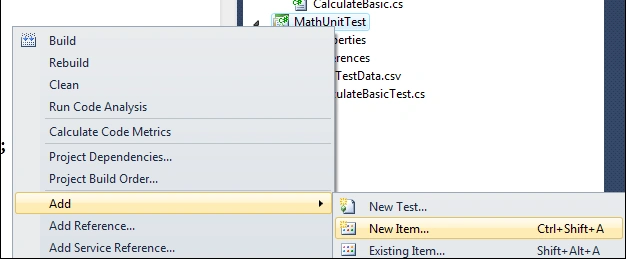
Select Text File and name it MultiplyTestData.csv.
Step 3: Add data to CSV file
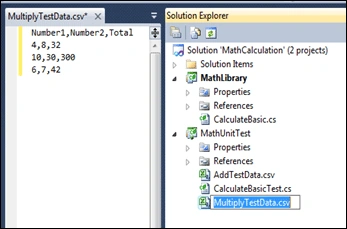
As shown below the file is created; then enter test data as shown. As shown the CSV file, Number1 and Number 2 are input parameters and Total is the result of multiplication of Number1 and Number2.
Step 4: Set CSV file property
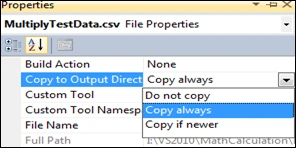
Right-click the MultiplyTestData.csv file and click properties. Select the Copy always option as shown below so that the file is copied to the bin folder after build.
Step 5: View Change Attribute of test method
To use the CSV file as an input for test data:
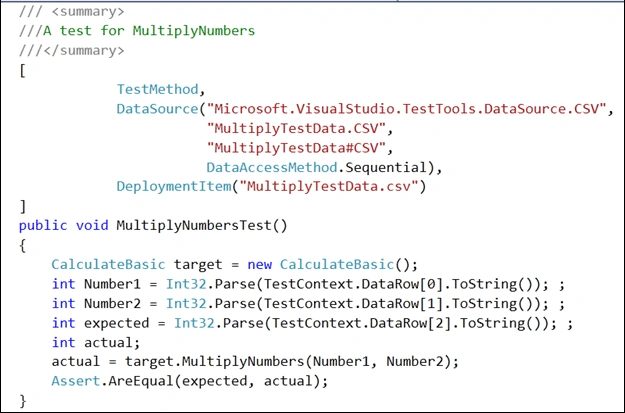
- Change the attribute of the MultiplyNumbersTest method as shown below
- Change the value assigned to Number1, Number2, expected as shown below. Here TextContext.DataRow[0] is the first column in the CSV file.
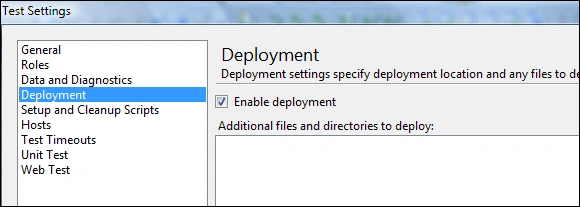
Before running the Unit Test, click on Test -> Edit Test Settings -> Local (local.testsettings) as shown above. The following screen pops up and makes sure that Deployment Enable deployment is checked.
Step 7: Run Unit Test
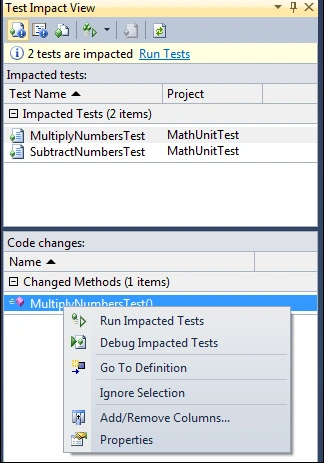
Click on Test -> Window -> Test Impact View to view the test impact window. Then build the solution. The following screen is shown. Here in the code changes section we can see MultiplyNumbersTest method. Right-click and select Run Impacted Tests.
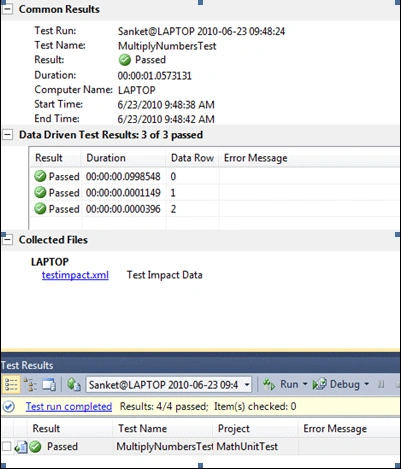
As shown below, the test is passed. Double-click on a Passed test in the Test Results window; it shows that all 3 rows from the CSV test has passed.
Conclusion: Using a CSV file, one can do Data driven Unit Testing. Here the advantage is we can test for all possible values and can also check the code coverage.
Jen DelzerPosted Jul 7, 2017, 2:45 PM
TestContext.DataRow doesn't work for me. It says an object reference is required.
SangramPosted Oct 18, 2011, 8:49 AM
please reply
SangramPosted Oct 18, 2011, 8:49 AM
please reply
BrigsPosted Jan 6, 2011, 11:09 PM
Is it possible to display a custom row (i.e. TestConditionID) in the test result instead of just data row?
shiva kumareditedPosted Jun 23, 2010, 11:14 AMEdited Jun 24, 2010, 6:14 AM
thank you for posting