
Introduction
In HTML5 Web Storage is a new API for storing data on the client-side. There are two types of Web Storage.
- Local Storage: stores data with no expiration date. Local Storage is kept even between browser sessions. This means data is still available when the browser is closed and reopened and also instantly between tabs and windows.
- Session Storage: stores data for one session. Session Storage is only available within the browser tab or window session. It's designed to store data in a single web page session.
How to Create Local Storage
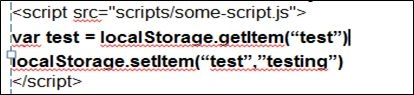 How to Create Session Storage
 How to Delete Storage
 Web Storage vs. Cookies
| Web Storage | Cookies |
| Data storage limitation is of 5MB to 10 MB per domain.
|
Storage limit of 4kb. Most browsers allow 30 to 50 cookies, so if you exceed the 4 KB limit of one cookie you could create another one. |
| The data is not included with every server request but used ONLY when asked for. | Cookies always sent with every HTTP request (usually even for images) resulting in more data being sent over the network. |
Note: Web Storage data is, in both cases, not available between differing browsers. For example, storage objects created in Firefox cannot be accessed in Internet Explorer, exactly like cookies.
Conclusion
In this article, we studied Web Storage in HTML5.


Prasanna MuraliPosted May 20, 2016, 7:21 AM EDT
Nice one....
Bhuvanesh MohankumarPosted Apr 30, 2016, 11:10 AM EDT
Good one...
Gagan SikriPosted Jan 19, 2016, 9:21 PM EST
Nice article with great explanation!
Santhakumar MunuswamyPosted Jan 19, 2016, 10:16 AM EST
Thanks for nice article. Keep it up
Rupesh KahanePosted Jan 19, 2016, 5:48 AM EST
Nice share
Mohammed IbrahimPosted Jan 19, 2016, 4:00 AM EST
nice
Ranjit PowarPosted Jan 18, 2016, 10:01 PM EST
Good
Ranjit PowarPosted Jan 18, 2016, 10:01 PM EST
Good
Humayun Kabir MamunPosted Jan 18, 2016, 5:41 PM EST
Nice...
Pankaj Kumar ChoudharyTOP 100Posted Jan 18, 2016, 2:29 PM EST
+5 for explanation ..........
Ehsan SajjadPosted Jan 18, 2016, 10:52 AM EST
good effort