

Objective: To show a popup when the mouse is hovered over the DataGrid cell with the information of the particular row's columns. And, to hide the popup when the mouse leaves the DataGrid's cell.
Output GUI:
File: Form1.cs[Design] using System.Windows.Controls.Primitives; namespace DataGridPopup //Members for Popup declared here so that only one instance is managed for the popup //at a time. public Form1() private void Form1_Load(object sender, EventArgs e) try dataGridView1.DataSource = arrSrc; throw ex; //Additional Check: to see if there is a valid row-column cell for the datagrid on each mouse over event: codePopup.Placement = System.Windows.Controls.Primitives.PlacementMode.MousePoint; private void dataGridView1_CellMouseLeave(object sender, DataGridViewCellEventArgs e) throw ex; namespace DataGridPopup public string UserName public DataSourceDatagrid(string usrName, string addr)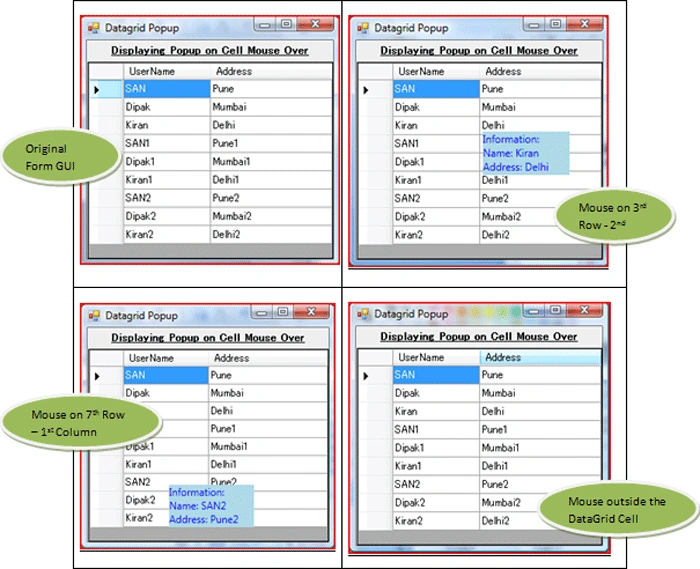
Many try to implement it by creating a new Form for the popup window and try to show/ hide the form.
Or, they may try creating a UserControl for the popup window.
Put the user UserControl in the Datagrid/ Form and try to display/hide it.
And, there could be many possible options.
But implementing it via all these may also lead to have other exceptional flows or others things that you may need to take care of.
Here, is a way that may not be so popular with everyone but is certainly the way which is meant for these kinds of implementation.
Here, being used is -> .NET Framework Class Library - Popup Class
Namespace: System.Windows.Controls.Primitives
Assembly: PresentationFramework (in PresentationFramework.dll)
Here, is a small, basic and self explanatory solution for that.
Application Structure:->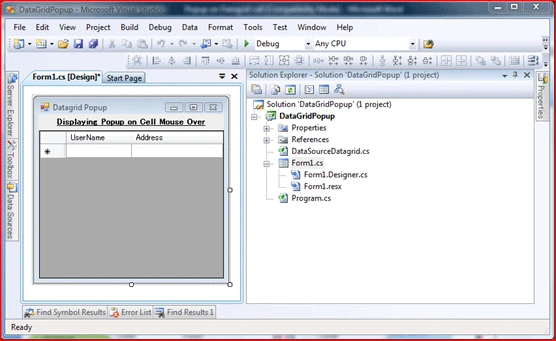
Additional References needed:
PresentationFramework.dll
PresentationCore.dll
WindowsBase.dll
Additional Namespace(s) required:
using System.Windows.Controls.Primitives;
using System.Windows.Controls;
Files:
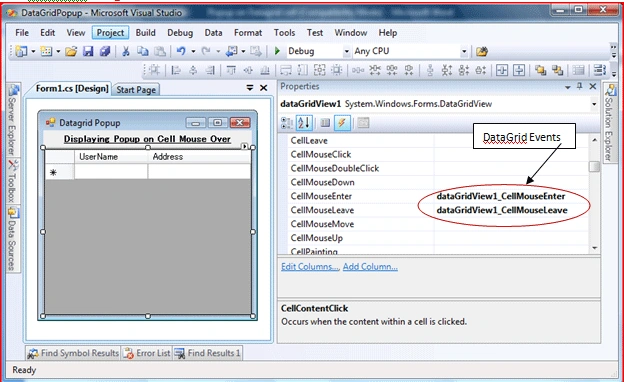
File: Form1.cs ->
using System;
using System.Collections;
using System.Collections.Generic;
using System.ComponentModel;
using System.Data;
using System.Drawing;
using System.Linq;
using System.Text;
using System.Windows.Forms;
using System.Windows.Controls;
{
public partial class Form1 : Form
{
Popup codePopup = new Popup();
TextBlock popupText = new TextBlock();
{
InitializeComponent();
}
{
ArrayList arrSrc = new ArrayList();
{
//Binding Datagrid with data:
arrSrc.Add(new DataSourceDatagrid("SAN", "Pune"));
arrSrc.Add(new DataSourceDatagrid("Dipak", "Mumbai"));
arrSrc.Add(new DataSourceDatagrid("Kiran", "Delhi"));
arrSrc.Add(new DataSourceDatagrid("SAN1", "Pune1"));
arrSrc.Add(new DataSourceDatagrid("Dipak1", "Mumbai1"));
arrSrc.Add(new DataSourceDatagrid("Kiran1", "Delhi1"));
arrSrc.Add(new DataSourceDatagrid("SAN2", "Pune2"));
arrSrc.Add(new DataSourceDatagrid("Dipak2", "Mumbai2"));
arrSrc.Add(new DataSourceDatagrid("Kiran2", "Delhi2"));
}
catch (Exception ex)
{
ex = new Exception("Error occurred while binding the datasource to datagrid.
" + ex.Message);
}
}
private void dataGridView1_CellMouseEnter(object sender, DataGridViewCellEventArgs e)
{
try
{
if (e.RowIndex >= 0 && e.RowIndex < dataGridView1.RowCount
&& e.ColumnIndex >= 0 && e.ColumnIndex < dataGridView1.ColumnCount)
{
codePopup.Visibility = System.Windows.Visibility.Hidden;
codePopup.IsOpen = false;
popupText.Text = "Information: "
+ System.Environment.NewLine
+ "Name: " + dataGridView1[0, e.RowIndex].Value.ToString()
+ System.Environment.NewLine
+ "Address: " + dataGridView1[1, e.RowIndex].Value.ToString();
popupText.Background = System.Windows.Media.Brushes.LightBlue;
popupText.Foreground = System.Windows.Media.Brushes.Blue;
codePopup.Child = popupText;
codePopup.Height = 50;
codePopup.Width = 100;
codePopup.IsOpen = true;
}
}
catch (Exception ex)
{
ex = new Exception("Error occurred while displaying the popup for datagrid cell. " +
ex.Message);
throw ex;
}
}
{
try
{
codePopup.IsOpen = false;
}
catch (Exception ex)
{
ex = new Exception("Error occurred while hiding the popup for datagrid cell. " +
ex.Message);
}
}
}
}
File: DataSourceDatagrid.cs ->
using System;
using System.Collections.Generic;
using System.Linq;
using System.Text;
{
public class DataSourceDatagrid
{
private string userName = string.Empty;
private string address = string.Empty;
{
get
{
return this.userName;
}
set
{
this.userName = value;
}
}
public string Address
{
get
{
return this.address;
}
set
{
this.address = value;
}
}
{
userName = usrName;
address = addr;
}
}
}
>> And, there are so many possiblities with the Popup Class that can be played with for better and attractive GUI etc.
Tapan jainPosted Oct 17, 2010, 12:24 AM
I am us Data Grid but i get diffculty so please give easy nd another solution....